OpenAI made Codex Automations generally available and also added theme import and sharing in the desktop app. Use scheduled runs and isolated worktrees to move Codex from interactive coding into background workflow execution.
OpenAI's launch thread says Automations are now GA and can be reused with templates, which turns one-off prompts into repeatable tasks. The concrete examples are recurring engineering chores: "daily repo briefings," "issue triage," and "PR comment follow-up," all run on a schedule rather than from an active chat.
The implementation details are more useful than the marketing label. Per OpenAI, each run can now specify the model and "reasoning level," and the execution target can be either an isolated worktree or an existing branch launch thread. In a practitioner write-up, the demo thread describes the mechanism as a "dedicated Git worktree in the background," so the main branch stays untouched while the agent works in parallel.
That makes Automations closer to a lightweight agent runner than a desktop convenience feature. The automation demo shows a recurring task configured in the Codex app while a terminal view runs Git operations in the background, reinforcing that the product is now aimed at unattended repo maintenance, not just interactive coding.
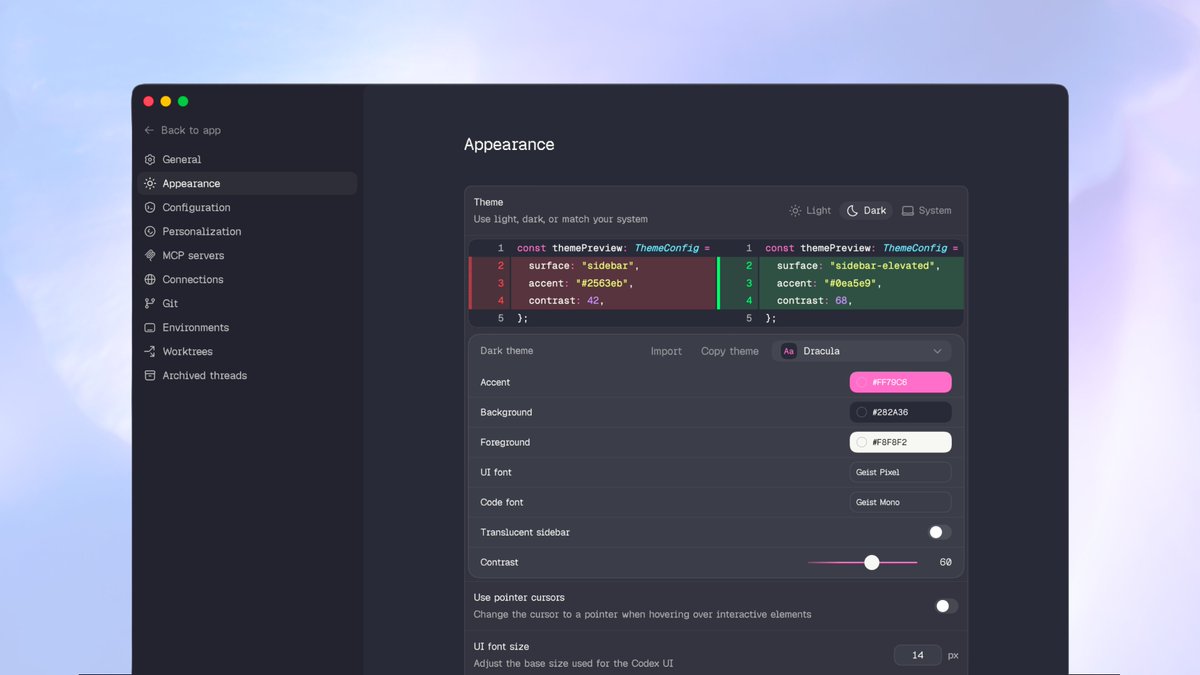
The same release adds theme personalization to the Codex desktop app. OpenAI says users can "import themes you like or share your own," and the screenshots in the update post show editable appearance fields for accent, background, foreground, fonts, contrast, and sidebar translucency.
The theme system appears to be portable as structured config, not just point-and-click presets. In a shared theme example, a user posts a full codex-theme-v1 blob with keys for codeThemeId, accent, contrast, fonts, semantic diff colors, and surface/background values. That suggests teams can pass around exact appearance configs as text, which is more useful than local-only UI customization.
The third-party screenshots also show these appearance controls living alongside MCP servers, Git, environments, and worktrees in the desktop app's settings. Themes are cosmetic, but the release packages them with the more substantive automation rollout, signaling that Codex desktop is being developed as a daily-use engineering client rather than a narrow demo surface.
We’ve been cooking. 2 updates in the Codex app 👇 You can now personalize the Codex app with themes that match your taste. Import themes you like or share your own.


OpenAI released Themes for Codex app and promoted Automations to general availability! Custom themes are supported as well. Matrix 👀


We’ve been cooking. 2 updates in the Codex app 👇 You can now personalize the Codex app with themes that match your taste. Import themes you like or share your own.
Probably good that I didn't become a designer 😂 codex-theme-v1:{"codeThemeId":"catppuccin","theme":{"accent":"#d600ff","contrast":45,"fonts":{"code":"Comic Shanns","ui":"Comic Sans Show more


the Codex app now has themes choose from some classics like Catppucin, Monokai, and Solarized. or try themes built with some partners from Linear, Notion, and OpenClaw among others. or make your own and share it this was a bit of a personal side quest that i’ve been thinking


