
Conductor 0.39 releases instant chat summaries and PR actions in the command palette
Conductor 0.39 adds instant chat summaries, PR actions in the command palette, in-file search, and a faster experimental sidebar. Teams running multi-session coding workflows can use it to cut UI friction and reduce context switching during review and triage.
TL;DR
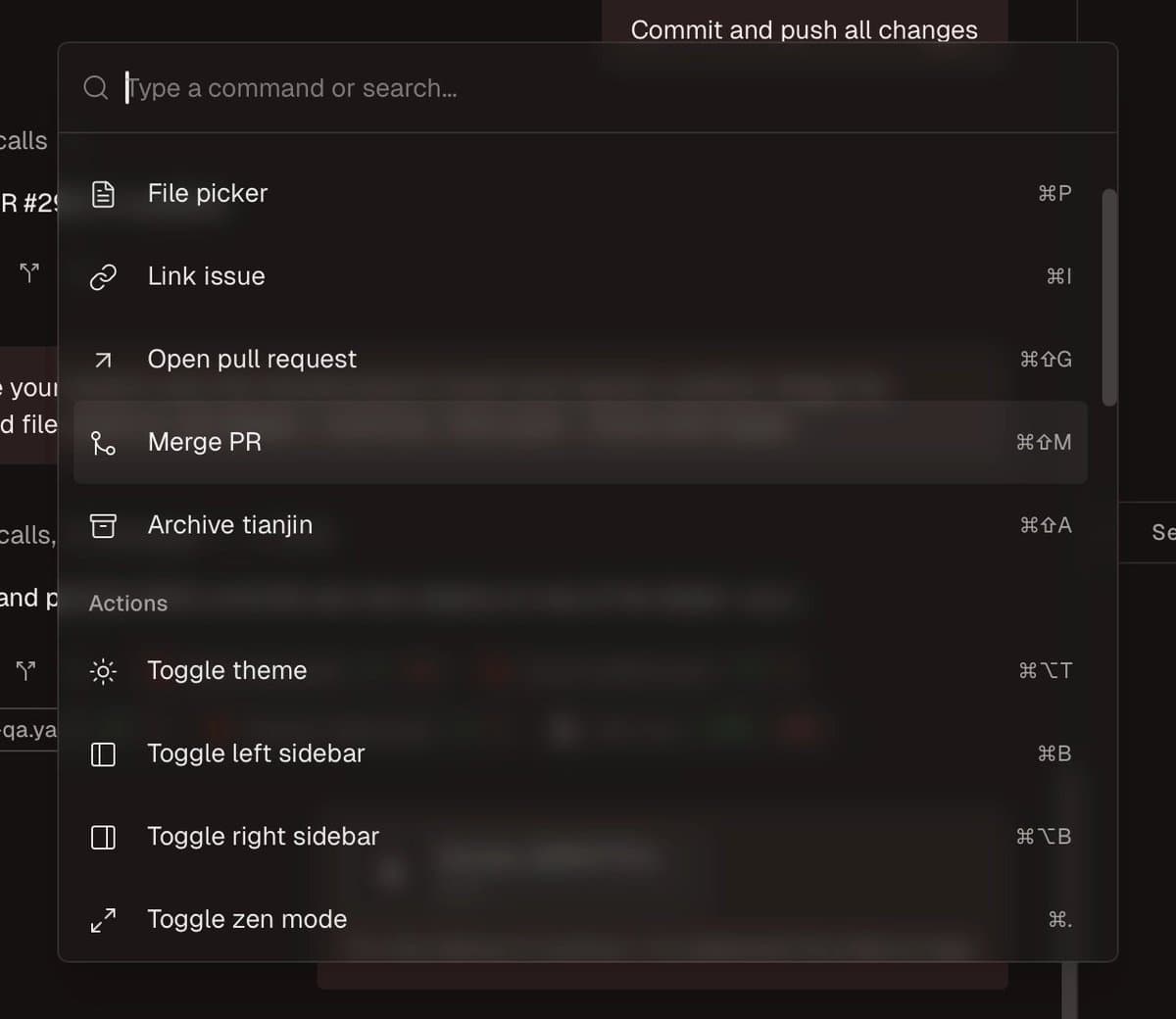
- Conductor 0.39 ships two workflow-facing changes at the top of the release: chat summaries are now "instant," and the command palette can handle PR creation, merging, and management from the keyboard, according to Conductor's release thread and command palette post.
- The update also adds in-file search in edit mode, with Conductor's search update saying users can now use "⌘F" inside files instead of relying on broader workspace navigation.
- On the UI side, Conductor says it fixed a virtualization bug so workspace switching is faster with less "scroll jank," as shown in the performance post, while the experimental sidebar adds branch names, state icons, and workspace counts in the sidebar update.
- Taken together, 0.39 is less about new model capability than about reducing friction in multi-session coding workflows: summarizing, triage, PR handling, file lookup, and workspace navigation all got tighter in one release release thread.
What shipped in 0.39?
Conductor positioned 0.39 as a workflow release. The headline change is that summarizing chats is now "instant," which removes a wait state from session handoffs and review passes in long-running agent conversations, according to Conductor's release thread. The same release expands the command palette so users can "create, merge, and manage PRs," jump to the next session needing attention, search sessions by message content, open settings tabs, and check for updates without leaving the keyboard, per the command palette post.
A smaller but practical addition is in-file search during edit mode. Conductor's search update says users can "finally search within files" with ⌘F, which closes an obvious gap for people reviewing or editing generated code inside the app rather than bouncing out to another editor.
Did the UI get faster too?
Yes. Conductor says it fixed "a bug in our virtualization library," and that switching between workspaces should now be faster with less "scroll jank," according to the performance post. That matters most for teams running many parallel sessions, where list rendering and workspace hops can become the bottleneck even when the underlying model is fast enough.
The experimental sidebar also got a more operational view of session state. In Conductor's sidebar update, workspaces now show human-readable branch names, distinct icons for plan-approval and user-input states, running indicators, and workspace counts next to collapsed status groups. The company says the redesigned sidebar is still behind Settings → Experimental → New sidebar, so these navigation improvements are available as an opt-in rather than the default UI.