
Pika launches Claude MCP with podcast, explainer and UGC ad skills
Pika launched a Claude connector that turns prompts, URLs and repos into explainers, podcast clips and UGC ads. The update keeps face, voice and identity controls inside Claude workflows, so creators can build video assets without switching apps.
TL;DR
- pika_labs' launch post introduced a Claude MCP connector that carries a Pika agent's face, name, personality, and multimodal tool access into Claude.
- According to pika_labs' skills post and the official plugin repo, the first three packaged skills are
/pika:explainer,/pika:podcast, and/pika:ugc-ads, sitting on top of 42 underlying media tools. - pika_labs' examples thread and minchoi's walkthrough both showed the same basic loop: drop in a URL, repo, or brief, then get back a captioned video asset from inside Claude.
- The Pika MCP page says the connector works through Claude's custom connector flow, while the repo README adds that the raw MCP endpoint also works in Claude.ai chat, Claude Desktop chat, Cursor, Codex, and other MCP clients.
You can browse the launch page, skim the plugin repo, and check the MCP spec behind the transport. The interesting wrinkle is that Pika split the product in two: a connector for identity and raw tools, then a plugin layer for opinionated video workflows. The repo is also more concrete than the marketing page, down to Claude Code version requirements, auth steps, and the claim that the three launch skills are backed by 42 atomic tools.
Identity travels through the connector
Pika's core pitch is not just video generation. On the official MCP page, the connector is framed as a way to bring a Pika agent's identity into Claude, including face, voice, personality, and persistent memory.
The same page says setup starts in Claude settings with a custom connector pointed at https://mcp.pika.me/api/mcp, then asks users to sign in and have Claude adopt the Pika identity. In the repo README, Pika breaks that stack into three layers:
- Pika Agent: persona, avatar, voice, and persistent memory, managed at pika.me
- Pika MCP: the open-protocol server at
https://mcp.pika.me/api/mcp - Pika Plugin: the curated Claude Code layer that turns those tools into slash commands
That split matters because the connector alone gets the agent and raw tools into Claude, while the plugin is what adds the prebuilt promo-video workflows.
Three skills sit on top of 42 media tools
The launch skills are cleanly packaged around common creator jobs, not around low-level model names.
Across the launch thread and the official repo, the three starting points are:
- Explainer: turn a URL, GitHub repo, or written brief into a narrated walkthrough video.
- Podcast: generate a two-host conversational clip from a topic, page, or set of character references.
- UGC Ads: make a promo video from a project link or brief.
The repo adds the more useful implementation detail. Those three commands are backed by 42 atomic creative tools exposed over MCP, covering image, video, voice, music, and editing. It also says the plugin can trigger from natural language, so a prompt like "walk me through this repo" can fire the same pipeline as /pika:explainer.
The setup splits between connectors and plugins
Pika shipped two install paths, and the evidence is much clearer about that than the headline launch copy.
For the connector side, the MCP page and pika_labs' instructions say to add a custom connector inside Claude and paste the MCP URL.
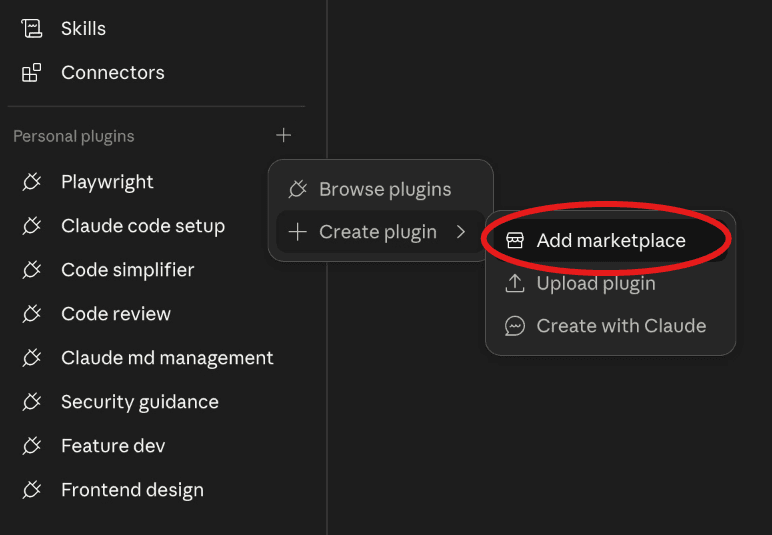
For the plugin side, the install flow shown by pika_labs' plugin install demo and repeated by minchoi's how-to is:
- Open Cowork or Code, then go to Customize.
- Add a marketplace under Personal plugins.
- Paste
Pika-Labs/Pika-Pluginsand sync. - Open Pika under Connectors and click Connect.
- Authorize Claude in the browser.
- Toggle the plugin on.
The repo adds a second, terminal-first path for Claude Code: claude plugin marketplace add Pika-Labs/Pika-Plugins followed by claude plugin install pika@pika-plugins. It also notes that the plugin requires Claude Code v2.0.12 or later, and that the raw MCP server works outside Claude Code even though the /pika:* commands do not.
Early demos focused on repo-to-video and link-to-video
The strongest launch examples were not abstract persona demos. They were very specific content formats with very small inputs.
The first batch of public examples centered on a few repeatable patterns:
- A GitHub URL into an explainer video about the Pika plugin repo, per pika_labs' first example
- A topic prompt into a podcast clip, per pika_labs' podcast demo
- A website into a UGC-style promo, per pika_labs' UGC ad demo
- A project link into what hasantoxr described as a walkthrough video with a lip-synced presenter and captions
By the time the second wave of posts landed, the product was already being summarized as "drop a link or idea, get a video," which is exactly the kind of packaging creative tools either live or die on.
Pika agents already existed beyond Claude
The Claude launch is easier to understand if you read it as a new surface for an existing agent product.
Before the Claude connector shipped, Pika agents were already being pitched as persistent creative operators that could move between models and interfaces. In ProperPrompter's demo, a single Pika Agent used GPT Images 2.0 for storyboard frames and Seedance 2.0 for final video generation inside one chat flow. In ProperPrompter's follow-up, the same workflow stitched two 15-second Seedance clips into one longer ad.
The more unusual example came from AmirMushich's workflow thread, which described a Pika agent running trend research, media generation, meeting support, and Telegram-based command intake from phone and desktop. That makes the Claude MCP launch feel less like a new standalone app and more like a new control surface for a persona-driven agent stack Pika had already been building.