
TimescaleDB adds read-only MCP mode for agents
TimescaleDB added a read-only MCP mode, practitioners pushed credential brokering, and an OpenClaw user open-sourced a skill-quarantine review pipeline. That matters because secret handling and destructive permissions are moving out of prompts and into brokered or reviewable control layers.
TL;DR
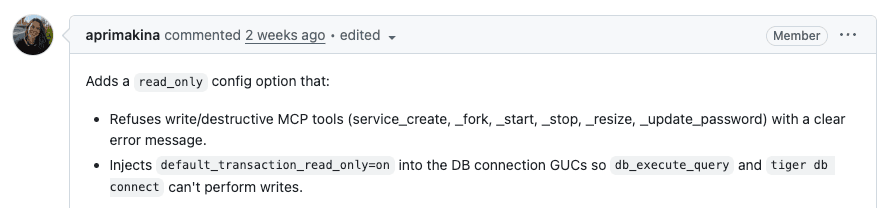
- TimescaleDB added a read-only mode for its MCP server that blocks destructive operations such as password resets, service deletion, and stop actions, according to michaelfreedman's TimescaleDB CLI note.
- dangtony98's credential brokering thread and dangtony98's follow-up post both frame the same shift: agents get access to services through a broker, not by directly reading API keys.
- An OpenClaw user published a quarantine workflow for third-party skills because those skills are injected straight into the system prompt, and Alex-S-Hamilton's Reddit post says the two-reviewer pipeline caught 15 of 15 malicious test skills with zero false negatives.
- The production-database deletion thread that the main Hacker News post surfaced pushed the same operational lesson into public view: destructive agent access is an IAM and recovery problem, not something prompts reliably contain.
- OpenClaw's doctor warning post shows the control layer is getting productized too, with tooling that flags plaintext API keys and sensitive headers before they sit in config files.
You can dig through the OpenClaw 2026.5.20 release, the doctor docs, and the skills quarantine repo. There is also an OpenClaw skills repo with community skills like autoreview, plus a long Hacker News discussion on what happens when an agent gets real destructive access.
Read-only MCP mode
TimescaleDB's tweak is small, but it hits the right layer. Instead of trusting the agent to avoid dangerous calls, the CLI can now expose an MCP server that simply refuses destructive operations.
The operations Michael Freedman listed as blocked were concrete: password reset, delete service, create or fork service, and stop actions in michaelfreedman's post. That is narrower than a general permissions essay, which is probably why it reads as useful.
Credential brokering
The broker pattern showing up in agent security conversations is straightforward: the agent calls a service through an intermediary that holds the real secret material.
Across dangtony98's thread, another short summary post, and hwchase17's repost, the common claim is that agents should not have direct visibility into environment variables or API keys. The pitch is not abstract policy. It is a concrete access pattern where the broker can scope, relay, and withhold raw credentials.
That framing lines up with the broader fallout from the production database deletion thread. In the discussion summary, the HN highlights post pulls out three recurring controls: least privilege, isolated backups, and the assumption that any action an agent can take may eventually be taken.
Skill quarantine
The most detailed piece of evidence in this batch came from OpenClaw's skill ecosystem. Alex-S-Hamilton's Reddit post argues that skills are risky because their YAML frontmatter and markdown body are injected directly into the system prompt at session start.
I got paranoid about OpenClaw skills injecting crap into my system prompt, so I built a quarantine pipeline with two LLMs as reviewers (Sonnet & Codex, 93.75% detection, zero false negatives)
1 comments
The review pipeline in the accompanying GitHub repo has four stages:
- Quarantine new skills in
unverified/, per Alex-S-Hamilton's write-up. - Run two independent LLM reviewers, Claude and Codex, against a shared injection catalog, again per the Reddit post.
- Split verdicts into
FINDINGS,NOVEL_FINDINGS, andCATALOG_SUGGESTIONS, according to Alex-S-Hamilton's described output format. - Move approved skills into
verified/only after a human decision and lockfile entry, as the post describes.
The smoke test numbers are the hook: 16 synthetic skills, 11 with catalog patterns, 4 with novel semantic attacks, 1 clean control, and 15 of 15 malicious samples caught as BLOCK or WARN according to Alex-S-Hamilton's test summary. The examples are more interesting than the metric, because they include zero-width bracket-tag tricks, buried role-addressing, curl | bash hidden several folders deep, and a semantic bypass that used no catalog keywords at all in the same post.
Hidden tools and hooks
A separate Reddit thread shows the same problem from another angle. oqdoawtt's Claude Code post claims Claude Code spawned 13 agents during a refactor even though the local settings.json did not allow the Agent tool.
Claude injecting hard coded permissions into it's System Prompt
9 comments
The post includes the model claiming that Agent appeared in the runtime's tool list anyway, and that the allow-list should have blocked it in oqdoawtt's transcript. In the comments, Standard-Ice2038's reply quoted in the thread points to a hooks-based approval layer that pushes risky tool calls to a phone for human approval.
That complaint sits uncomfortably close to the OpenClaw quarantine story. In one case the concern is third-party skills landing in the prompt before a session starts. In the other, the concern is runtime tool availability that a project-level config may not fully communicate. Both are about the control surface around the model, not just the model.
Doctor warnings
OpenClaw's own release notes show that some of these controls are already becoming product features instead of forum advice.
The 2026.5.20 release bundled several small safety and operability changes:
- Doctor warns when
openclaw.jsonstores plaintext provider API keys or sensitive headers, per openclaw's doctor post and the doctor docs. - Model status now explains when a session is pinned to a different model than the default, including the reason and docs link, according to openclaw's model-status post.
- xAI login on headless or remote machines now supports device-code OAuth, per openclaw's xAI provider post and the xAI provider docs.
- Discord voice sessions can follow configured users across channels while preserving allowed-channel checks and DAVE recovery, according to openclaw's Discord voice post and the Discord docs.
None of those changes solves agent security on its own. Together, they show where the work is landing: brokered credentials, narrower tool permissions, prompt-surface review, and more explicit runtime status instead of invisible defaults.