
Codex adds macOS computer use, in-app browser, and artifact previews
Codex gained background macOS control, page inspection, image generation, plugins, artifacts, and follow-up automations. That gives it one agent thread for desktop apps, frontend debugging, and recurring work.
TL;DR
- reach_vb's launch thread framed the update as Codex getting "a lot closer to a general work agent," with new computer control, richer outputs, and longer-running work inside one thread.
- According to reach_vb's macOS demo, Codex can now operate macOS apps in the background, which extends it beyond terminal-only workflows.
- reach_vb's browser demo adds an in-app browser that can open localhost, inspect pages, and catch visual or console issues during frontend work.
- reach_vb's artifacts demo, reach_vb's image-generation demo, and reach_vb's plugins demo show Codex producing files, generating assets, and pulling in tools and context from other apps.
- reach_vb's automations post and reach_vb's PR-work post push Codex past one-shot chat, into follow-ups, recurring tasks, CI babysitting, and repo migrations such as the OpenAIDevs GPT-5.5 update example.
You can try Proof in Codex from danshipper's writing demo, watch steipete's GitHub workaround as Codex clicks through the web UI after hitting an API limit, and see steipete's Cloudflare example where it opens a dashboard to create a fresh API key. danshipper's Talkie test also shows the in-app browser being used for web research, not just app debugging.
macOS computer use
The biggest capability jump is simple: Codex can now leave the terminal. In reach_vb's macOS demo, it can see, click, type, and validate workflows in background macOS apps.
That widens the task surface from shell commands to anything living in desktop apps, settings panes, simulators, or browser tabs. steipete's GitHub example is the clearest real-world proof, because Codex hits a GitHub rate limit, opens the browser, clicks through the site, and, as steipete added, even typed into the comment box and closed the issue.
In-app browser
The browser feature is narrower than full computer use, but easier to reason about. reach_vb's browser demo says Codex can open localhost, inspect the rendered page, check console output, and iterate with the page beside the code.
That closes a common agent loop for frontend work:
- open the app locally
- inspect the rendered UI
- catch visual regressions
- catch console errors
- patch the code without leaving the thread
danshipper's Talkie screenshot and danshipper's Proof collaboration demo show the same browser surface being used more broadly, as a research tab and as a live document workspace.
Plugins and artifacts
OpenAI bundled several smaller changes that matter because they keep more output inside the same session. reach_vb's plugins demo says Codex can pull in tools and context from more apps and integrations, while reach_vb's artifacts demo makes spreadsheets, docs, slides, and other files first-class outputs with previews before shipping.
The launch thread breaks that expansion into three concrete output paths:
- reach_vb's image-generation demo adds built-in image generation for app assets, game art, slides, mockups, and docs.
- reach_vb's artifacts demo adds editable artifacts plus previews.
- reach_vb's knowledge-work post positions those artifacts as the end product for messy input cleanup, anomaly spotting, feedback synthesis, and report packaging.
The throughline is that Codex is no longer only returning code diffs or terminal output. It is producing inspectable files and using outside tools in the same thread.
Follow-ups and PR work
reach_vb's automations post adds follow-ups and recurring workflows, which is one of the clearest signs OpenAI wants Codex to persist beyond a single reply.
The examples in the thread are concrete:
- keep an eye on something
- come back later
- continue a recurring workflow in the same thread
- investigate PR feedback
- make edits
- run checks
- babysit CI until the work is ready
That same posture shows up in OpenAIDevs' GPT-5.5 migration example, where Codex is asked to update an existing repo to GPT-5.5. The product pitch is shifting from code assistant to thread-based work queue.
Early hands-on uses
The first outside demos already stretch beyond coding. danshipper's Talkie test uses the in-app browser to research whether a model trained on 1930s text can code, with Codex reading a web page and interacting with the site.
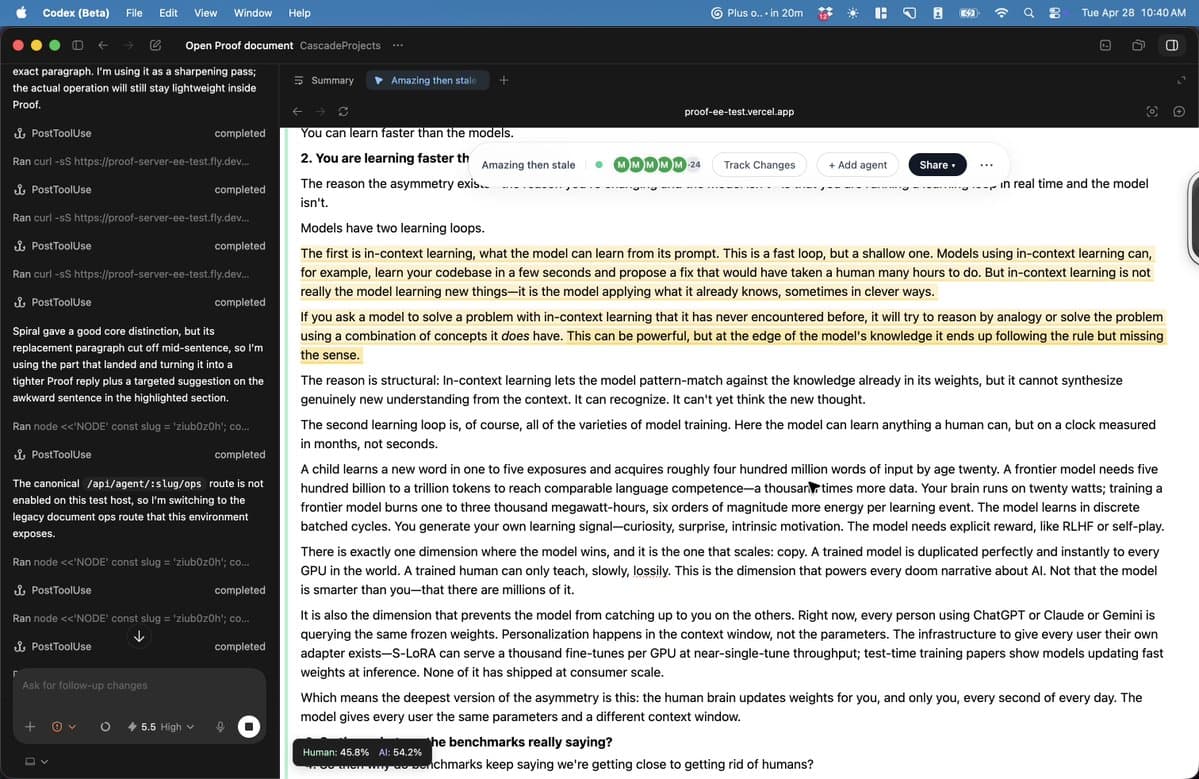
Meanwhile danshipper's Proof collaboration demo shows a split workflow where the human types directly in Proof while Codex works in parallel on the left. That is a different interaction model from prompt, wait, accept. It looks closer to a shared workspace where the agent keeps moving while the user edits in real time.
Steipete's two posts add a sharper edge to that picture. In the GitHub workaround, Codex uses the browser when the API path is blocked, and in the Cloudflare key example, it opens Cloudflare and creates a new API key after discovering the original one lacked permissions.