
Codex opens mobile preview in ChatGPT for iOS and Android remote control
OpenAI rolled out Codex in the ChatGPT mobile app, letting users start work, review outputs, approve steps, and steer remote sessions from iPhone or Android. The preview keeps execution on a laptop, Mac mini, devbox, or SSH target while syncing screenshots, diffs, and terminal state back to mobile.
TL;DR
- OpenAI's announcement put Codex into the ChatGPT mobile app in preview on iOS and Android, with users able to start tasks, review outputs, steer execution, and approve next steps from a phone while the agent keeps running on another machine.
- According to OpenAIDevs, the mobile control layer rides on the existing desktop Codex app and now-general Remote SSH support, so the same session can point at laptops, devboxes, and other managed remote environments.
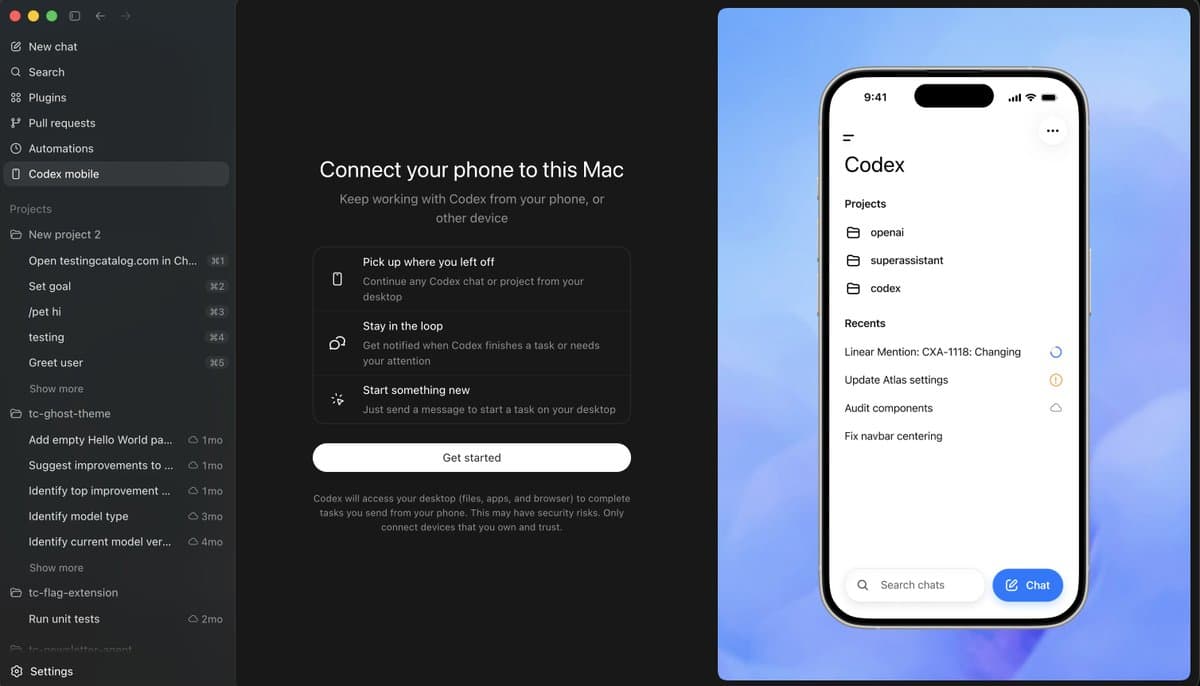
- Early setup evidence from kevinkern's setup screen and OpenAIDevs' reply shows the current flow depends on updating ChatGPT mobile plus the Codex macOS app, then pairing from the desktop sidebar. Windows pairing is not live yet.
- Hands-on posts from altryne's first test and a multi-device screenshot suggest one phone can see and control more than one connected Mac, which makes this feel closer to a remote agent control plane than a one-shot mobile companion.
- The first user friction showed up fast: NickADobos' thread focused on keeping a Mac awake for long runs, which underlines the core design choice that execution stays on the host machine rather than moving into the phone.
OpenAI's official post says the phone can browse all threads, swap models, and approve commands while Codex stays attached to your files and apps on the host. You can also trace the rollout through an earlier leak hint, an internal mobile screenshot, and a day-earlier browser update that landed just before the mobile preview. The oddest useful detail came from altryne's screenshot, which showed a dormant "control other devices" tab that was not yet working.
What shipped
The shipped feature is not a separate Codex mobile app. It is a new Codex surface inside the ChatGPT mobile app, backed by a paired desktop Codex app on macOS today and by Windows later, per OpenAI's announcement and OpenAIDevs' setup reply.
The official launch language in Official post and the demo clips in The Rundown AI's quote post line up on four core actions:
- start a new task from mobile
- review outputs from existing threads
- approve commands and next steps
- steer or redirect work already running elsewhere
OpenAI also said the preview is rolling out across all plans in supported regions on both iOS and Android, while OpenAI's thread adds that phone-to-Windows support is still coming soon.
Pairing and host machines
The setup screenshots make the architecture pretty explicit. The phone connects to "this Mac," and the warning text in kevinkern's screenshot says Codex will access the desktop's files, apps, and browser to complete tasks sent from the phone.
That pairing flow currently looks like this, based on kevinkern's mobile setup screen, reach_vb's screenshot, and OpenAIDevs' reply:
- update the ChatGPT mobile app
- update the Codex macOS app
- open setup from the Codex desktop sidebar
- connect the phone to the desktop app
OpenAI's own copy in OpenAIDevs and the official post frames the host side broadly. A paired phone can talk to a MacBook, Mac mini, Mac Studio, laptop, devbox, or SSH-connected remote environment, but the compute and state stay on that host.
Remote SSH and multi-device control
One of the more consequential details is buried in OpenAIDevs' thread, which says Remote SSH is now generally available. That turns mobile Codex from "control my laptop from my phone" into "control whatever box Codex is attached to," including managed devboxes.
User reports suggest the app already treats devices as first-class targets. altryne's test said they connected both a laptop and a Mac mini and could control them separately, while the device picker screenshot shows two machines exposed as independent tabs inside the same mobile view.
Those same reports add a few concrete capabilities from the current harness:
- separate control of multiple Macs, per altryne's test
- access to computer use, according to altryne's follow-up
- browser access through the Chrome extension, also from altryne's follow-up
- long-running tasks reviewed from the phone via /goal, per the same follow-up
That is a bigger surface than a simple mobile notifier.
Threads, approvals, and the mobile workflow
The mobile UI shown across The Rundown AI's clip, dkundel's outdoor screenshot, and jxnlco's beach video centers on threads rather than on a single remote desktop session. OpenAI's own copy says users can work across all of their threads, not just dispatch one job to one computer.
The workflow evidence clusters around a few repeated actions:
- send a fresh prompt from the phone into a project or repo context, as in dkundel's task screen
- monitor task progress and outputs away from the keyboard, per btibor91's testing note
- approve commands or next steps from mobile, as shown in The Rundown AI's clip
- switch models from the phone, also visible in the same clip
- jump between recent work items and projects, visible in kevinkern's screenshot
This thread-centric design is the line that makes the launch feel more ambitious than ordinary remote desktop control. gdb's post called it a step toward universal agent usage, and even skeptical reactions like daniel_mac8's reversal landed on comparisons to OpenClaw rather than to screen-sharing apps.
Hands-on use cases
The first-day use cases were mundane in a useful way. People were not posting benchmark numbers. They were posting the moments when a task popped into their head away from a desk.
Examples from the evidence pool:
- dkundel sent tasks while outside with horses
- a dog-walk screenshot shows project review from a phone on a leash walk
- jxnlco demoed Codex from a beach table
- petergostev highlighted Android shipping as a day-one citizen, not an afterthought
- btibor91 said the setup was especially useful for always-on Mac minis and Mac Studios
The common pattern is short mobile interrupts feeding longer host-side runs. That matches the product copy in the official post, which keeps emphasizing continuity of working state instead of on-device execution.
Previews, leaks, and the extra tab
The mobile rollout was visible before launch. mattrickard's earlier screenshot showed an internal mobile chat surface responding to "Codex App on mobile achieved internally," while mattlam_'s prelaunch video hinted at an agent view on phone that already supported Codex.
A more interesting post-launch detail came from altryne's screenshot, which included text for "Connect your favorite apps to Codex" plus an extra tab for controlling other devices that, by their account, did not work yet. That suggests the current preview may be only one slice of a broader mobile control surface.
The day before launch, thsottiaux's browser-improvements note also mentioned different viewports, screenshot viewing, better annotations, and token-efficient changes to the in-app browser. Together with OpenAIDevs' repost about viewport testing, that reads like groundwork for the kind of mobile-supervised browser automation the preview is now exposing.
Sleep state and long-running sessions
The most practical launch-day caveat came from power management. Because the phone is only steering a host machine, a sleeping Mac can break the illusion of always-on mobile Codex.
NickADobos' thread initially recommended Amphetamine or caffeinate to keep a Mac awake during Codex runs. A later follow-up from the same thread says a new setting exists, which suggests OpenAI either shipped or exposed a more native answer almost immediately.
That caveat matters because it reveals the real boundary of the product. Mobile Codex is a remote control layer with synced context, screenshots, diffs, and approvals, but the job still lives or dies with the availability of the paired machine.