
Codex reportedly leaks mobile remote access in ChatGPT app screenshots
Posts and screenshots from TestingCatalog, Kolt Regaskes, and others say Codex remote access is being prepared inside the ChatGPT app, but OpenAI has not confirmed a release. If real, the feature would extend the recent remote-control push from desktop sessions to phones.
TL;DR
- Multiple screenshots posted by ai_for_success's setup modal and koltregaskes's macOS shot show a "Set up Codex mobile" flow inside the Codex app, with ChatGPT on the phone positioned as the mobile client.
- The leaked copy says the phone experience would let users access existing Codex threads and projects, create new ones, and receive completion or attention alerts, according to ai_for_success's screenshot and testingcatalog's earlier post.
- That mobile leak landed after earlier remote-control evidence from testingcatalog's Connections settings screenshot and sound4movement's changelog snippet, which pointed to a headless, remotely controllable app server.
- The strongest caveat is that OpenAI still has not publicly confirmed a ship date, and even kimmonismus's repost framed the screenshots as unverified while testingcatalog's correction narrowed one earlier claim about persistent connections.
The screenshots are unusually specific. You can read TestingCatalog's mobile writeup and its earlier remote-control changelog report, then compare them with the changelog screenshot, which names codex remote-control as a simpler entrypoint for a headless app server. mattlam_'s overnight prototype even shows the rough shape of the workflow people expect OpenAI to ship.
Codex mobile
The modal text is the core leak. It says, "Use the ChatGPT app on your phone to keep working with Codex whenever your computer is awake," which ties the phone experience to an already-running desktop machine rather than to a fully standalone mobile agent, per testingcatalog's post and ai_for_success's screenshot.
The setup copy also exposes the first feature list:
- Access all threads and projects
- Create new threads and projects
- Get notified when Codex desktop completes a task
- Get notified when Codex needs attention
That reads like session continuation plus push notifications, not a separate Codex mobile app.
Remote-control plumbing
The mobile screenshots make more sense next to the earlier desktop evidence. testingcatalog's settings leak showed a Connections panel with toggles for "Allow other devices to connect" and "Keep connection alive," plus an authorization flow for signed-in devices.
A day later, testingcatalog's correction clarified that the keep-alive toggle was for incoming connections, where other devices control Codex, not for keeping outgoing SSH sessions open. Separately, the changelog screenshot described codex remote-control as a simpler entrypoint for starting a headless, remotely controllable app-server.
Put together, the leaked surface looks less like a random mobile UI experiment and more like a client for the remote-control layer already appearing in desktop builds.
The expected phone flow
One of the more useful community posts came from mattlam_, who mocked up a Codex remote-control flow using /goal. His breakdown is concrete:
/remote-controlstarts a small server on the laptop- Codex generates a fresh token and QR code
- A phone connects through a web app
- Phone and laptop stay in sync
That is not evidence of OpenAI's implementation, but it lines up closely with the leaked "keep working with Codex whenever your computer is awake" copy and gives a plausible model for how session handoff could work.
Other moving pieces
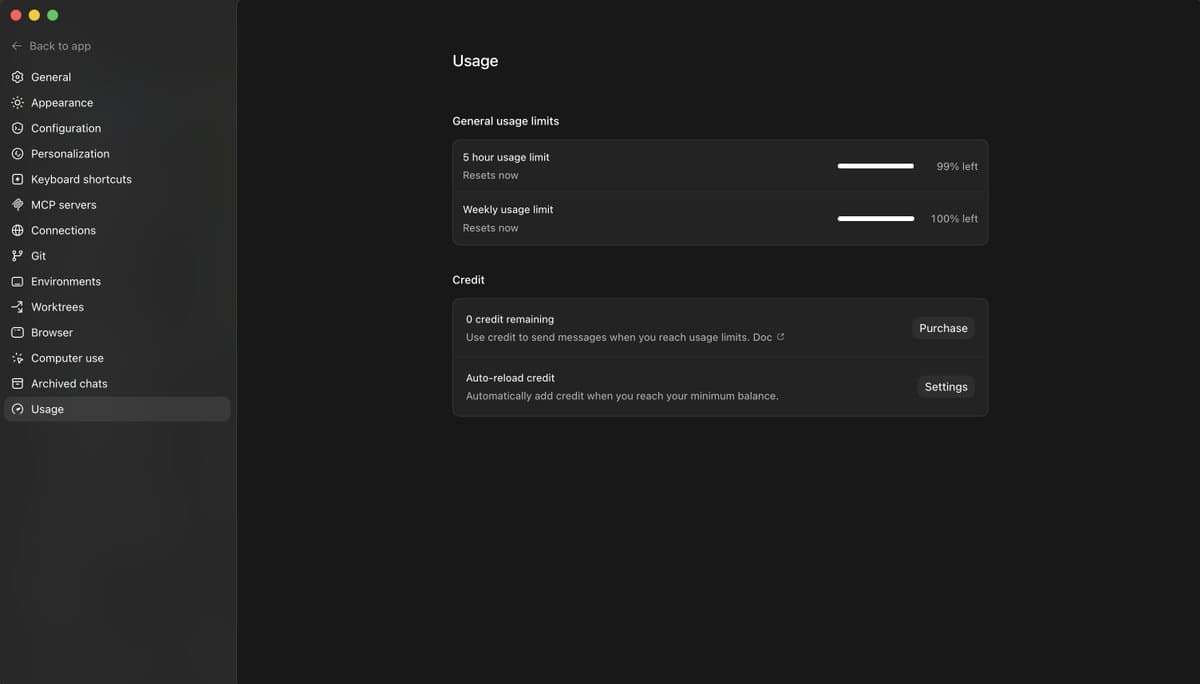
The mobile leak did not arrive in isolation. TheRealAdamG said /goal had already landed in the Codex app, not just the CLI, which matters because the community prototype for remote control was built around that command. And testingcatalog's follow-up said a new Usage tab was also being added to settings.
Those are small details, but they point in the same direction as the remote-control and phone screenshots: Codex is being broken into more persistent surfaces, with desktop state, mobile follow-up, and settings for device-level connections all showing up at once.