
Google adds Gemini API spend caps in AI Studio with project-level dollar limits
Google AI Studio now lets developers set experimental per-project spend caps for Gemini API usage. Use it as a native billing guardrail, but account for roughly 10-minute enforcement lag and possible batch-job overshoot.
TL;DR
- Google AI Studio has started rolling out experimental project-level spend caps for the Gemini API, giving developers a native way to set a maximum dollar limit per project AI Studio launch.
- The cap is not instantaneous: Google's rollout details say enforcement can lag by up to 10 minutes, so some overage can still slip through before usage is blocked.
- Google also says batch mode completions may still exceed the cap, and email alerts for cap hits are "coming soon," according to launch notes.
- For engineers running agents or CI jobs, Simon Willison's developer reaction captures the practical win: a built-in guardrail against "a nasty surprise bill."
What exactly shipped?
Google added a new spend dashboard in AI Studio that lets you set a project-level dollar ceiling for Gemini API usage. In Google's product note, the company frames it as a way to give developers "more control and peace of mind" when building with Gemini.
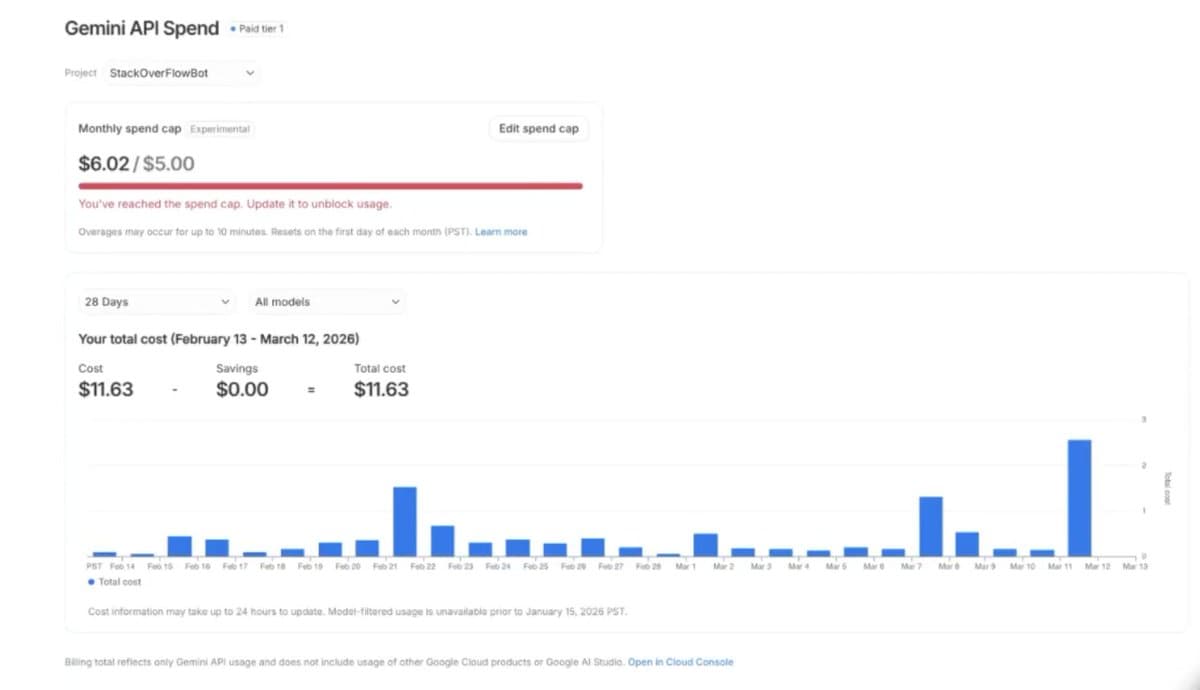
The main change is that this is an enforcement mechanism, not just a billing alert. A walkthrough in dashboard demo shows a user setting a fixed dollar limit directly in the Gemini API dashboard, while the spend UI screenshot shows the blocked state after a cap is exceeded, including an "Edit spend cap" control and a message that usage is unblocked only after the cap is raised. The same screenshot also says the cap resets on the first day of each month PST and that spend data itself can take up to 24 hours to update.
What are the operational limits?
The guardrail is useful, but it is not a hard real-time cutoff. Google's rollout details say spend caps can take "up to a 10 minute delay" to take effect, and the AI Studio account's launch notes adds that batch mode completions may still incur overages.
That means the feature is best understood as a billing backstop with some leakage, not a precise per-request quota. Google's launch notes also label the feature experimental and say its scope may change, while the rollout thread says email notifications for cap hits are being rolled out separately.
A concrete use case came from Simon Willison, whose developer reaction highlights running Gemini prompts in CI or letting agents experiment "without fear of a nasty surprise bill." That is the gap this closes versus budget alerts alone: a native project limit inside AI Studio rather than an external notification workflow.