
GitHub Copilot adds 1M context window and reasoning levels
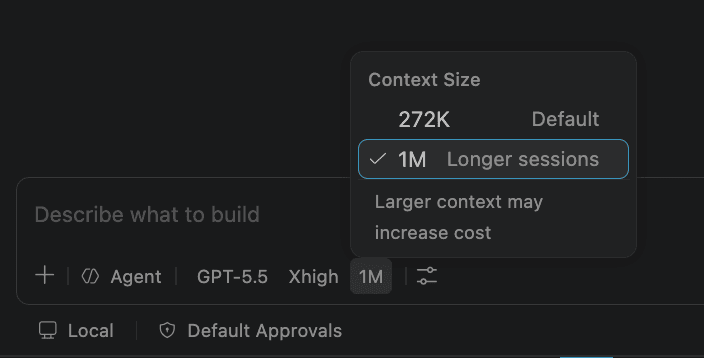
GitHub Copilot now supports a 1M-token context window and configurable reasoning levels in VS Code, Copilot CLI, and the Copilot app. It matters because larger repo context and explicit effort controls arrive in the same surfaces teams already use for agent-assisted development.
TL;DR
- GitHub Copilot now exposes a 1 million token context window in VS Code, Copilot CLI, and the Copilot app, according to pierceboggan's launch post and the official GitHub changelog.
- The same rollout adds configurable reasoning levels, which GitHub describes as a speed versus depth control for architectural and debugging work, per pierceboggan's launch post and the same changelog entry.
- The timing matters because GitHub only opened its new Copilot desktop app technical preview two days earlier, giving the new controls a dedicated agent surface alongside CLI and VS Code, as lukehoban's linked blog post and the Copilot app announcement show.
- Bigger windows and higher reasoning are no longer an abstract model spec, they now sit inside the same Copilot surfaces GitHub is pushing for agent workflows, from the app's cross-client continuity in lukehoban's continuity post to the CLI upgrades in the CLI changelog.
You can browse the Copilot app repo, read the short launch changelog for 1M context and reasoning, and the weirdly important footnote is billing: GitHub says heavier context windows and higher reasoning consume more AI credits, just days after usage-based billing went live. pierceboggan's repost of a 1M app demo also shows the setting already live in the Copilot app, not just in release notes.
1M context and reasoning levels
GitHub's June 4 changelog makes two changes official in one shot:
- 1 million token context windows are live in VS Code, Copilot CLI, and the Copilot app.
- Reasoning levels are now configurable on supported models.
- More surfaces are supposed to follow, according to the official changelog.
- Heavier context windows and higher reasoning consume more AI credits, under GitHub's new usage-based billing model described in the June 1 billing update.
GitHub frames the effort control as a way to trade speed for deeper work on architecture and debugging. That same control had already appeared in other Copilot surfaces, including JetBrains, where GitHub described it as configurable thinking effort in a separate June 2 changelog.
Copilot app
The app is the new desktop control plane GitHub is building around agents. In the official launch post, GitHub describes a My Work view for active sessions, issues, pull requests, and background automations, with each task running in its own git worktree.
Two details matter here:
- Canvases are bidirectional work surfaces for humans and agents.
- The technical preview is open to existing Copilot Pro, Pro+, Business, and Enterprise users.
- Work can move between local and cloud execution.
- GitHub positions the app as continuous across clients, not as a standalone side tool.
As lukehoban's continuity post puts it, work started in the app can be continued across CLI, mobile, and web, with mobile notifications and remote control for long-running sessions. pierceboggan's repost of a 1M app demo is the clearest evidence that the new context setting already plugs directly into that app workflow.
Copilot CLI
The CLI side shipped its own refresh at Microsoft Build. According to the official CLI changelog, four changes landed at once:
- Voice input is generally available.
- Rubber duck critique is generally available.
- Prompt scheduling is available inside
/experimental. - A redesigned terminal UI with tabs for issues, pull requests, and gists is also in
/experimental.
One correction is easy to miss: GitHub updated that changelog on June 3 to clarify that prompt scheduling was not generally available after all, it belongs under /experimental. ai_for_success's demo post shows how GitHub is packaging that broader CLI push together with the new desktop app, not as an isolated terminal feature drop.