
Google adds Grounding with Google Maps to AI Studio UI for Gemini APIs
Google is adding Grounding with Google Maps to AI Studio’s UI, and a Google reply says the Maps grounding capability already exists in the API. If you build location-heavy Gemini apps, start designing around map lookups instead of stitching search and geocoding manually.
TL;DR
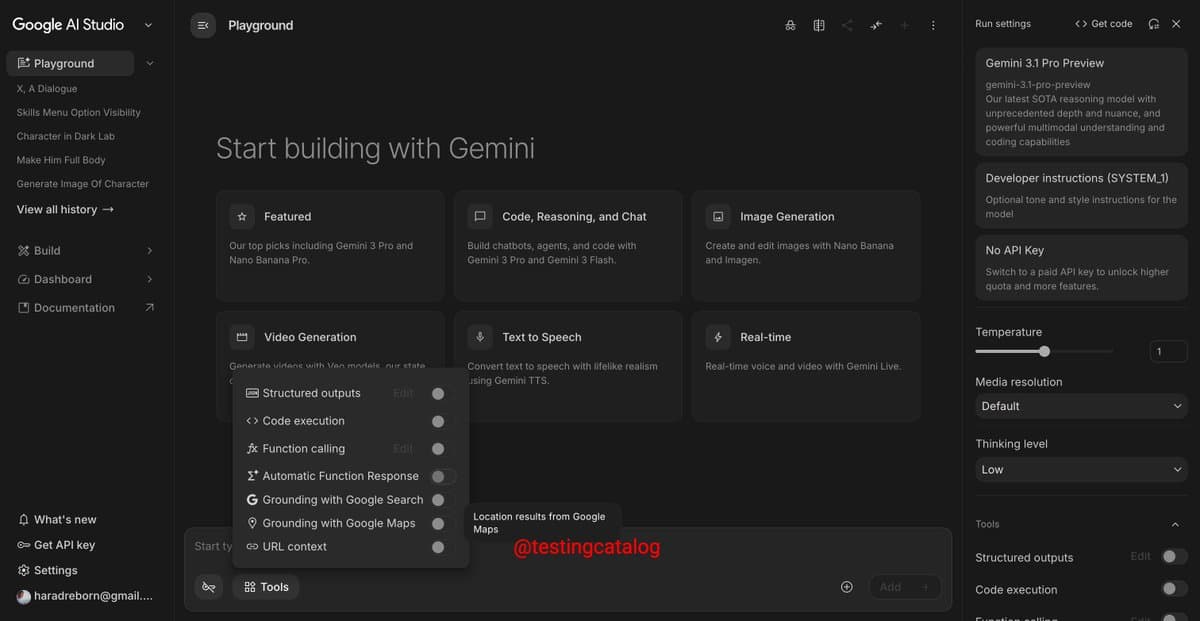
- Google is adding a Grounding with Google Maps option to AI Studio’s tool picker, with the UI labeling it as access to “location results from Google Maps,” according to the AI Studio screenshot.
- A Google reply says the capability is already in the API and the current change is “adding support in the UI as well,” per Logan Kilpatrick's reply.
- For Gemini developers, that shifts Maps grounding from a hidden or API-first capability toward a discoverable workflow inside AI Studio, as shown in the tool menu and clarified by the API comment.
- The screenshot places Maps grounding alongside Search grounding, function calling, and code execution, suggesting Google is treating location lookup as a first-class tool in the Gemini build flow the tool list.
What actually changed in AI Studio
The visible product change is in AI Studio’s Playground UI: a new tool entry called Grounding with Google Maps appears in the same menu as structured outputs, code execution, function calling, and Grounding with Google Search. The tooltip text in the screenshot describes it as returning “location results from Google Maps,” which is the clearest public description so far of what the tool is meant to expose.
That matters because this is not being presented as a brand-new backend capability. In a direct reply, Logan Kilpatrick said Google already has it “in the API” and is “just adding support in the UI as well.” The practical change is discoverability and easier testing inside AI Studio, rather than a net-new API primitive.
What it means for Gemini app builders
For engineers building location-heavy assistants, store finders, travel flows, or map-aware agents, the update points to a cleaner path than stitching together generic search results and separate geocoding logic. Google’s UI description frames the output as Maps-native location results, which implies a more direct grounding source for place lookup inside Gemini workflows.
The supporting thread adds one more signal about where this is headed. TestingCatalog called out the value of “Maps coding” and said the button could matter even more with a mobile app, in the follow-up post, while the screenshot shows Google placing Maps grounding directly in the prototyping surface engineers already use to test prompts and tools. That combination makes this look less like a one-off experiment and more like an effort to make location retrieval a standard part of Gemini app development.