
Google Workspace adds Gemini agents to Docs, Sheets, Slides, and Drive for Google AI Pro and Ultra
Google rolled Gemini deeper into Docs, Sheets, Slides, and Drive, including spreadsheet task execution, editable slide generation, and grounded file search. Teams should test approval flows, context sourcing, and current feature limits before broad rollout.
TL;DR
- Google rolled out a deeper Gemini workflow across Docs, Sheets, Slides, and Drive, with Google’s launch clip saying the new experience is available now for Google AI Pro and Ultra users.
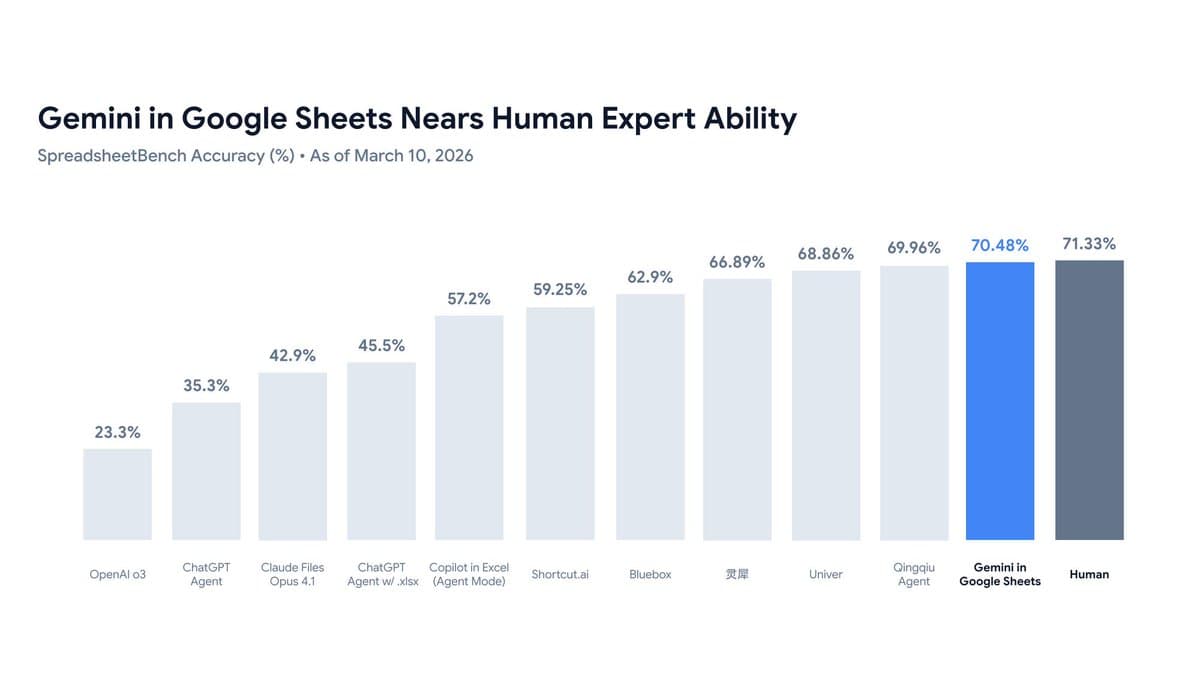
- In Sheets, the biggest implementation change is an agentic flow: the early-access tester thread says Gemini turns a request into a step-by-step plan, waits for approval, then executes while showing a live checklist; the same thread says Sheets scored 70.48% on SpreadsheetBench versus 71.33% for humans.
- In Docs and Slides, Gemini now works more like an in-product collaborator: according to the tester thread, Docs can draft against context from Drive, Gmail, Chat, and the web with a preview-before-insert flow, while Slides generates one slide at a time and keeps output fully editable.
- Drive is becoming the grounding layer for the suite: the tester thread says search now shows AI overviews with citations and supports multi-turn questions across Drive, Gmail, Chat, Calendar, and the web, though the same post says the experience is currently US-only and English-only.
What shipped inside Docs, Sheets, Slides, and Drive
The rollout is not a single chatbot sidebar. Google is pushing app-specific behaviors into each Workspace surface. In the early-access thread, Sheets is described as having an agent that can handle “multi step tasks almost autonomously”: a user submits a request, Gemini produces a plan, the user approves it, and the system executes while updating the sheet in real time. A supporting demo from feature recap also calls out “Fill with Gemini,” where a dragged column can be populated from web research and mailbox context.
Docs adds a tighter edit loop than the old generate-and-paste model. The thread says Gemini can co-edit “directly on the canvas,” generate a preview before insertion, and pull context from Drive, Gmail, Chat, and the web; users can also mention specific files and ask Gemini to match writing style. In Slides, the same thread says generation happens one slide at a time while analyzing nearby slides for fonts, colors, layout, and style consistency, and the output remains editable rather than flattened into static assets.
How grounding and cross-app context now work
The engineering pattern across the launch is retrieval plus traceability. The early-access thread says Gemini in Drive now returns AI overviews directly in search results and answers from files with “full citations,” which matters because users can inspect where generated content came from instead of treating Workspace output as opaque synthesis. That same post says Gemini can hold multi-turn conversations across Drive, Gmail, Chat, Calendar, and the web, with sources carried through the interaction.
This also changes how content gets assembled. The feature recap describes Gemini as “connective tissue” across private emails, calendars, and Drive files, with examples like drafting a newsletter from HOA minutes and upcoming events stored in separate locations. In practice, that means the new Workspace flow is less about prompt-to-text generation and more about combining retrieval, document editing, and task execution inside the productivity stack.
What teams should watch in rollout and testing
The early-access details also expose the current limits. In Docs, the thread says source settings reset every session and custom Gems still need to be pasted manually. In Slides, the same post says Gemini cannot yet edit videos, tables, or custom shapes, and it cannot reference slides by number. Those constraints matter for workflow automation because they define where a human still has to route around the model.
Rollout scope is also narrower than “all Workspace users.” The launch clip says the new Docs, Sheets, Slides, and Drive experience is available today to Google AI Pro and Ultra users, while the tester thread says at least some of the new Drive-centric experience is US-only and English-only for now. For engineering teams, the most important product behavior is the approval checkpoint in Sheets and the cited retrieval layer in Drive: both are concrete control surfaces, and both should be validated before broader internal deployment.