
Adobe Firefly integrates GPT Image 2 brand boards into Kling 3.0 spots
A documented Firefly workflow starts with a GPT Image 2 visual identity board, reuses it as reference material for branded scenes, then stitches Kling 3.0 clips and audio inside Firefly. It matters because brand system creation, asset generation, and video assembly stay inside one Adobe stack.
TL;DR
- egeberkina's workflow turns a single GPT Image 2 brand board into a full fake campaign, then reuses that board as the visual reference for every downstream asset.
- The board prompt in egeberkina's brand-board prompt is unusually specific about layout, typography, packaging, lighting, and color contrast, which helps explain why the later product shots keep the same VYRO look.
- In egeberkina's reference-image step, the visual identity board becomes the conditioning image for branded product scenes, so the workflow is less about one-off image prompts and more about carrying a system forward.
- egeberkina's Kling step and egeberkina's soundtrack step keep the motion edit and music pass inside Firefly, matching Adobe's own pitch that Firefly now bundles GPT Image 2, Kling 3.0, video editing, and audio tools in one studio via Firefly AI Assistant public beta.
Adobe's own product pages now read a lot like this thread. You can find GPT Image 2 in Firefly's model roster, Kling 3.0 in Firefly Video Editor, and a broader promise that Firefly AI Assistant will stitch multi-app tasks together from a single chat. The weirdly useful part is that egeberkina's post already shows the practical version: brand system first, assets second, motion third, soundtrack last.
Brand board
The whole campaign starts with one prompt, not a moodboard assembled by hand.
That prompt asks GPT Image 2 for eight concrete ingredients:
- a large VYRO logo
- a typography system
- a split color palette, vivid products versus muted base tones
- campaign photography
- product shots
- packaging design
- logo applications on fabric
- social media examples
It also locks the aesthetic in with production language, not just style adjectives: structured grid, soft natural light, concrete and beige backgrounds, editorial sportswear photography, no UI chrome, no futuristic overlays. According to Adobe's partner models documentation, OpenAI image models now sit directly inside Firefly for text-to-image and Firefly Boards, which makes this kind of identity-sheet prompt a first-class starting point instead of a hacky detour.
Reference image
The second step is where the workflow stops looking like prompt art and starts looking like brand production.
Rather than describing VYRO from scratch every time, egeberkina uploads the identity board as a reference image and writes smaller scene prompts around it. The sample prompt narrows to one product shot, ankle crop, neon socks, visible logo, concrete wall, diffused light.
That creates a simple pattern creative teams will recognize:
- generate the system
- lock the system into a reference image
- spin out campaign assets from that reference
Adobe has been nudging Firefly toward exactly this kind of multi-step workflow. Its AI Assistant page says Firefly can choose tools across Photoshop, Illustrator, Premiere, and more inside one interface, with the pitch that users describe the outcome and let the system chain the steps.
Kling clips
Once the stills exist, the thread moves them into video without leaving Firefly.
The process here is short:
- send the generated images into Kling 3.0 inside Firefly
- generate a few motion clips
- stitch them together in Firefly Video Editor
Adobe announced Kling 3.0 and Kling 3.0 Omni in Firefly on April 15, alongside an expanded Firefly Video Editor. That same post describes the editor as a browser-based timeline for combining generated clips, music, and uploaded footage, which is basically the productized version of what egeberkina's demo shows in miniature.
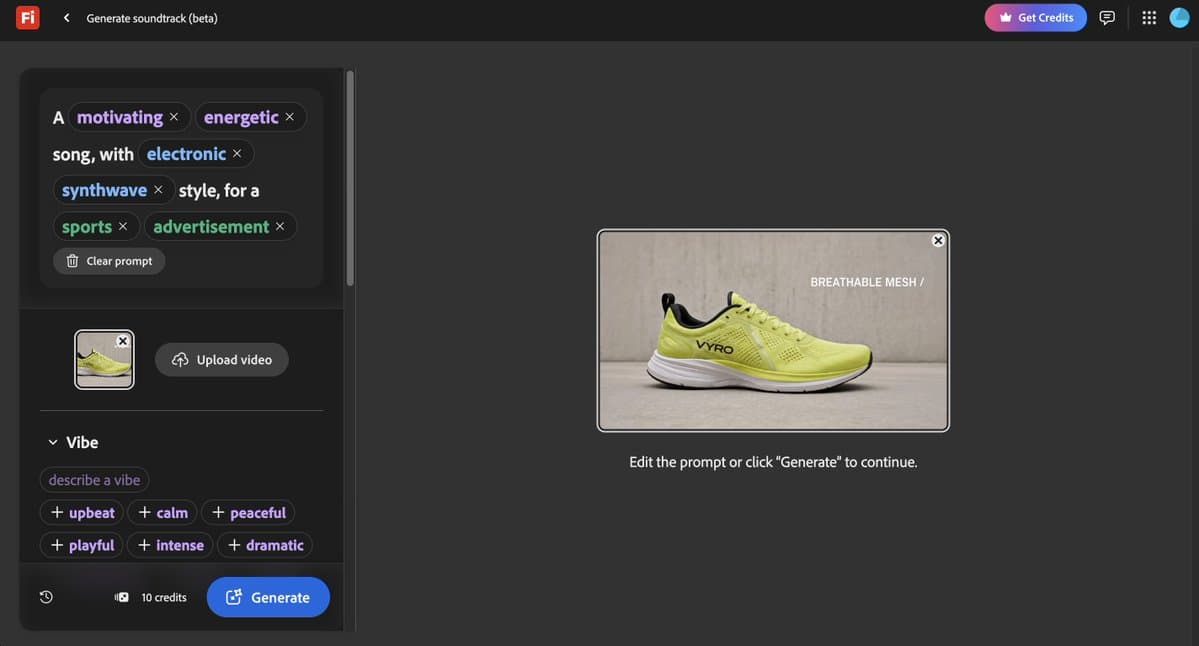
Soundtrack Generator
The last pass adds music after the edit, not before it.
That sequencing matters because the soundtrack generator is matching a finished cut, not trying to steer image generation upstream. In the full thread, egeberkina's Firefly link points readers straight to Firefly, and Adobe's April 27 blog says the app now combines partner models including GPT Image 2, Kling 3.0, ElevenLabs' Multilingual v2, and other generators in the same environment.
A quiet detail in Adobe's April 15 video update is that Firefly Video Editor also picked up studio-quality sound controls. So the stack here is no longer just image model plus video model, it is getting close to a lightweight finishing suite.
Outside Firefly
Adobe spent the same two-day window pushing these workflows beyond the Firefly app itself.
On April 27, Adobe opened Firefly AI Assistant in public beta, positioning it as a conversational layer that can orchestrate work across Creative Cloud apps. A day later, Adobe launched the Adobe for creativity connector for Claude, which pulls Photoshop, Illustrator, Firefly, Express, Premiere, Lightroom, InDesign, and Stock into Claude.
The evidence tweets show the same expansion from the user side. icreatelife's post demos the public beta by turning a day into a game-style video inside Firefly, while AllaAisling's tutorial context says Photoshop also now plugs directly into ChatGPT, including generative remove, fill, and background replacement. The bigger reveal is not any single model swap. Adobe is trying to make the handoff between brand system, asset generation, editing, and external chat surfaces feel like one continuous prompt chain.