
GPT-6 Astra and LTX power a clickable generated-video site
Amir Mushich published a workflow for a web interface where clicks move between generated video states. It uses planned keyframes, matched forward and reverse clips, and a direct LTX API connection.
TL;DR
- The hero video functions as an interface state machine, moving among scene, lighting, clothing, and cast variants in AmirMushich's clickable demo.
- A static 16:9 composition, centered subject, flanking architecture, and a 9:16 mobile-safe zone were locked before motion generation, per AmirMushich's layout plan.
- Four transformations yield eight directional clips, with shared boundary frames between each forward and reverse action, according to AmirMushich's clip rules.
- Generation and frontend implementation ran as one loop, from prompt through React integration and browser testing, in AmirMushich's workflow diagram.
- The GitHub build pack includes the site prompt, image and video prompts, eight edited clips, and troubleshooting notes.
Lightricks' official LTX-2 codebase points to the LTX-2.5 model weights and a pipeline package with image-to-video, keyframe interpolation, and retake tasks. Version one has one deliberate limitation: each transformed phase returns to Home instead of linking directly to every other phase, AmirMushich said in a reply.
Five states, eight clips
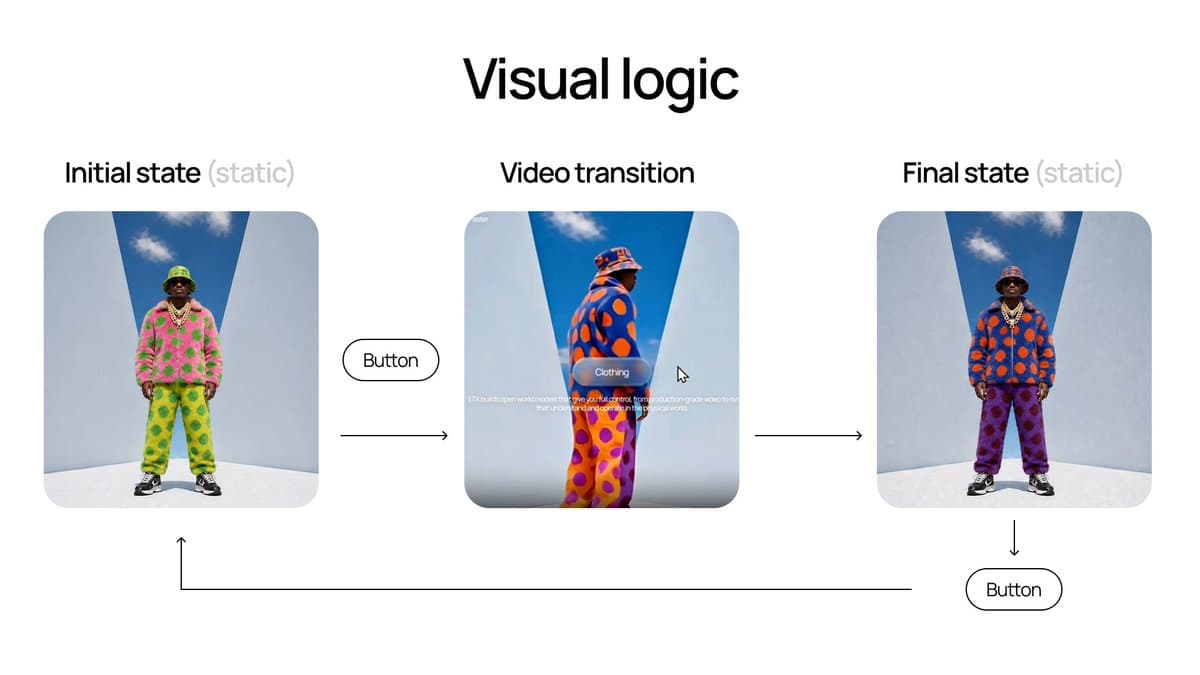
AmirMushich begins from one base frame and branches into four transformed world states, as his logic setup describes. His build pack lists eight edited clips, one forward and one reverse transition for each transformation.
- Initial
- Scene
- Lighting
- Clothing
- Cast
The locked composition
The source frame was designed to survive every variation:
- 16:9 canvas
- Static camera
- Full-body subject at center
- Architecture on both sides
- Central 9:16 safe area for mobile
Each destination keyframe changes only one category: environment for Scene, the full lighting system for Lighting, colorway for Clothing, or character and outfit for Cast. Identity, scale, position, architecture, and exposure remain fixed, with no zoom, shake, morph, blur, or extra objects.
Shared boundary frames
The forward and reverse renders may have different durations. Their endpoints cannot drift:
- The forward clip's last frame equals the reverse clip's first frame.
- The reverse clip's last frame equals the initial base frame.
Mushich trimmed and retimed the masters in After Effects, then checked dimensions and crop, boundary frames, exposure and gamma, player jumps, scale changes, and whether reverse playback looked convincing before upscaling.
Codex and the LTX API
Mushich connected the LTX API to Codex so video generation and implementation could cycle through prompt, generation, inspection, React integration, browser test, and prompt adjustment. He divided the work into four stages:
- Ideas and prototyping in GPT-6 Astra chat, using high or medium.
- First and last-frame storyboards in GPT Images 2.
- Video generation through the LTX API inside Codex.
- Final site design and build in GPT-6 Astra high.
His setup note points to LTX's API-key console for the credential used by the agent.
UI control states
After the clips were ready, Mushich used Figma for the controls and specified six UI conditions:
- Initial state
- Hover state
- Playback state
- Final state
- Reset transition
- Desktop and mobile layouts
During playback, the large controller collapses to the active action. Controls remain inactive while a transition is running.
Cycle tests and the build pack
The final test matrix covered each round trip, Initial to Scene to Initial, Initial to Lighting to Initial, Initial to Clothing to Initial, and Initial to Cast to Initial. It also included rapid clicks, reloads, mobile dimensions, and slow media loading.
AmirMushich's build pack contains the full website build prompt, image and video prompts, all eight edited clips, plus workflow and troubleshooting material. His later follow-up also links to a one-prompt rebuild of the site.