
GPT Image 2 and Seedance 2.0 support 3x2 storyboards for 30-second scenes
Creators posted character-sheet and 3x2 storyboard workflows that stretch Seedance clips into longer, more consistent sequences. The prompts show panel density, text load, and fixed character position affect motion quality and continuity.
TL;DR
- Creators are using GPT Image 2 to make character sheets and storyboard grids, then handing those boards to Seedance 2.0 to animate 15-second chunks that can be stitched into longer scenes, as MayorKingAI's Apollo vs Ares workflow and CuriousRefuge's character-consistency test both show.
- The clearest prompt pattern in the evidence is structural, not poetic: MayorKingAI's first 3x2 board split a 30-second fight into two 6-panel sheets, while MayorKingAI's first Seedance prompt converted each board into a timestamped 15-second timeline.
- Panel density and text load both matter. underwoodxie96's storyboard test said dense text hurts video quality, while MayorKingAI's thread explicitly chose 3x2 over 3x3 to avoid cramming a longer scene into one board.
- Position-locking has become a practical continuity hack: MayorKingAI's first storyboard prompt and MayorKingAI's second Seedance prompt both keep Apollo on the left and Ares on the right to reduce swaps between shots.
- The workflow is already branching into other formats, with Artedeingenio's storybook animation turning illustrated pages into gentle parallax video, underwoodxie96's magazine-cover example turning static editorial art into motion, and DavidmComfort's pre-vis note using Seedance first, then extracting stills back into storyboards.
You can open one GPT Image 2 storyboard prompt, skim a matching Seedance video prompt, and even click through to Leonardo from MayorKingAI's tool link. The prompt shares around underwoodxie96's magazine-cover workflow and underwoodxie96's first-frame workflow make the pattern unusually legible: image model for structure, video model for motion, editor for the final assembly.
3x2 storyboards
The biggest concrete shift in this batch of examples is the move from one dense board to two linked 3x2 boards. In MayorKingAI's first storyboard prompt, the stated goal was to make a longer scene than 15 seconds while preserving quality, instead of compressing everything into a 3x3 grid.
The split is mechanical:
- Board 1 covers panels 1 to 6, ending with Ares blocking Apollo's first arrow, per the first sheet.
- Board 2 continues with panels 7 to 12, using Board 1 as a reference image for continuity, per the continuation sheet.
- Seedance then turns each board into a separate 15-second clip with explicit timestamps, per part 1 and part 2.
- Final editing happens outside the model, with music in Suno and assembly in CapCut, according to MayorKingAI's top post.
That is a nice little production grammar: one board per clip, one clip per 15-second block, then stitch.
Character sheets
The character-sheet prompts are doing more than visual style. They are packing in the sort of preproduction metadata that animation teams usually keep in separate docs.
CuriousRefuge's shared prompt asks for:
- turnaround views: front, 3/4, side, back, 3/4 back
- head studies from multiple angles
- a cinematic portrait tied to environment, lens, and lighting
- wardrobe, material, and performance notes
- a strict consistency rule so face, costume, and proportions do not drift
MayorKingAI used a leaner version of the same idea for Apollo and Ares, with matching sheet structure for both characters before any storyboard work started, according to the Apollo sheet and the Ares sheet.
The interesting part is that creators are treating these sheets as machine-readable references. MayorKingAI's first Seedance prompt explicitly feeds both character sheets plus the storyboard into the video model, while CuriousRefuge says the consistency is not perfect because Seedance still hallucinates a bit.
Prompt density
Two separate posts point at the same constraint: more storyboard detail does not automatically mean better motion.
In underwoodxie96's comparison, the blunt claim is that storyboards with a lot of text do not produce good video quality. The attached board is loaded with camera notation, SFX, frame counts, and system text, exactly the sort of thing prompt nerds usually assume should help.
Meanwhile kaigani's accidental test is useful because it goes the other way. A bare GPT Image 2 request, sent before the details were filled in, still produced a coherent default 3x3 story beat sequence.
Taken together, the current sweet spot looks narrower than people expected:
- enough text to lock sequence logic
- enough visual references to lock identity
- not so much text that the board turns into a screenplay poster
That matches MayorKingAI's choice to spread action across two simpler 3x2 boards instead of one denser grid.
Position locking
The most reusable continuity trick in the evidence is embarrassingly simple: pin each character to a side of the frame.
MayorKingAI repeats the rule across both image and video prompts:
- Apollo always left
- Ares always right
- Storyboard 2 must continue Storyboard 1 with the same panel layout, lighting, and tone
- Seedance timelines preserve right-to-left and left-to-right action paths
That side-locking shows up as a workaround for one of video generation's oldest failure modes, identity and position swaps mid-sequence. CuriousRefuge's test says consistency is close but not 100 percent, which makes the explicit left-right rule look less like prompt superstition and more like a real control surface.
Formats spreading beyond fight scenes
The same GPT Image 2 plus Seedance pairing is already being bent into very different formats.
One branch is editorial and graphic. underwoodxie96's example starts with a magazine-cover-style still, then uses Seedance to add just enough hair and layout motion to turn it into a moving cover.
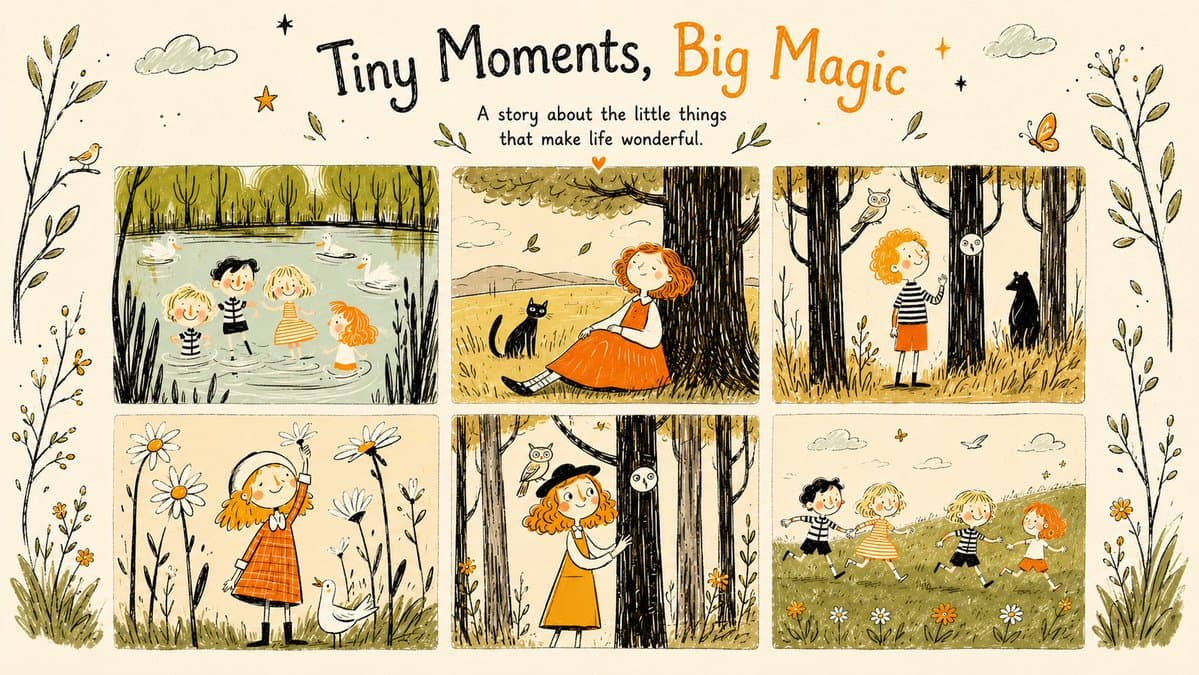
Another branch is illustrated page animation. Artedeingenio's prompt maps a 15-second children's book piece into four timed beats:
- closed book with dust and push-in
- book opening to a water-play scene
- page turn to a forest scene with parallax
- page turn to a meadow, then a half-close in warm light
There is also a first-frame version of the workflow. underwoodxie96's post starts with a single GPT Image 2 keyframe, then asks Seedance to extrapolate the clip from that image alone.
Seedance as pre-vis
The last twist is that some creators are running the pipeline backward.
DavidmComfort says Seedance's spatial understanding is strong enough to use it for pre-visualization first, then extract stills from the generated clip to build a detailed storyboard afterward. That flips the usual order of storyboard first, animation second.
A neighboring workflow from AllarHaltsonen's thread adds a hybrid variant:
- start with a Midjourney image and style reference, per the opening step
- pass that image through GPT Image 2 to make it photorealistic, per the photoreal step
- ask GPT Image 2 for a 10-shot storyboard with camera angles and SFX, per the storyboard step
- animate from the storyboard in Seedance via LTX Studio, per the final step
That makes the broader pattern hard to miss. Seedance 2.0 is being used as animator, layout checker, pre-vis engine, and continuity stress test, depending on where creators drop it into the chain.