
HyperFrames guides 5-step HTML launch video workflow with storyboard review
A creator walkthrough mapped HyperFrames into a five-step process: gather assets, write a storyboard, mine the launch repo, review static frames, then build and polish the final clip. Keep edits in HTML until the last pass, then use Studio for copy, spacing, color, and motion tweaks.
TL;DR
- petergyang's episode thread turned HyperFrames into a five-step workflow: gather assets, write a storyboard, pull animations from the repo, review static frames, then build and polish in Studio.
- According to petergyang's preview post, the tool is free and open source, but the difference between a slick launch clip and HTML slop lives in setup files like
frame.mdandstoryboard.md. - petergyang's static-frame step adds a useful gate before rendering: convert the storyboard into HTML frames, inspect the densest visual moment from each scene, then iterate there first.
- petergyang's repo-mining step says the launch repo already contains reusable motion patterns, including a Claude-style input box, typewriter reveals, and zoom effects.
- petergyang's episode thread also says HyperFrames ships a built-in
/website-to-videoskill, so the polished five-step flow sits on top of a much faster one-shot path.
You can watch the full interview that Peter Yang linked in petergyang's tutorial post, grab the HyperFrames repo from petergyang's repo link, and see that the workflow starts with a surprisingly unglamorous file, frame.md, in both petergyang's first step and petergyang's preview post. The other nice wrinkle is that the static-frame review step delays full video renders until the visual layout is already working in HTML.
The five files and passes
The workflow is basically a file-driven production loop inside Codex or Claude Code, not a prompt-and-pray generator.
Peter Yang's walkthrough in his five-step overview breaks it into five passes:
- Gather assets and create a
frame.md. - Write a
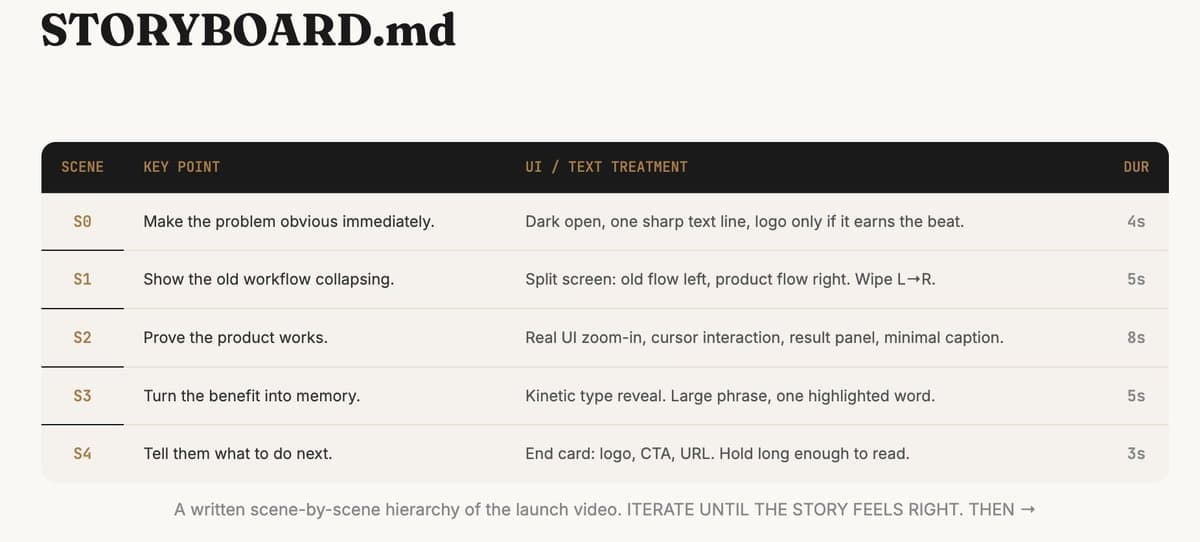
storyboard.mdwith scenes, text treatment, and timing. - Point the agent at the HyperFrames repo for reusable motion patterns.
- Generate storyboard HTML and review one static frame per scene.
- Render the clip, then polish copy and layout in Studio.
petergyang's storyboard step makes the second file concrete. The storyboard is where scene order, on-screen text, UI treatment, and duration get specified before animation starts.
Static frames before video
The sharpest part of the process is the fourth step. Instead of burning time on full renders, petergyang's static-frame step says to turn storyboard.md into storyboard.html and review the most visually dense frame from each scene first.
That changes the workflow from video editing to layout debugging. By the time the full clip is rendered, the typography, spacing, and scene composition have already been checked in HTML.
The repo doubles as a motion library
petergyang's repo-mining step says the launch repo is not just an installer, it is also a reference set of prebuilt components and motion patterns.
The examples he calls out are specific enough to be useful:
- Claude input box animations
- Typewriter reveals
- Zoom effects
- Components and examples pulled from earlier launch videos
That makes the repo closer to a motion kit than a blank framework. The agent's job in this step is to lift working patterns, not invent every transition from scratch.
Studio is the last-mile editor
petergyang's build-and-polish step places HyperFrames Studio at the end of the chain, after the HTML and scene structure are already working.
The tweaks he lists are the boring details that usually decide whether a launch clip feels finished: moving text, changing copy, and adjusting color, opacity, and spacing. petergyang's reply about skill also underlines that the tool still depends on taste and craft, even if the animation is code-driven.
One-shot mode exists, but the tutorial argues for the slower path
petergyang's tl;dr post says you can one-shot a video from a single prompt. petergyang's episode thread adds that HyperFrames includes a built-in /website-to-video skill that can generate a launch clip from any URL.
The actual tutorial still pushes the five-step workflow because it gives the agent better raw material, clearer scene structure, and a review stage before final render. That is the real reveal here: HyperFrames can do the fast demo path, but its better-looking results come from treating HTML video like a miniature design system.