
Topaz Wonder 3 improves portrait detail and text clarity in creator demos
Sponsored creator threads showed Wonder 3 improving portrait detail, skin texture, lighting, and text clarity from rough inputs without stacking multiple enhancement passes. The examples covered photo portraits and low-resolution renders across desktop and web tools, so compare outputs before adopting it in production.
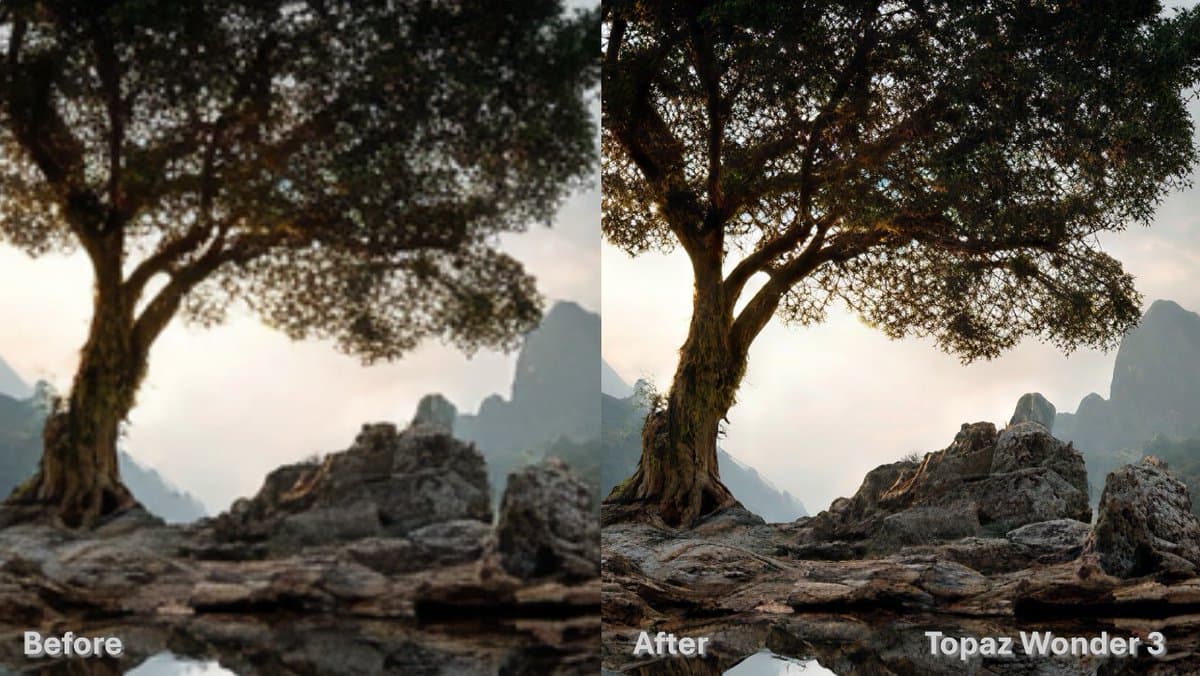
TL;DR
- Sponsored creator demos from carolletta's portrait test, AllaAisling's thread, and awesome_visuals' character demo all pushed the same claim: Wonder 3 adds sharper detail and more natural texture without the plastic look older enhancer stacks often introduce.
- Topaz's own Wonder 3 model page says the model is meant for both clean inputs and heavily degraded images, and positions it against Wonder 2, which the company says was more focused on ultra-low-resolution upscaling.
- The control surface is simple. AllaAisling's walkthrough shows a Low, Medium, High selector, while developer documentation says those levels are the main way to tune behavior across mixed-quality inputs.
- Availability spans desktop and web. AllaAisling's walkthrough places Wonder 3 inside Topaz Photo, Gigapixel, and Image Web, while the official cloud page lists unlimited local and cloud rendering with a 32 MP cloud export limit.
You can browse the official model page, check the developer docs, and compare that marketing language to creator demos from carolletta, AllaAisling, and awesome_visuals. The most concrete detail buried in Topaz's own materials is that Wonder 3 is supposed to replace multi-step cleanup for a broader set of images than Wonder 2, then show up across Image Web docs and Gigapixel docs as the same Low, Medium, High model.
Single-pass enhancement
The cleanest product pitch came from AllaAisling's thread, which described Wonder 3 as one model that upscales, denoises, sharpens, and fixes lighting in a single pass. That matches Topaz's official Wonder 3 page, which places the model alongside separate tools like relighting and text preservation but frames Wonder 3 itself as the broader all-image option.
Two recurring claims showed up across the demos:
- more natural skin and fabric texture, per carolletta's portrait test
- stronger recovery from rough low-resolution inputs, per GlennHasABeard's reposted note and AllaAisling's thread
- preserved text, logos, and fine detail when the source image still carries enough signal, per AllaAisling's thread
- less need to stack multiple enhancement passes, which developer documentation backs up by saying Wonder 3 improves on Wonder 2's edge cases and reduces earlier plasticky artifacts
Portraits and stylized renders
The creator examples were not all chasing photoreal portraits. awesome_visuals' demo used a stylized character design, set Wonder 3 to Medium, and upscaled to 4K while saying the output kept the original style intact. In the replies, pzf_ai's comment specifically called out hair versus skin treatment as looking selectively applied rather than uniformly sharpened.
That lines up with Topaz's own category list. The developer docs and Image Web model docs both say Wonder 3 is intended for portraits, landscapes, wildlife, and texture-heavy subjects like metallics, feathers, fabric, and skin.
The portrait demos still carry a big caveat: the strongest examples in the evidence pool are paid creator partnerships, stated explicitly in carolletta's disclosure and carolletta's follow-up link post. They are useful as workflow evidence, not neutral benchmarks.
Controls and availability
The operating model is minimal:
- open Topaz Photo, Gigapixel, or Image Web, as shown in AllaAisling's walkthrough
- load an image and choose Wonder 3
- pick Low, Medium, or High
- preview and export
Topaz repeats the same structure across its docs. The official model page says Wonder 3 accepts any resolution and works on both high-quality and degraded inputs. The cloud page adds the more operational details: unlimited local rendering, unlimited cloud rendering, a concurrency limit of two cloud jobs, and a 32 MP cloud export limit.
The product footprint is broader than one app. AllaAisling's walkthrough names Topaz Photo, Gigapixel, and Image Web, while the Gigapixel docs list Wonder 3 among its generative models and the Image Web docs describe the same model as "advanced generative realism for all image types."