
FLUX 3 Image adds bounding-box layout controls
FLUX 3 Image adds bounding-box layouts, precise multi-turn edits, 4K output and support for up to 10 references. A creator comparison found it most accurate at following fine-detail editing instructions.
TL;DR
- FLUX 3 Image adds bounding-box composition for new images and edits, demonstrated in BFL's layout demo.
- Multi-turn edits are meant to preserve untouched pixels, according to BFL's editing announcement.
- Output goes up to 4K, with support for as many as 10 reference images, according to BFL's launch thread.
- FLUX alone kept a tiny-column edit confined to the intended objects in ai_artworkgen's comparison with Midjourney and Ideogram.
A camel becomes a futuristic vehicle inside BFL's editing demo, while the desert backdrop stays put. One creator combined a kneeling pose and peppermint-camo trousers in a single edit prompt; the 4K tier in Runware's docs reaches 4096 × 4096 for square images.
Bounding-box layouts
BFL supports bounding boxes both when composing an image from scratch and when editing an existing one.
Runware's API reference exposes the controls through settings.boundingBoxes:
idanddescription: a unique region identifier and a description of its contents.referenceIndex: the input image supplying an element, indexed from 0 to 9. A null value denotes a new element.sourceBoxandtargetBox: coordinates written as[top, left, bottom, right]on a normalized 0-to-1000 grid.- Matching coordinates: keep the element in place. Different source and target coordinates move or resize it.
targetBox: null: removes an element from a supplied reference image.
The coordinate scale stays the same regardless of output dimensions.
Pixel-preserving edits
BFL promises precise edits “without changing any other pixel.” Its replacement demo targets a camel inside a desert scene.
The API documentation uses softer wording: pixels outside an editing frame “generally” stay unchanged, according to Cocoloop's launch report.
Kimono recoloring and macro close-ups
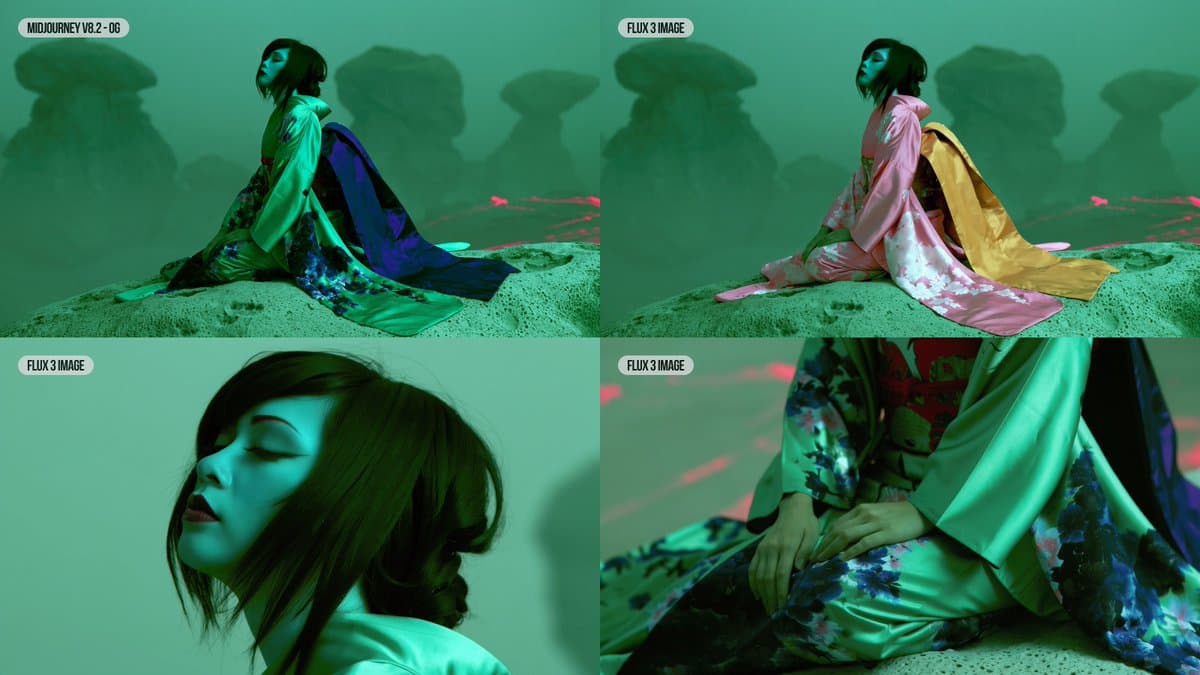
Creator ai_artworkgen compared editing instructions across Midjourney, Ideogram 4.5 and FLUX 3 Image.
The kimono test used three requests:
- “Change her kimono to pink silk with white flowers, and a custard yellow bow.”
- “Show me a macro closeup of the subject's face.”
- “Show me a macro closeup of the subject's hands on her kimono.”
Results differed on both instruction following and continuity:
- Midjourney: handled the two close-ups, but missed the white flowers and exact custard-yellow shade, according to ai_artworkgen.
- Ideogram 4.5: matched the garment changes, but the macro shots' lighting looked “a bit off” to ai_artworkgen.
- FLUX 3 Image: matched the garment changes and earned praise for lighting and contextual awareness in the close-ups, according to ai_artworkgen.
Chained edits and pose changes
Ideogram 4.5 also held up across successive edits, sometimes with two changes per iteration while maintaining image quality, ai_artworkgen reported in a follow-up.
For a separate FLUX test, the creator used a Midjourney original and reported that the model “nailed so many edits” on the first attempt. The prompt bundled a new pose with several wardrobe changes:
Marble-column edits
The final comparison requested: “Change some of the detailing on the marble columns to camo print.” FLUX was the only model that changed just the columns, according to ai_artworkgen.
The smallest edit is the best demo in this thread.
Ten reference images
A composition can draw from up to 10 reference images, according to BFL's launch thread.
Runware's reference-image schema accepts:
- Image UUIDs.
- Image URLs.
- Data URIs.
- Base64-encoded images.
Each reference must be at least 128 pixels in size. A bounding box's referenceIndex connects a placed element to the relevant input image.
4K output
Runware's dimension table puts the 4K tier at approximately 16.8 megapixels, with dimensions varying by aspect ratio:
- Square: 4096 × 4096.
- Landscape, approximately 16:9: 5456 × 3072.
- Portrait, approximately 9:16: 3072 × 5456.
API prices and commercial weights
FLUX 3 Image is available through BFL's Playground and its API. BFL's API launch promotion offers 50% off until October 8, according to its launch thread.
Runware's published rates list discounted and standard per-image prices:
- 0.75K: $0.0205 discounted, $0.041 standard.
- 1K: $0.024 discounted, $0.048 standard.
- 2K: $0.05 discounted, $0.10 standard.
- 4K: $0.303 discounted, $0.607 standard.
Commercial weights are available under a license for fine-tuning and deployment on a company's own infrastructure. BFL says an open-weight version will launch “in the coming weeks” in the same announcement.