
OpenAI rolls out Intelligent UI interactive answers in ChatGPT
ChatGPT's Intelligent UI lets GPT-6 generate charts, forms and interactive tools from native streaming components. Paid tiers start receiving it today, with Free and Go following tomorrow.
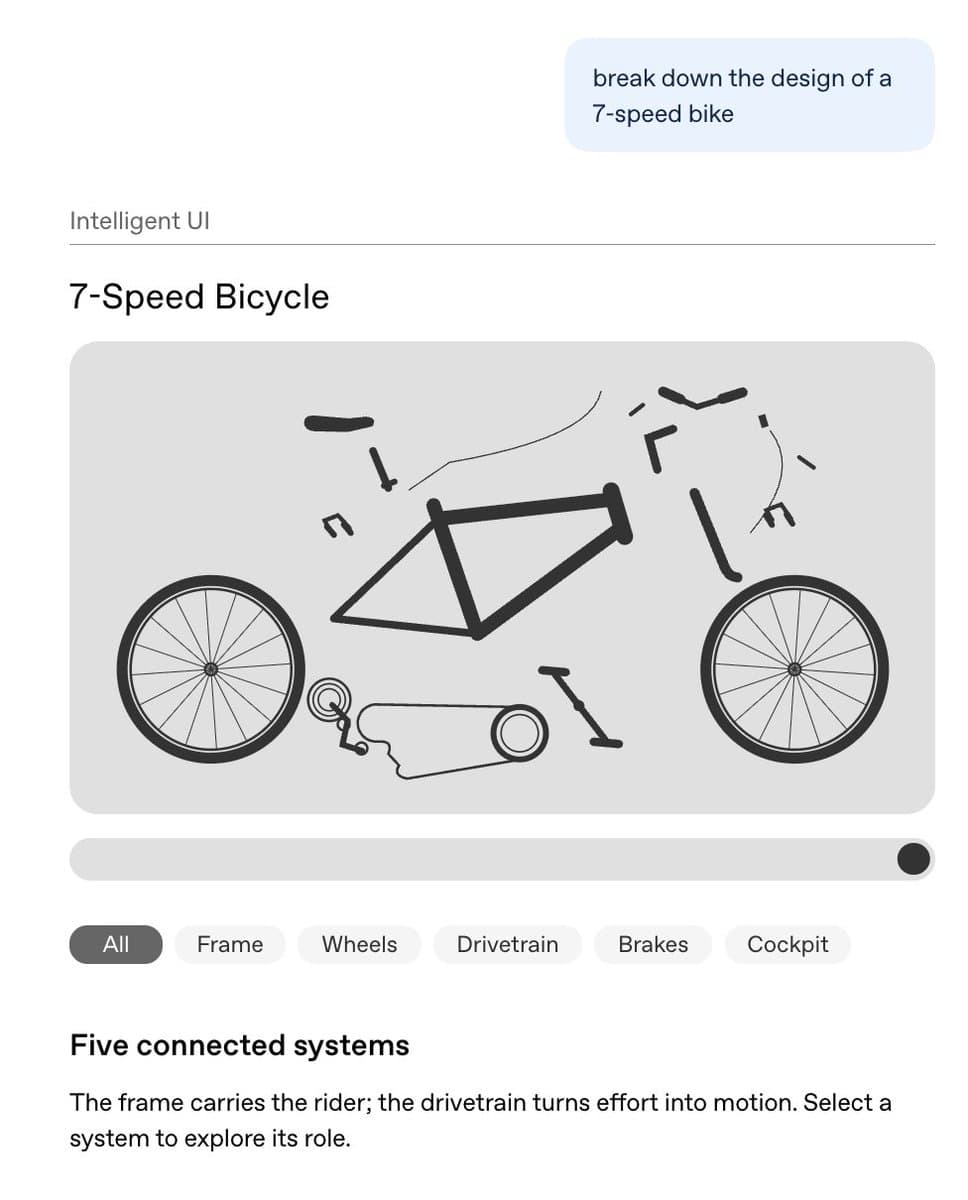
TL;DR
- ChatGPT answers can now contain usable calculators, diagrams and forms, as OpenAI describes in its Intelligent UI announcement.
- Native components render progressively while the model generates them, according to the launch explanation.
- GPT-6 can answer, resume reasoning, use tools and answer again, a cycle michpokrass calls interleaved thinking.
- Paid tiers start receiving GPT-6 Sol on October 7; Free and Go get GPT-6 Luna starting October 8, according to OpenAI's rollout notice.
The streaming compiler is the neat engineering trick: interfaces appear before generation finishes. One tester isolated native controls with a DIL-only prompt, while OpenAI's model guide excludes Pro effort from the new experience.
Interactive answers
OpenAI groups Intelligent UI into three kinds of answers:
- Visual plans: recipes alongside cooking schedules, or road-trip maps with detour notes.
- Explorable explanations: diagrams and adjustable inputs for learning how something works.
- On-demand tools: savings calculators, dinner bill splitters and games inside the conversation.
An early-access user described the experience as a nice change from walls of text.
Native streaming components
OpenAI's implementation combines three pieces:
- A native component library supplies a familiar design foundation across web and mobile.
- A compiler processes the interface during generation, allowing progressive rendering.
- Design training teaches the model to choose content, layout, visuals and interactions, including when plain text is sufficient.
Interface evaluations cover clarity, usefulness and completeness. The tooling also targets token-efficient output and instant streaming, although the announcement gives no token-savings figure.
DIL and other rendering paths
ChatGPT described six rendering paths in nicdunz's test:
- DIL components: native layouts, buttons, sliders and interactive controls.
- AppBlock: custom HTML/JavaScript visualizations and interactions.
- GenUI widgets: specialized widgets for weather, sports and calculators.
- Chart: native data visualizations.
- MapWidgetV2: interactive maps and routes.
- AsyncImage / AsyncVideo: embedded visual media.
nicdunz singled out DIL as the only part that felt new. The follow-up prompt requested native DIL components and local interaction state while excluding the other rendering routes and external tools.
Interleaved thinking
ChatGPT can now repeat this cycle, as michpokrass explains:
- Emit a partial answer.
- Continue reasoning.
- Use tools.
- Emit another response and keep working.
For web-search questions, GPT-6 Instant starts answering 44% sooner on average than GPT-5.6 Instant, according to OpenAI's announcement. The reported metric is answer-start latency.
In a separate internal evaluation of high-value everyday agentic tasks, OpenAI says GPT-6 Extra High begins answering in the same time as GPT-5.6 Medium while scoring above GPT-5.6 Extra High.
Chat rollout and client limits
The models powering Work and Codex remain unchanged, and Enterprise availability depends on workplace admin settings, according to the release announcement.
Client support and model selection follow OpenAI's documented rules:
- Thinking effort: GPT-6 supports the features from Instant through Extra High, including higher reasoning efforts in Chat. Pro effort uses GPT-6 Astra and excludes these capabilities.
- Clients: web and supported updated apps receive the features. Older macOS and Windows desktop apps do not support them.
- Existing selections: “Latest” moves to GPT-6 at the same effort; explicit GPT-5.6 Sol selections stay on GPT-5.6.
- Quotas: Intelligent UI has no separate allowance. Existing model, tool and plan limits still apply.
OpenUI for developer-built agents
rabi_guha pointed to OpenUI as a way to put generative interfaces into other agents after the ChatGPT release.
The OpenUI repository describes:
- A compact, streaming-first language for model-generated interfaces.
- Official React support, with community integrations for other frameworks.
- Built-in component libraries and ready-made chat interfaces.
Layout and visuals controls
The new presentation drew complaints too. nicdunz asked whether the text had become larger and said the interface felt like “a kids app.”
On the web, Settings → Layout and visuals reduces visual elements, according to OpenAI's help page. Some visuals may still appear; the setting does not restore a fully classic, text-only experience. Appearance changes to one conversation do not change other chats.