
Claude Managed Agents adds dynamic workflows for up to 1,000 agents
Claude Managed Agents can plan and coordinate dynamic multiagent workflows. Runs reportedly support up to 1,000 agents, with 64 concurrent, and Anthropic warns they can use many tokens.
TL;DR
- Dynamic workflows are now in public beta for Claude Managed Agents: a lead agent writes a program that coordinates workers and combines their results, according to Anthropic's announcement.
- Runs support up to 1,000 agents, per Anthropic's configuration post, with a current concurrency limit of 64 reported by WesRoth.
- Bug detection jumped from 14–27 of 70 planted bugs to 66 of 70 in Anthropic's test, with the workflow returning the same count across three runs.
- Token consumption is a launch caveat: daniel_mac8 reported an $8.36, five-minute code review, while Anthropic warned that workflows can use many tokens.
The workflow docs say the generated orchestration code is hidden from the API's normal output, although the lead agent can be asked to print it after the run. Saved agent references remain pinned to resolved versions, even when worker definitions subsequently change. A Slack automation template substitutes real credentials for placeholders as requests leave the sandbox for allowed hosts.
Workflow programs
Claude's generated program takes over routing and combining results, the most interesting part of Anthropic's workflow design. The server executes it in the background, leaving the lead agent free to communicate with the user or check on several open runs.
The program can:
- Fan out: run multiple workers simultaneously.
- Pass results: feed one worker's output into another worker's prompt.
- Advance independently: choose the next agents and write their prompts without routing every result through the lead conversation.
- Repeat and branch: revise a draft until a review passes or a round limit is reached.
- Handle failures: catch a failed worker or allow its failure to end the run.
Named phases expose progress through stages such as reading documents and reconciling findings. Once a run ends, the lead agent gets a turn to read its result and can answer the user or start another run.
Configuration
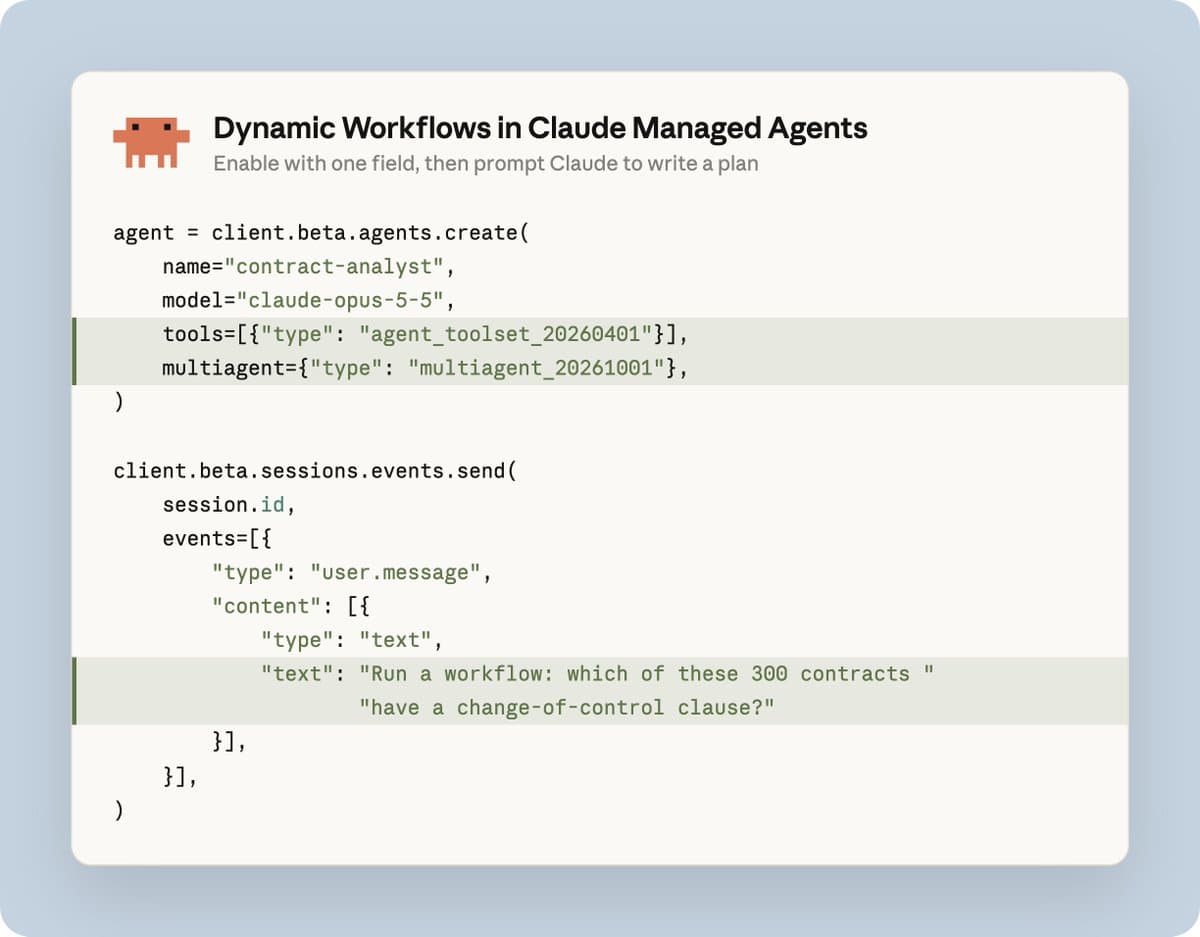
The minimal agent-definition fragment in the multiagent documentation is:
- Defaults: subagents, workflows, and inline worker definitions are enabled.
- API header: requests use
anthropic-beta: managed-agents-2026-04-01. - Scale: Anthropic specifies up to 1,000 agents per run; WesRoth reports 64 concurrent.
- Nesting: only the session's primary agent starts workflow runs. Workers inside a run cannot start nested runs.
Anthropic also supplies a Claude Code onboarding command in its setup post:
Inline workers and shared files
Workers have separate conversation histories but share the session sandbox, filesystem, mounted memory, and session-scoped vault credentials, according to Anthropic's thread documentation.
The agent schema supports two worker types:
- Inline workers: the workflow writes their system prompts. They use the lead agent's model and a subset of its tools, MCP servers, and skills; inherited tools retain their permission policies.
- Predefined workers: saved agents use their own model, system prompt, tools, MCP servers, and skills. The workflow can therefore invoke specialists configured with different models.
The predefined-agent lists for subagents and workflows are separate, with up to 20 unique agents in each list. Ordinary subagents have a 25-child-thread limit, including idle threads; workflow threads are exempt from that limit.
Bug-hunting results
Anthropic planted 70 bugs in a 116,000-line codebase and tested each setup three times.
| Setup | Run 1 | Run 2 | Run 3 |
| --- | ---: | ---: | ---: |
| Single agent | 14 bugs | 15 bugs | 27 bugs |
| Dynamic workflow | 66 bugs | 66 bugs | 66 bugs |
The workflow recovered about 94% of the planted bugs in every run. Anthropic's benchmark post omits run costs and token budgets.
Token billing and budgets
In a separate hands-on run, daniel_mac8 reported 21 bugs described as proven across 18,000 lines of code, completed in five minutes for $8.36 using Max API credits.
Managed Agents pricing combines model-token charges with session runtime. Every worker consumes tokens, including inline workers running the lead agent's model.
The session-budget mechanism has several concrete behaviors:
- Public list prices: the ceiling is measured against tracked list cost.
- Cents as strings:
max_list_cost.amount: "500"represents $5.00. - Session-wide accounting: the budget covers the session's workflow runs too.
- Pause at the ceiling: the platform stops issuing new model requests and goes idle. An in-flight request still finishes, so final cost can exceed the cap slightly.
- Resume: increasing or removing the budget resumes the work it paused.
The price drew a defense from daniel_mac8 in a reply: a human would cost substantially more even to write buggy code.
Monthly API credits
The review's funding came from a separate platform-credit rollout:
- Max 5x: $100 monthly.
- Max 20x: $200 monthly.
- Team: a pooled balance of up to $500 monthly.
The credit terms cover Managed Agents, the Claude API, Agent SDK, and Playground, while excluding interactive Claude Code usage and third-party cloud platforms. Credits expire each billing cycle without rollover and are spent before purchased credits.
Scheduled automations
Anthropic's automation reference implementation runs a Slack and GitHub briefing on managed infrastructure, with no local process kept running. It organizes the deployment into six components:
- Sources: named Slack channels and GitHub repositories.
- Destination: one Slack channel for the brief.
- Agent: model, tools, and run instructions in
agent.md. - Schedule: cron timing and a time zone; each trigger starts a fresh session.
- Memory: read-only preferences and read-write state mounted under
/mnt/memory/. - Guardrails: scoped read access, a network allowlist, and a per-run spending cap.
The template tracks a bookmark per source instead of reading a fixed “last 24 hours” window. If a source fails, its bookmark stays unchanged and the brief names the unavailable source.
Slack delivery also has an explicit receipt: bookmarks and the reporting ledger advance only after Slack returns "ok": true and a message timestamp. An ambiguous response marks the run “maybe posted” without advancing either record.
An Agent SDK side project previously required a continuously running process and “didnt work that well,” trq212 said in a migration report. A one-prompt port to Managed Agents made it “way more reliable.”
Run events and partial failures
The workflow lifecycle documentation exposes several integration gotchas:
completedpermits failed work. A workflow can finish withresult.type: "completed"even when a worker failed or a thread could not be created. Those failures appear in individual thread events.- Idle can mean paused. Completion requires every observed run to receive
workflow_run.status_ended, followed by the session becoming idle withstop_reason: "end_turn", without that idle being caused by the client's interruption. - Run events do not trigger webhooks. They arrive on the primary session event stream. Worker message events remain on their own thread streams.
- Phase endings do not certify success. A
workflow_run.phase_endedevent can close a phase when the run ends, without saying its work finished. - The deadline keeps ticking. Runs have a default 24-hour lifetime. Budget pauses and time waiting for the client count toward it, so a paused run can still end with
timeout_error.