
Codex users report Appshots, browser control, and parallel PR workflows
OpenAI shipped a docs agent that can hand off guides to Codex, and users published Appshots, browser-control, parallel PR, and multi-tree workflows. Watch the examples for ways to structure Codex around orchestrated tasks, while code-review and plugin gaps remain.
TL;DR
- OpenAIDevs' docs agent post introduced a docs agent on developers.openai.com that answers product questions, links straight to the relevant docs, and can turn a project description into a Codex-ready guide.
- Appshots moved from obscure feature to power-user habit fast: reach_vb's command list called them the most useful software on his Mac, while steipete's post said he had been manually dragging screenshots into Codex instead.
- Browser work is getting more explicit and more powerful. reach_vb's Thursday update list said Codex added Developer Mode with controlled CDP access and up to 2x faster browser use, and the official Codex changelog matches that inventory.
- The strongest usage examples are orchestration stories, not one-shot prompt stories: OpenAIDevs' website workflow demo showed parallel site edits, while steipete's crabbox thread described Codex running across multiple trees and even signing up for services through browser and computer use.
- The rough edges are visible too. jxnlco's plugin feedback request asked whether plugins are actually making Codex better, and zeeg's code-quality complaint drew agreement that human code reading still sits in the loop.
You can connect Codex to OpenAI's docs MCP server, check the official Appshots page, and compare the in-app browser docs with the Chrome extension docs. The split is unusually clear: localhost and public pages stay in Codex, signed-in work moves to Chrome, and Appshots act as the fast handoff when the relevant context is sitting in some other Mac app.
Docs agent
The new docs agent is a small but telling product move. According to OpenAIDevs' thread, it does not just answer questions about OpenAI products, it takes users to the relevant documentation and can generate a custom guide with a tailored prompt and resources for Codex.
That handoff matches the official Docs MCP page, which exposes a public documentation-only MCP server at https://developers.openai.com/mcp. OpenAI's docs already position that server as shared infrastructure for Codex, the CLI, and external agents, so the website agent looks less like a standalone chatbot and more like a guided front end for the same docs stack.
Appshots
Officially, Appshots capture the frontmost Mac window, including a screenshot plus any text the app exposes, then attach that state to a Codex thread. The hotkey is both Command keys by default, which explains why the user examples read like muscle-memory shortcuts instead of prompt engineering.
The recurring commands in reach_vb's post were structured around investigation, PR creation, eval runs, and heartbeat follow-ups. steipete's post added the more revealing data point: some users were still moving screenshots into Codex by hand, which means Appshots is solving a workflow tax many people had not realized already had a product surface.
Browser control
The browser stack now has three distinct lanes. The official in-app browser docs reserve that surface for local dev servers, file-backed previews, and public pages without sign-in. The official Chrome extension docs reserve Chrome for logged-in state, extensions, and internal tools.
The new part is Developer Mode. Both reach_vb's update list and the official Codex changelog say Codex can now get controlled Chrome DevTools Protocol access for network inspection, console output, runtime errors, performance profiling, and page state. The app settings docs also show site allowlists, blocklists, and an org-level switch for full CDP access, which makes this feel closer to a governed debugging tool than a generic browser agent.
Parallel PR workflows
The most concrete user reports are about concurrency. In OpenAIDevs' customer example, Andrew Pignanelli used Codex to update multiple parts of a website in parallel and cut a week of work to three days.
[Src:4|steipete's crabbox thread] is the more extreme version: Codex looping for four days across multiple trees, verifying end-to-end behavior, opening PR-worthy changes, and using browser or computer use to sign up for external services. That lines up with OpenAI's own workflow guide, which explicitly describes planning locally, delegating implementation to cloud threads that run in parallel, and then creating a PR from the result.
OpenAI already has a separate GitHub review flow where @codex review focuses on P0 and P1 issues. The interesting shift in the tweets is that users are increasingly treating Codex as a background worker for long-running implementation, not just a reviewer at the end.
Plugin gaps and code review
The friction points are not hidden. jxnlco's post asked users whether plugins are actually making Codex better, which is the kind of question teams ask when the integration surface exists but the win is still uneven.
Code quality is the other open complaint. zeeg's post called Codex's output ugly, and zeeg's follow-up argued that shipping production software still requires people who actually read the code. That lands next to OpenAI's own GitHub review docs, which narrow automated review to serious issues rather than claiming the tool can replace human judgment.
Usage spike, mixed adoption
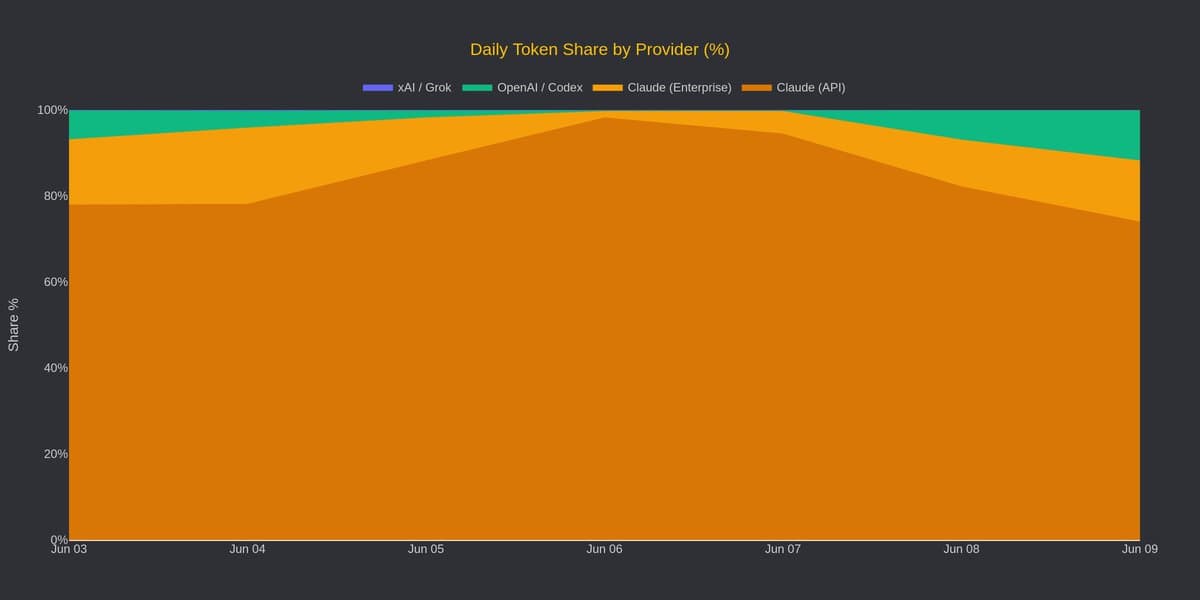
The market picture is messy in a useful way. thsottiaux's post said token consumption for Codex spiked over 48 hours even without a launch, and dylan522p's SemiAnalysis anecdote claimed some power users switched over after getting frustrated with Anthropic refusals.
But broad business adoption did not jump with the same immediacy. arakharazian's Ramp AI Index thread and the underlying Ramp write-up said OpenAI held roughly flat at 39.5% of businesses in June, while Anthropic rose to 41%. The short version is that Codex looks hot with power users before it looks settled in enterprise share data.