
Cua releases encrypted local Computer History for agent actions
Cua Driver's early-preview Computer History stores encrypted local metadata about agent actions so later sessions can recover successful routes. It excludes screenshots and typed text and is off by default.
TL;DR
- Computer History is an open-source, early-preview Cua Driver feature that keeps an encrypted local record of agent actions across macOS, Windows, and Linux, as trycua's launch post describes.
- The record can survive a reset, a new session, or a switch to another compatible agent, according to trycua's cross-session description.
- Cua's macOS chess check completed with 33.3% fewer actions and no failed routes when history was enabled, versus three failed routes without it, in trycua's chess run.
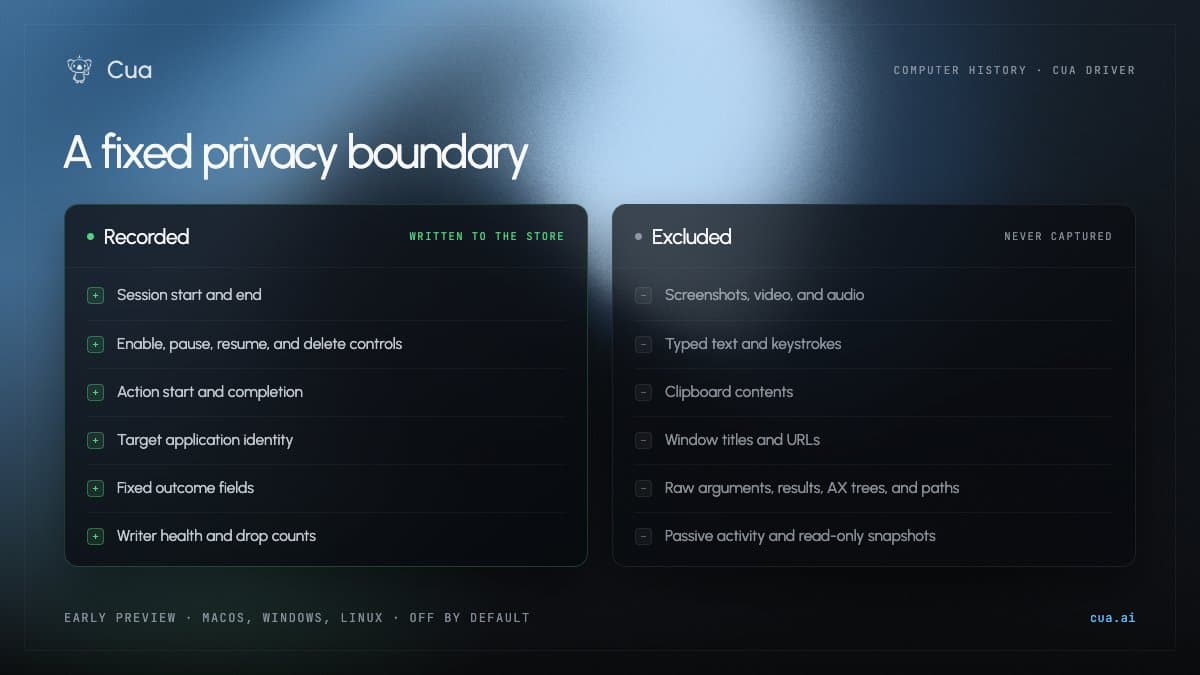
- The stored data is intentionally narrow: trycua's event allowlist excludes screenshots, typed text, keystrokes, clipboard contents, URLs, raw arguments, results, and accessibility trees, while trycua's encryption details says no history data enters product telemetry.
- Access is opt-in on the nightly channel, with pause, disable, and deletion controls listed in trycua's activation instructions.
A permitted query is capped at 200 metadata events and creates an access-audit event in the preview guide. The architecture note calls this narrow release Preview 0, with richer local context, process isolation, and an NVIDIA OpenShell policy adapter reserved for later stages.
Cua Driver action metadata
Computer History records only actions mediated by Cua Driver, not unrelated desktop activity. Its implementation and docs are published in the Cua Driver repository.
The preview guide defines the encrypted allowlist as:
- Time and monotonic sequence number, plus opaque session and action identifiers.
- A fixed Cua capability, with optional fixed-field application identifier and display name.
- Fixed outcome, delivery, route, evidence, and escalation categories.
- Session lifecycle, access-audit, and writer-health events.
Cross-session queries
A compatible agent can recover which app and Cua capabilities were used, along with whether actions succeeded, after the original conversation context has gone away.
The preview guide exposes exactly two read-only agent tools: history_status, gated by history.status, and history_query, gated by history.query. Cua's existing permission mode, policy ceiling, and capability manifest decide each call; agents cannot enable, pause, resume, disable, delete, export, or retrieve the encryption key through those tools.
Route reuse tests
Cua reported three preview checks, rather than a general benchmark:
- The macOS chess task reused the successful route, cut actions by 33.3%, and avoided failed routes, according to trycua's chess run.
- The Windows Paint continuation received application attribution, the earlier action sequence, and confirmed outcomes after a context reset, in trycua's Windows continuation test.
- The Linux LibreOffice Writer check retained six Cua action events, the app, and capabilities used, while withholding the supplied text, screenshots, paths, titles, and URLs, per trycua's Linux continuation test.
Encrypted event store
The architecture note specifies a CBOR Sequence of per-record COSE_Encrypt0 objects carrying CloudEvents JSON. ChaCha20-Poly1305 authenticates each record; a namespace root key in macOS Keychain, Windows Credential Manager, or Linux Secret Service derives per-chunk HKDF keys.
There is no plaintext fallback and no history network I/O. The filesystem can still expose that the directory exists, its total size, and file modification times, while copying ciphertext alone to another machine cannot recover it without the original user's credential-store key.
Nightly activation and deletion
The feature is off by default and currently requires a Cua Driver nightly.
Enabling initializes the device-local credential and verifies an encrypted write and read before capture begins. The default retention period is seven days, the encrypted-store quota is 100 MiB, and queries never return events beyond the seven-day cutoff.
history pause, history resume, and history disable preserve the existing encrypted store. cua-driver history delete --yes destroys the namespace key and store cryptographically, though Cua does not claim physical erasure from snapshots, backups, copied ciphertext, SSD wear leveling, or memory already decrypted by a process; switching back to a stable build also leaves a preview store untouched.