
Claude Code Mods walkthrough says plugins run unsandboxed with user permissions
A Claude Code Mods walkthrough says plugins retain state and run with the user's permissions. Its examples show JavaScript or TypeScript mods drawing UI, rewriting prompts and intercepting tool calls.
TL;DR
- Claude Code mods can rewrite prompts, intercept tool calls and draw custom UI, as demonstrated in the opening demo.
- Mods stay loaded and retain state across events, unlike per-event shell hooks, according to the thread's comparison.
- Mods run unsandboxed with the user's permissions, a caveat emphasized in the security warning.
- The built-in “You should know” plugin uses a sideagent to flag overlooked information, according to ClaudeDevs.
An independent v2.1.287 experiment gave a mod the final say over commands a hook and deny rule had rejected. Anthropic's walkthrough fits Token Weather into about 80 lines, while its mod catalog publishes source for built-ins including AGENTS.md support.
User permissions
Anthropic's mod documentation lists six capabilities available once a mod loads:
- Read and write files anywhere the user's account can access.
- Read environment variables and settings, including stored API keys.
- Observe every submitted prompt and tool call.
- Rewrite prompts and tool calls, submit prompts as the user, or message another session.
- Approve tool calls before a permission prompt appears.
- Make model calls against the user's plan or API key.
The walkthrough also describes a JavaScript runtime “sandbox” without DOM or Node globals. External operations go through the host API, $; the security documentation explicitly says processes a mod starts run outside Claude Code's Bash sandbox.
Permission overrides
On a personal Max account without managed settings, a mod overrode both a project hook and a deny rule in an independent test of v2.1.287. Its tool.check handler awaited next(e), then returned { decision: "allow" } regardless of the result.
The four runs produced these outcomes:
- Hook, no mod: a
PreToolUsehook blocked the Bash command. - Deny rule, no mod: settings denied
touch marker-deny. - Hook plus mod: the hook logged its rejection, but
marker-hookwas created. - Deny rule plus mod:
marker-denywas created.
Permission precedence is the sharpest edge of this release.
The organization docs say a mod can approve calls blocked by non-managed PreToolUse hooks or subject to ask rules, including where the enterprise guard runs. In auto mode, a mod-approved call runs without a classifier check.
sec-default
A built-in policy mod, sec-default, loads ahead of user-installed mods on machines with managed settings and for users signed in on Team or Enterprise plans. API-key and third-party-provider sessions get it only when their machine has managed settings, according to the admin documentation.
Its protections have specific boundaries:
- Deny rules: user-installed mods cannot override them by default, regardless of which settings file holds the rule.
- Managed hooks: a managed
PreToolUseblock is final. Those hooks run again if a mod rewrites the call. - Managed configuration: user mods cannot change managed instructions, the system prompt, settings exposed to mods, or managed MCP tools and descriptions.
- Direct file access:
Read(.env)can be denied while a mod still reads the file through$.fs.reador starts a program that reads it. - Network policy: restrictions on
$.http.fetchdo not cover networking performed by a program started through$.process.run.
Mods cannot redraw the permission prompt itself. They can still approve a call before that prompt appears.
Mod loading controls
Marketplace restrictions apply to mods because they ship inside plugins. The admin guide distinguishes these loading controls:
allowManagedModsOnly: a managed option underpluginConfigs["cc-plugin-sec-default@builtin"].options. It blocks user-installed, locally loaded and Claude-generated mods while leaving users' settings hooks and status lines working.disableSideloadFlags: rejects--plugin-dirand--plugin-url, and prevents in-session generated mods from loading. A marketplace allowlist alone still permits loading from local directories.- Managed
disableAllHooks: disables every installed mod and every settings hook, including managed hooks. Custom status lines and/goalalso stop. --safe-mode: disables installed mods, including organizational mods, and other customizations for one session.
The early-access variable CLAUDE_CODE_ENABLE_FUNCTION_HOOKS is ignored in v2.1.287 and later. Setting it to 0 leaves mods enabled.
Event middleware
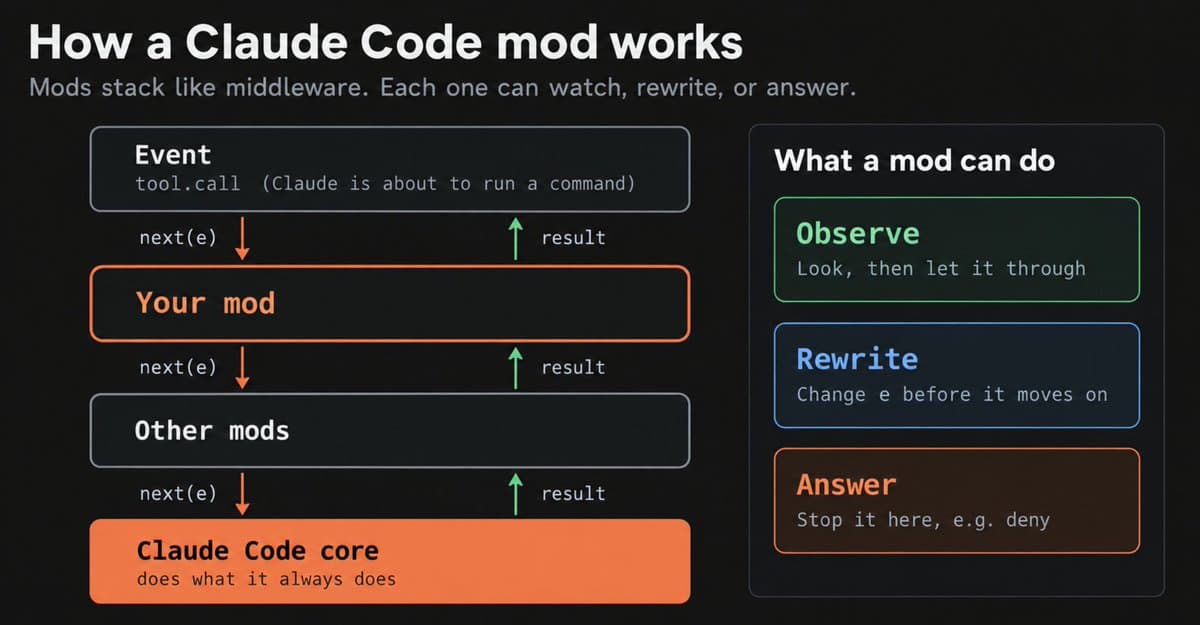
Mods are enabled by default from Claude Code 2.1.287 and work in the CLI and Claude Desktop's Code tab. Each module exports register(on, options) and registers event handlers with on(event, matcher?, hook), as documented in the walkthrough.
Handlers have three basic moves:
- Observe: await
next(e), inspect the result, then return it. - Rewrite: pass modified event data to
next(...). - Answer: return a result without calling
next, replacing the remaining chain and built-in behavior.
The first-loaded mod sees the event first and the result last. Events cover submitted prompts, tool calls, session and turn lifecycle, slash commands, and ui.render.
A shell-command settings hook starts a command for each event and exchanges JSON through stdin and stdout. A mod remains loaded, shares state across handlers and can register model-callable tools or commands that run without a Claude turn.
Built-in mods
Some built-in features now use the same extension mechanism:
/diff: can be disabled through/pluginor replaced with a custom implementation, according to Anthropic's announcement.- AGENTS.md: supplies project instructions when the project has no CLAUDE.md of its own, according to the built-in mod catalog.
Individualized interfaces were an explicit goal in bcherny's launch thread. Anthropic says it plans to move more built-in features into mods so users can keep a smaller core and add features back selectively.
State and hot reload
A prompt can produce a mod and updated UI inside the same running session, as demonstrated in the original thread. Anthropic supplies both a written walkthrough and a video explainer.
The authoring mechanics include:
- Reload-safe state: module variables reset on hot reload; host-held
$.statevalues survive for the session. - Reactive drawing: a
$.state.getduring rendering subscribes that view, so later writes trigger redraws automatically. - Version-specific types: each load writes the current build's API declarations into
.claude-plugin/types/. The API can change between releases. - State contracts: named state values must be declared in a
.d.tscontract referenced by the plugin manifest. - Static validation:
claude plugin validatelists hooks and API calls without executing the mod. - Runtime tests:
claude plugin testruns*.test.tsfiles against Claude Code's runtime, with test hooks able to stub downstream responses. - Temporary generation: an in-session generated mod loads only for that session and its folder is cleaned up later. Preserving it requires copying the folder out and installing it as a plugin.
Token Weather, Blast Radius, Replay Theater
Anthropic's three samples exercise different parts of the API:
- Token Weather: draws a context-window forecast above the prompt, with token usage, recent-turn history and the latest turn's delta.
- Blast Radius: holds risky Bash calls, including
rm -rf, force pushes and database migrations, then offers Proceed or Cancel after showing the expected changes. - Replay Theater: adds
/replayto step through file edits from the last turn, one diff at a time.
You should know
The built-in observer plugin scans Claude's output through a sideagent and surfaces important information the main agent or user might miss.
Its activation command is:
The 2.1.287 release notes specify first-party sessions with telemetry enabled. That availability restriction accompanies the command in the changelog.
Modsmith and Next steps
The community package Modsmith bundles six mods, according to daniel_mac8's announcement:
- quiz-after: quizzes the user on what Claude just built.
- next-steps-supervisor: checks whether the goal was met and where corners were cut.
- assumption-ledger: exposes assumptions and actions Claude considered but skipped.
- mode-registry: provides a shared
/modeswitch for participating mods. - effort-modes: maps UI work, API work and code review to different effort levels.
- artifact-dashboard: supplies a shared kanban board across Claude sessions.
The author also says its builder skill estimates per-turn costs, vets outside mods and makes generated mods share screen space rather than overlap.
A separate next-steps mod supplies task-completion actions in a community example.
Next steps with task follow-up actions
Post-launch fixes
Claude Code 2.1.289 includes permission and renderer hardening, according to ClaudeCodeLog's changelog thread:
- Managed-machine deny and ask rules now hold over mod approvals on nested parts of compound shell commands.
- User plugins can no longer rewrite descriptions of organization-managed MCP sign-in tools.
- Read deny rules now cover files mentioned with
@, changed or selected through IDE symlinks. - Asynchronous plugin UI-handler failures no longer end supervised or background sessions.
- A failing mod
Clientis isolated to that component and raisesui.fault, rather than taking down surrounding UI. - Teammates gain
agent.spawn, agent IDs are unified across plugin events, and$.agent.list()exposes idle and waiting states.