
Google Colab releases MCP server for notebook GPUs via uvx install
Google open-sourced a Colab MCP server that exposes code execution, connection, and notebook editing to MCP-compatible agents. It gives local coding agents a direct bridge to cloud GPUs without hand-rolled notebook automation.
TL;DR
- Google open-sourced a Colab MCP server that lets MCP-compatible agents use Colab runtimes as a remote execution target, with tools for code execution, notebook connection, and notebook editing, according to Google's announcement.
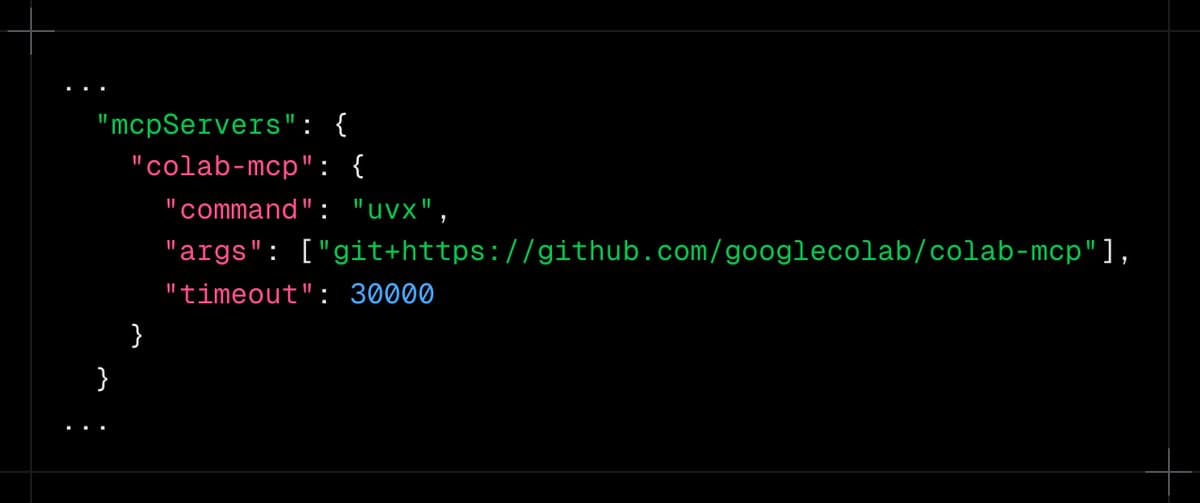
- The setup is lightweight: the [img:0|uvx config] from the launch post shows a
uvx-based server entry pointing at the GitHub repo, rather than a custom local bridge. - Google's developer blog post, surfaced in Hamel Husain's note, frames Colab as a programmable sandbox where agents can add cells, run Python on cloud GPUs, and create or update
.ipynbnotebooks.
What shipped?
Google's MCP server turns Colab into an agent-accessible runtime instead of a browser-only notebook session. In the launch thread, Google says agents can execute_code, connect, and edit notebooks, which covers the core loop most coding agents need: attach to a runtime, run Python, and persist the result back into a notebook.
The practical change is that a local agent can now offload work to Colab GPUs without hand-rolled notebook automation. The same announcement says it works with Gemini CLI, Antigravity, or "any MCP-compatible client," making the interface more about protocol support than one specific IDE or assistant.
How do engineers use it?
The install path appears intentionally minimal. The [img:0|config screenshot] in the repo setup shows a single MCP server definition using uvx and the Colab MCP GitHub package, while Google's blog post describes prerequisites like git, Python, and uv.
That makes the feature more useful as infrastructure than as a one-off demo. Google's post describes agents scaffolding projects, managing dependencies, adding code and markdown cells, and reorganizing notebooks dynamically, which gives teams a standard way to connect local coding agents to reproducible cloud notebook environments.