
Adobe Firefly adds Precision Flow and AI Markup in Video Editor beta
Adobe Firefly is rolling out Precision Flow and AI Markup while previewing an AI-first Video Editor and Firefly AI Assistant in beta. Use the new tools to move from prompt-only generation into direct visual edits, moodboards, and in-app video plus sound workflows.
TL;DR
- Adobe Firefly is rolling out two direct-manipulation editing tools, with AllaAisling's sponsored demo showing Precision Flow for separate zone controls and AI Markup for paint-and-sketch edits inside the same workflow.
- icreatelife's beta screenshot points to a new Firefly Video Editor in beta, with video generation and sound-effect generation embedded in a timeline-based editor rather than split across separate tools.
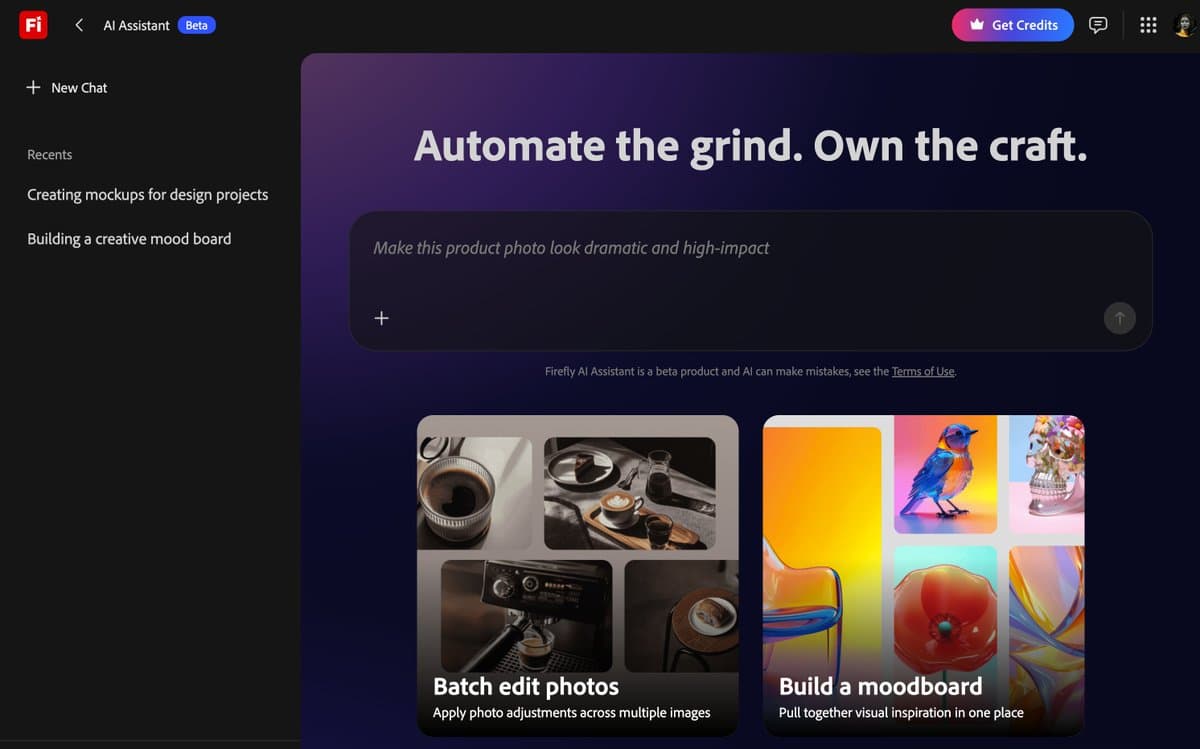
- The screenshots around carolletta's beta post and the Firefly gallery screenshot thread suggest Adobe is also testing a Firefly AI Assistant that can help build moodboards and pull from a shared Firefly Image Gallery.
- Creator posts like icreatelife's Firefly Boards workflow frame the broader shift clearly: Adobe is stitching image generation, storyboarding, video, and soundtrack creation into one suite, with AllaAisling's reply about soundtrack generation adding audio to the picture.
Adobe Firefly already bills itself as Adobe's generative AI surface. What changed in this rollout is the interaction model: AllaAisling's demo is about sliders and brush strokes, icreatelife's screenshot shows generation inside an editor timeline, and carolletta's post hints at an assistant that can assemble moodboards from a gallery of community images.
Precision Flow
Precision Flow replaces prompt-only iteration with per-region controls. In AllaAisling's demo, the image is split into asphalt, shoe, and background, and each zone gets its own slider adjustment instead of a fresh text rewrite.
That is a much more designer-native interface than the usual prompt box loop. The video in the same demo shows the change in practice: lighting, sharpness, and mood shift independently, while the composition stays put.
AI Markup
The second tool in the same post is AI Markup. According to AllaAisling's description, it lets the user paint out signs, sketch a glow halo, clean the sole, and add a splash with rough gestures, then hand execution to Firefly.
The useful distinction is that Firefly is no longer only interpreting text. It is also interpreting intent from marks on the canvas, which is closer to retouching and compositing than to one-shot generation.
Video Editor beta
The beta interface screenshot shows a dark timeline editor with a preview window, media bin, and a right-side "Generate media" panel. The visible controls expose a video prompt field, model selection, 720p output, 24 FPS, five-second duration, and an in-editor Generate button.
The same post says you can generate videos and sound effects inside the editor. That matters less as a feature checklist than as a workflow signal: Firefly is moving generation into the edit surface, where clips, timing, and prompts live together.
Firefly Boards
Firefly Boards looks like Adobe's bridge between ideation and production. icreatelife's storyboard screenshot shows a grid of illustrated scenes for a pilot episode, plus controls for Generate image, Generate video, and Presets inside the same board.
The post says the tool has been in the works for two years and is already being used to animate a pilot. That makes Boards feel less like a moodboard toy and more like a pre-production surface for sequencing scenes before they land in the video editor.
AI Assistant and gallery
carolletta's post says a Firefly AI Assistant is now in beta and highlights a "Build a moodboard" view. The accompanying thread in the gallery screenshot post adds one concrete detail: anyone with an Adobe account can share images to the Firefly Image Gallery.
If that beta ships broadly, the assistant is not just a chatbot wrapper. It appears tied to a live asset pool, with gallery images feeding ideation and moodboard assembly.
Soundtrack generation
One small reply adds a new piece of the map. In AllaAisling's reply to icreatelife, she says "Generate soundtrack, only in Adobe Firefly," which lines up with the Video Editor beta post claiming in-app sound-effect generation.
Taken together, the current creator evidence points to a suite that spans four linked surfaces:
- direct image editing with Precision Flow and AI Markup, per AllaAisling's demo
- storyboard creation in Boards, per icreatelife's post
- timeline-based video generation in the Video Editor beta, per icreatelife's screenshot
- soundtrack or audio generation, per AllaAisling's reply