
GPT Image 2 supports 9-panel storyboards and 10-page brand books
Creators used GPT Image 2 for storyboard sheets, brand books, posters, and campaign visuals across Firefly, Paper, Codex, and Leonardo. The shift turns it into a preproduction tool, but tests still report inconsistent guideline adherence without extra context.
TL;DR
- Creators are using GPT Image 2 as a preproduction engine, not just an image generator: MayorKingAI's 9-panel short turned a one-line idea into a storyboard sheet with timing, camera moves, palette, and character sheets, while MayorKingAI's cinematic production plan used the same pattern for a fight scene board.
- The strongest workflow in the evidence is storyboard first, video second: ProperPrompter's Firefly thread, MayorKingAI's Leonardo short, and MayorKingAI's Leonardo filmmaking thread all use GPT Image 2 to lock shots and Seedance 2.0 to animate from that plan.
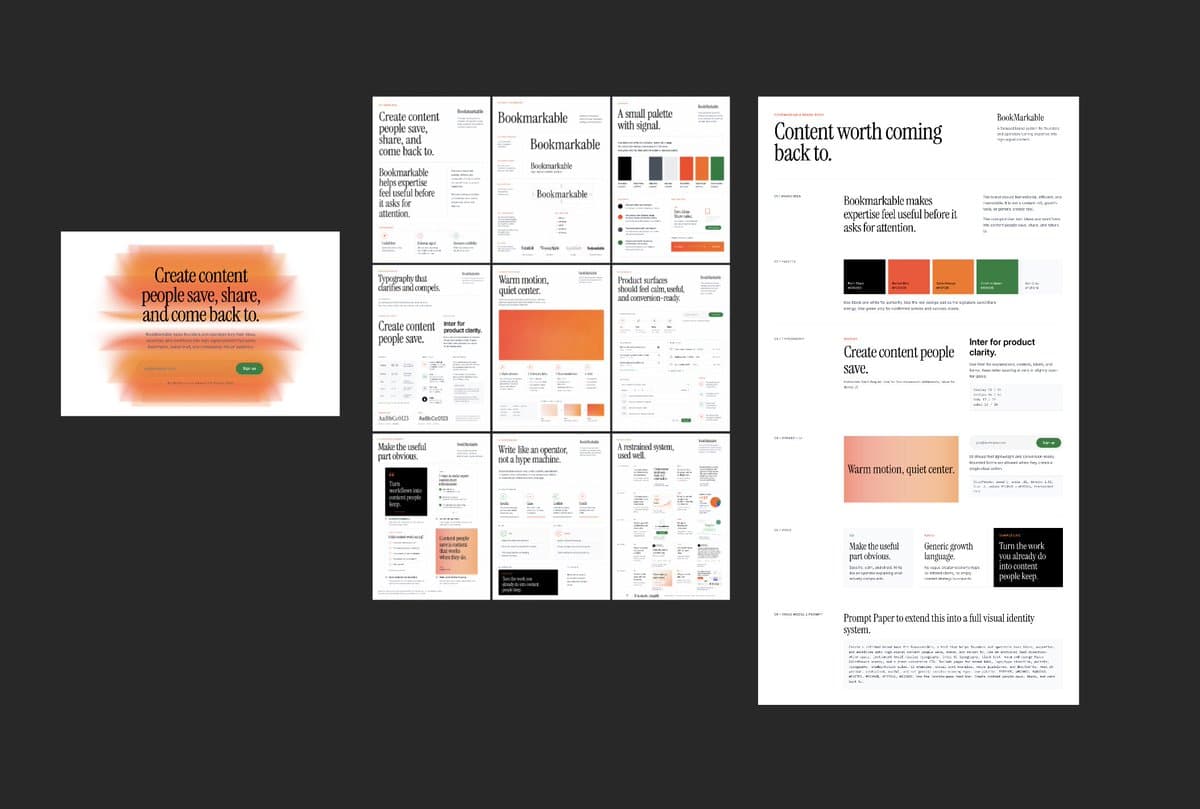
- Brand work is moving the same way: shannholmberg's brand-book workflow claims Paper, Codex, and GPT Image 2 can produce a 10-page brand book in one pass, while AmirMushich's hero-banner prompt turns GPT Image 2 into a campaign-layout generator.
- The catch is control: AmirMushich's Ferrari example says GPT Image 2 is strong for hero visuals but still unpredictable on brand adherence, and AmirMushich's Kia test shows why people keep wrapping the model in long prompts, moodboards, and guideline files.
- OpenAI's own pitch around OpenAI's launch post and the reaction in the main HN thread line up with what creators are actually doing: better prompt adherence and text rendering are making structured outputs, like posters, slides, storyboards, and brand assets, much more usable.
You can see GPT Image 2 inside Adobe Firefly, watch creators build full shorts in Leonardo, and even catch a brand workflow that runs through Paper MCP and Codex. The weirdly useful shift is that the model keeps getting asked for planning documents instead of finished art, from 9-panel boards to 2x2 slides to campaign triptychs. Even the skepticism is concrete: the HN discussion kept circling prompt adherence, realism, provenance, and whether these outputs are reliable enough for real client work.
9-panel storyboards
The most repeatable pattern in the evidence is to ask GPT Image 2 for a layout that already thinks like a production board. MayorKingAI's thread specifies a 3x3 storyboard sheet with timecodes, shot type, camera movement, character sheet, and palette, then feeds that plan forward into animation.
The prompt structure is unusually specific:
- title and runtime
- grid size, here 9 panels
- character sheet on the side
- shot-by-shot timecodes
- camera directions, like push-in or tracking
- continuity rules, like keeping motion left to right
- palette and visual style notes
That continuity rule shows up more than once. In the storyboard prompt, the dog always approaches from screen left toward screen right, and panel 05 must keep the alien aiming directly at the dog. GPT Image 2 is doing less concept art here and more continuity paperwork.
ProperPrompter lands on the same idea with a looser board. ProperPrompter's thread says less-detailed storyboards work better with Seedance because they leave room for the video model to resolve details without fighting over exact anatomy or props.
Shot-by-shot Seedance prompts
Once the board exists, creators are handing it to Claude or rewriting it themselves into a timed motion script. ProperPrompter's thread explicitly passes the storyboard image and character image into Claude, which returns a six-shot Seedance 2.0 prompt with durations, camera moves, environment details, and audio cues.
Across the examples, the handoff looks similar:
- Generate a turnaround or character sheet.
- Generate a low-detail storyboard or production board.
- Convert that board into a timed prompt.
- Animate in Seedance 2.0.
MayorKingAI's filmmaking combo makes the same move with a higher-budget framing. GPT Image 2 produces a cinematic production plan sheet with character reference, floor plan, five storyboard panels, palette, lighting, and mood. The Seedance prompt in the follow-up post then copies those beats into a 15-second timeline.
The interesting part is not that GPT Image 2 can make a pretty storyboard. It is that creators are treating the storyboard as an intermediate file format between idea and video.
10-page brand books
Brand workflows are getting the same scaffolding treatment. shannholmberg's post lays out a six-step loop that starts in Paper, turns a moodboard into a brand brief with Codex over Paper MCP, then exports that coded brand book as a PNG and sends it back into GPT Image 2 to generate a finished 10-page brand book.
The sequence is structured enough to read like a mini pipeline:
- Brainstorm the name.
- Choose or invent the design system.
- Build a moodboard in Paper.
- Use Codex plus Paper MCP to turn the moodboard into a brand brief and coded brand book.
- Export that brand book as an image and feed it to GPT Image 2 with a brand prompt.
- Get a finished 10-page brand book that can drive landing pages, ads, and lead magnets.
That is a clean example of where image models are quietly becoming document generators. The output is still visual, but the job is closer to layout synthesis than illustration.
Brand guideline drift
The evidence is also blunt about the failure mode. AmirMushich's Ferrari example says GPT Image 2 is already strong for hero visuals, landing pages, ad banners, and social posts, but calls it "insanely unpredictable" for staying on brand. AmirMushich's Kia test asks whether the model did a good job against Kia brand guidelines, which tells you the real bottleneck is evaluation, not raw image quality.
That is why the prompts keep expanding into pseudo-briefs. Amir's campaign-banner template in the hero-banner prompt asks the model to infer:
- dominant brand colors
- typography character
- campaign content and product line
- a public figure with real brand association
- a three-panel layout with portrait, typographic hero, and product close-up
It is a smart hack, and also a clue that the base model still needs a lot of external structure. The more brand-native the output needs to feel, the more people are surrounding GPT Image 2 with research instructions, PDF guidelines, attached references, or project memory.
Campaign layouts and posters
Structured visuals, not just brand books, are where GPT Image 2 looks most immediately useful. The examples in the evidence break into a few clear buckets:
- campaign triptychs and hero banners, via AmirMushich's Puma layout
- tutorial posters, via CharaspowerAI's moonwalk poster
- 2x2 presentation slides, via AmirMushich's Nike slide grid
- sports editorial collages, via AIwithSynthia's basketball poster
- architecture prompt studies, via AllaAisling's brutalist prompt studio
What these share is text and spatial discipline. According to the Hacker News overview, commenters immediately tested comics, multi-panel scenes, hard visual prompts, and text-heavy cases because OpenAI was pitching better prompt adherence, editing, text rendering, and multilingual generation. That lines up with the outputs people are actually publishing.
Where the model shows up
The last useful reveal is distribution. GPT Image 2 keeps surfacing inside broader creative stacks rather than as a standalone tab.
The evidence puts it in at least four different places:
- Adobe Firefly, where ProperPrompter's thread calls GPT Image 2 a partner model and links directly to Firefly.
- Leonardo, where MayorKingAI's short and MayorKingAI's filmmaking combo pair GPT Image 2 with Seedance 2.0 inside one toolchain.
- Paper plus Codex, where shannholmberg's workflow uses MCP-connected docs and code generation to build a brand book before handing the visual pass to GPT Image 2.
- InVideo's agent flow, where techhalla's walkthrough shows an agent generating reference sheets, logos, clips, and Seedance extensions while the user stays in what the post calls "director mode."
That spread matters because it changes the role of the model. GPT Image 2 keeps showing up as the planning layer inside larger systems, the thing that drafts boards, sheets, posters, and references other tools can animate, lay out, or extend.