
GPT Image 2 supports character reference sheets and 2x2 brand slides
Creators are using GPT Image 2 for multi-angle character sheets, 2x2 brand moodboards, editorial collages, and App Store assets. The model is being pushed beyond single hero images into reusable design systems with notes, text blocks, and consistent characters.
TL;DR
- underwoodxie96's character sheet and underwoodxie96's Boa Hancock sheet show the clearest new use case for GPT Image 2: one prompt can produce a full reference board with multiple angles, notes, props, and a readable color palette.
- AmirMushich's 2x2 slide prompt pushes the model past single images into a four-card editorial system, and OpenAI's image generation guide plus its prompting guide both lean into structured prompts, edits, and design-oriented workflows.
- bas_fijneman's Peekaboo workflow and bas_fijneman's website demo split the job across models: GPT Image 2 for mascot art and app-store visuals, GPT-5.5 for product logic, Codex for the working prototype.
- AIwithSynthia's editorial collage and NahFlo2n's UGC-style clip show the other end of the spectrum, photorealistic campaign assets that look less like AI art experiments and more like usable marketing comps.
- CharaspowerAI's Leonardo workflow and underwoodxie96's GPT Image 2 plus Seedance 2 workflow show GPT Image 2 getting used as the still-image planning layer before video generation.
You can skim OpenAI's API guide for the official generate-and-edit workflow, then jump to underwoodxie96's Boa Hancock sheet for the anime reference-board version, AmirMushich's Nike slide grid for the brand-deck version, and bas_fijneman's Peekaboo site demo for the full asset-pipeline version. Heather Cooper's hands-on writeup zeroes in on the same pattern from another angle: text rendering and layout control are finally good enough for mockups, branded visuals, and graphic-design-adjacent work.
Character reference sheets
The biggest creative shift here is not prettier hero shots. It is that GPT Image 2 can keep enough structure intact to make sheets you can reuse.
Between underwoodxie96's Boa Hancock sheet, underwoodxie96's Nami Reine sheet, and DannyLimanseta's evolution grid, the repeatable pattern looks like this:
- multiple poses in one frame
- profile text and handwritten-style notes
- props or tool callouts
- color palette blocks
- layout consistency across variants
OpenAI's prompting guide explicitly recommends structured prompts, short labeled segments, and prompts that state the intended use, such as UI mock, ad, or infographic. That maps almost perfectly to these sheets, which read more like design documents than image prompts.
DannyLimanseta's monster-evolution board adds the other useful wrinkle: consistency across variations. The sheet keeps the creature's core shape and palette while swapping poses and evolutions, which is exactly the kind of task older image models loved to derail.
2x2 brand slides
AmirMushich's most interesting trick is treating GPT Image 2 like a junior editorial designer with a rigid grid, not like a concept artist.
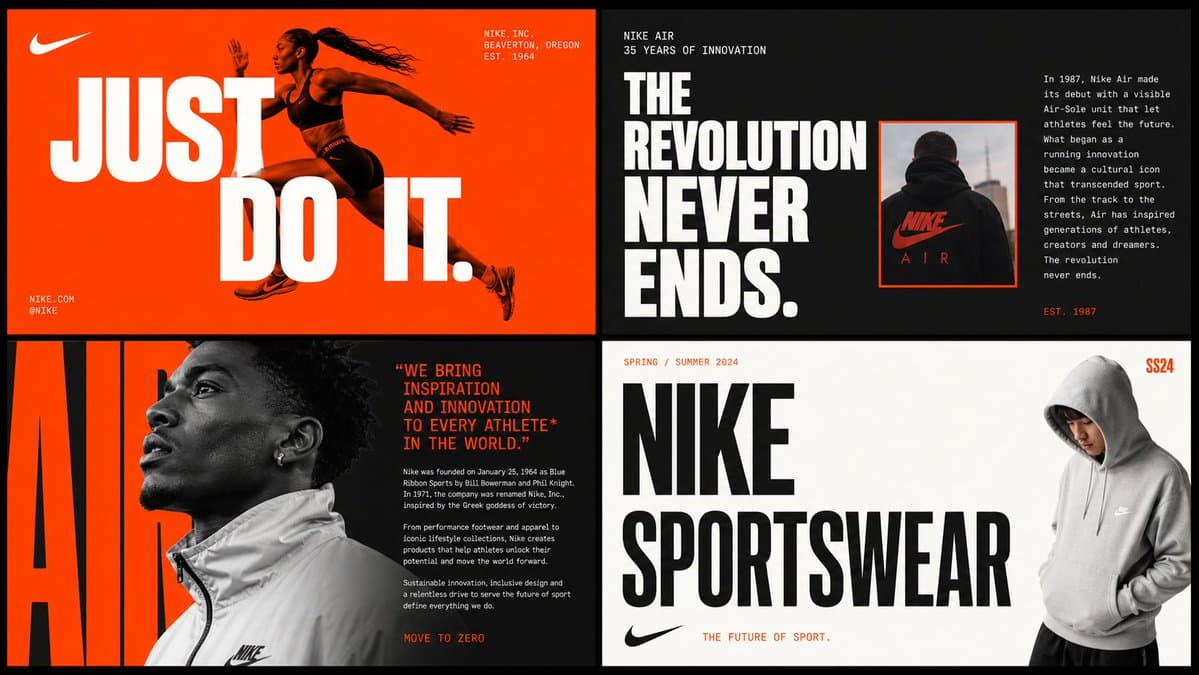
The prompt in AmirMushich's 2x2 slide prompt is basically a design spec. It breaks the image into four cards and defines each one separately:
- hero editorial
- editorial text layout
- fashion editorial
- clean brand statement
It also asks the model to infer a brand's color system, typography DNA, slogans, campaign names, and layout conventions from training data, then reuse those across the grid. OpenAI's guide says GPT Image 2 supports iterative edits and multi-step flows, and the academy page says clarity matters most for layout constraints. This is that principle taken to an absurdly literal place.
The result in AmirMushich's Nike slide grid matters because it is not a single poster. It is a small system, with one palette, one typographic voice, and four layout modes that still look like they belong together.
Prompt specs as asset pipelines
The Peekaboo threads are where GPT Image 2 stops looking like a generator and starts looking like one piece of a production stack.
According to bas_fijneman's Peekaboo workflow, the split was:
- GPT Image 2 for mascot poses, sticker rewards, and App Store style mockups
- GPT-5.5 for product logic, microcopy, and screen behavior
- Codex for the interactive prototype
The follow-up prompt in bas_fijneman's website prompt reads like an engineering handoff more than an art brief. It specifies:
- exact stack: React, Vite, Tailwind CSS v4, Framer Motion, Lucide React
- named components: Hero, Metrics, Features, CTA, Footer
- exact color tokens and font choices
- motion timings and hover behavior
- a full asset manifest under
/public/Assets
The App Store version in bas_fijneman's ASO prompt does the same thing for marketing screenshots. It fixes canvas size, iPhone proportions, headline lengths, badge copy, and the exact five screens to generate. OpenAI's image generation guide says the model can generate from scratch or edit iteratively, and Heather Cooper's writeup makes the practical point: once text rendering stops falling apart, mockups and branded visuals become much more usable.
Editorial collages and photoreal marketing comps
Not every example here is system design. Some of the strongest outputs are just old-school campaign formats that used to break on composition or skin texture.
The golf collage in AIwithSynthia's golf collage is a familiar magazine layout, one large hero image and two smaller supporting shots, but the prompt controls wardrobe, setting, pose, and editorial tone tightly enough to make the format useful. NahFlo2n goes one step further in NahFlo2n's UGC-style clip, claiming the whole creator-style video was generated and already being tested across seven-figure brands.
OpenAI's cookbook example says GPT Image is markedly better than older OpenAI image models at instruction following and photorealism. That lines up with why these posts travel: they look less like AI art flexes and more like comps a creative team could actually pitch from.
Image-to-video handoff
The last useful pattern is that creators are using GPT Image 2 as preproduction for video, not as the final deliverable.
Both CharaspowerAI's Leonardo workflow and underwoodxie96's GPT Image 2 plus Seedance 2 workflow break the process into three stages:
- character sheet
- location sheet
- video generation
That matters because the still images are doing planning work. The character sheet locks identity, the location sheet locks environment, and the video model inherits a more stable visual target. Even the PromptsRef product page linked from underwoodxie96's PromptsRef link is built around multi-model comparison, which fits the way creators are now chaining image and video models instead of expecting one model to do everything.
This is probably the most transferable workflow in the batch. A sheet is easier to inspect than a clip, easier to revise than a storyboard, and a much cleaner handoff into a video model than a raw paragraph prompt.