
Codex builds a 2D RPG from one prompt in creator tests
Creators showed Codex building a retro 2D RPG, handling browser-based social posting, and replacing parts of the PRD workflow with working prototypes. Users also reported thread-sorting and design limits in the app, so watch where it still breaks down.
TL;DR
- stevibe's RPG build showed Codex turning a one-paragraph prompt into a playable retro 2D RPG, and stevibe's follow-up said the agent even generated character art on a green background, then chroma-keyed it into transparent PNG assets.
- petergyang's posting workflow used browser control to publish across services with awkward edge cases, including Substack Notes, LinkedIn tag cleanup, and Threads' 500-character cap, which lines up with OpenAI's Codex Chrome extension docs for signed-in browser tasks.
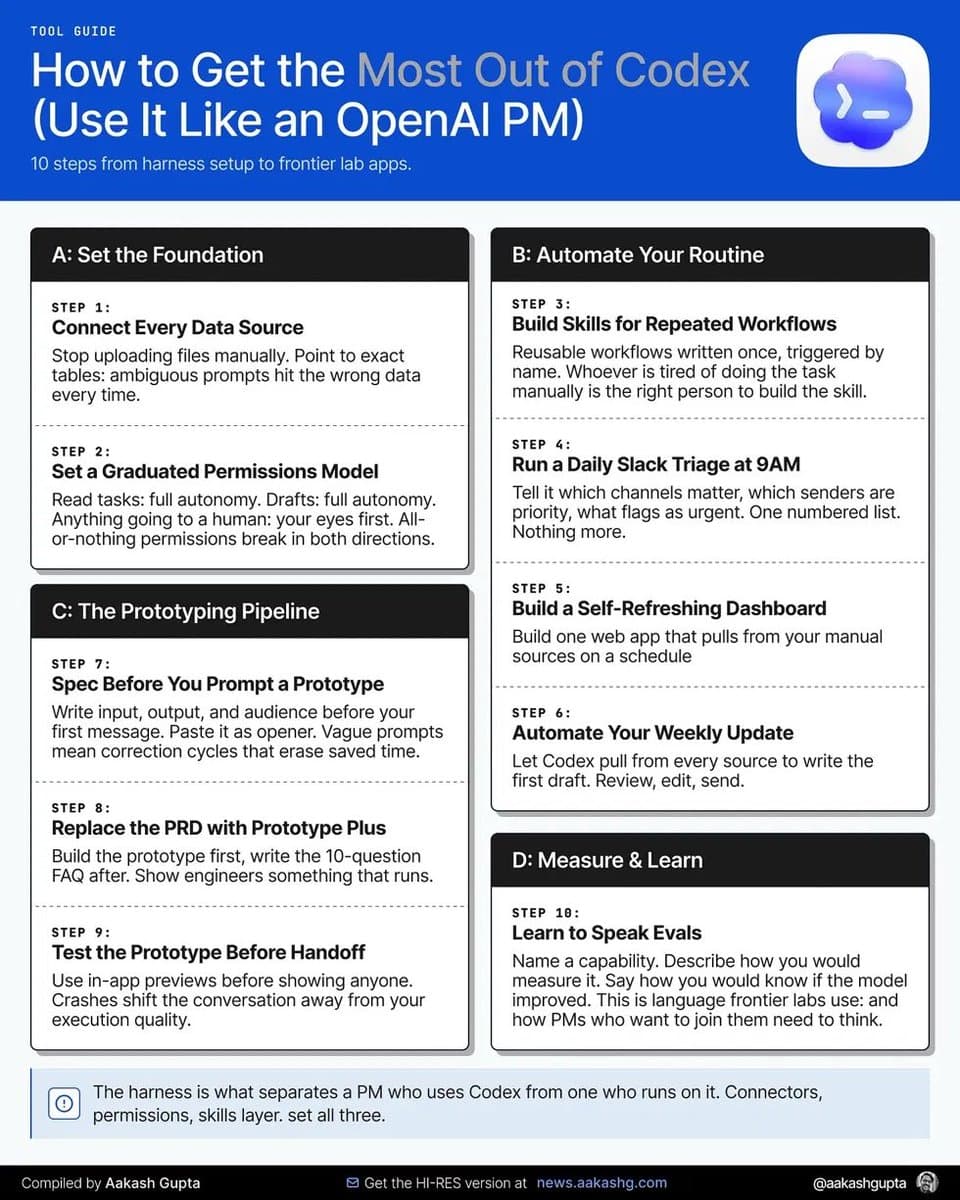
- aakashgupta's PRD thread and aakashgupta's setup breakdown both describe the same shift: Codex is becoming a prototype-first tool for PMs who can hand engineers a pull request or a working artifact instead of a long spec.
- OpenAI's Codex app overview says the desktop app is built for parallel threads, worktrees, and automations, but petergyang's thread-management complaint says even 10 active threads already feel unwieldy.
- The creator demos are strong, but awilkinson's Mac app note and petergyang's slides complaint both say Codex still lags on front-end taste compared with Claude.
You can trace the browser side to OpenAI's in-app browser docs and Chrome extension docs, watch OpenAI's own Sites launch video, and even see Peter Yang point to Printing Press as part of his posting stack in petergyang's Printing Press reply. The weird part is how wide the demos already are: a one-prompt RPG, cross-platform social posting, and a YouTube episode about an OpenAI PM swapping PRDs for prototypes.
Browser tasks
OpenAI splits Codex's web tooling three ways. The in-app browser is for public pages and localhost previews, the Chrome extension is for logged-in sites like LinkedIn or Gmail, and computer use is the heavier option when a GUI task falls outside a normal plugin.
That matches the most concrete creator demo in this batch. According to petergyang's post, he dumped the quirks of several social surfaces into Codex and let the agent handle them in-browser:
- Substack Notes, which he described as having no API
- LinkedIn posts, where X-style @ mentions had to be stripped from tags
- Threads, where posts had to respect a 500-character limit
Peter later said in petergyang's reply about Printing Press that he was using Printing Press, a tool that generates agent-native CLIs and skills from a prompt, for part of that workflow. The interesting part is not just browser clicking. It is Codex sitting on top of a custom skill layer plus signed-in browser state, which is much closer to an automation harness than a one-off prompt.
2D RPGs
The cleanest creator example came from stevibe's RPG thread, where Codex built a retro isometric RPG while the user went to breakfast.
The details worth pulling out are mechanical, not mystical:
- Codex classified the project as "medium difficulty" once it was constrained to 2D
- The prompt specified a world map, NPC interaction, enterable buildings, and a retro visual style
- The result included both code and art assets, not just scaffolding
Stevibe added one useful implementation detail in the transparent-PNG follow-up. Codex apparently generated images against a green background, then extracted transparent PNGs with chroma key. That is a small workflow clue, but it explains how the demo crossed the usual gap between "the code runs" and "the game actually has usable sprites."
A separate OpenAI Community post, Codex workflow: building an IdeaChain browser game, shows the same pattern from a more engineering-heavy angle: use Codex to prototype the loop, then force generated game content through structured blueprints and validation instead of letting arbitrary prompt output become live gameplay.
Prototype-first PM work
The strongest non-game use case here is not coding faster. It is shortening the distance between an idea and something other people can react to.
Aakash Gupta's summary of Abhi Muchhal's workflow, in his PRD thread and his setup breakdown, surfaces four concrete habits:
- Stop the PRD early and build the prototype first.
- Point Codex at the most similar shipped code, not the whole repo.
- Take the artifact to roughly 70 to 80 percent completion before handoff.
- Replace the giant spec with a short companion FAQ once the prototype exists.
The workflow gets more interesting once you connect it to OpenAI's own product surface. The Codex app overview says the desktop client supports parallel threads, worktrees, Git flows, and remote control from ChatGPT mobile, while the automations docs describe scheduled background runs that report back into a Triage inbox. That maps closely to Gupta's account of morning Slack triage, auto-rebuilt dashboards, and weekly updates assembled from Slack, Notion, Drive, and dashboards before the PM sits down.
Dan Shipper's inbox-zero demo, linked from danshipper's post, pushes the same idea into knowledge work. His claim was not that Codex writes prettier email. It was that a Codex-native app can turn inbox, Slack, meetings, and calendars into review cards and next-action drafts.
Thread overload and weak design taste
The product story is not all upside. The most useful complaints in this batch are very specific.
OpenAI pitches Codex as a place to run threads in parallel, but petergyang's post says even keeping the app to 10 threads felt messy enough that he wanted filters for "waiting for approval" and "currently working." That fits the official automations page, which already has a Triage inbox for scheduled tasks, but not the broader thread sorting he is asking for.
Design quality is the other recurring miss. awilkinson's note says the Mac app is more enjoyable than the terminal and better across devices and sessions, but still calls Codex a sub-par designer next to Opus 4.8. petergyang's slides complaint makes the same point more bluntly: Claude can one-shot good-looking HTML slides, while Codex often flubs the first visual impression.
That leaves a clear split in these early creator tests. Codex looks strongest when the job is operational, browser-bound, or prototype-heavy. It looks shakier when the output has to win on taste at first glance.