
Codex desktop supports remote Mac Studio sessions with custom themes and 3 background agents
A user demo showed Codex desktop driving a remote Mac Studio while terminals and three background agents kept running, plus custom theme controls in the app. That makes the beta look more viable for solo builders who want one always-on machine instead of local laptop churn.
TL;DR
- Codex desktop now looks more credible as an always-on setup because the remote demo shows a stable connection into a Mac Studio, with development work running off the local laptop.
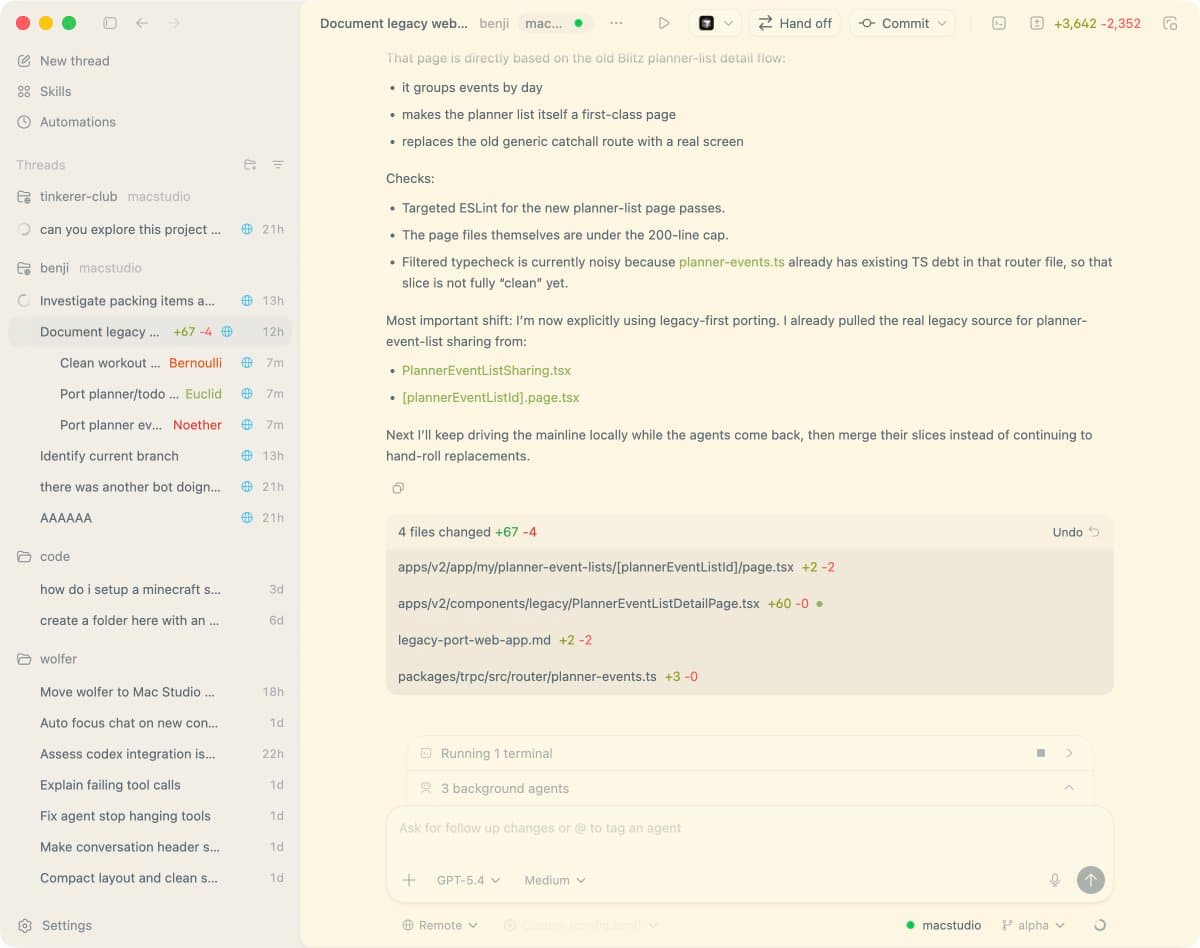
- In that same desktop screenshot, Codex is juggling one live terminal and three background agents, suggesting a more persistent multi-process workflow than a single chat box.
- The app also exposes user-facing appearance controls: the theme panel shows editable accent, background, foreground, fonts, translucency, and contrast settings.
- Creator sentiment in the user write-up frames the experience less as autocomplete and more as working with a senior coding partner, which helps explain why remote orchestration matters here.
What changed in the desktop workflow
The clearest new detail is that Codex desktop can steer a remote Mac Studio reliably enough for day-to-day work. In the demo post, the creator says the connection stays stable while away from the machine, and the screenshot shows project work, installs, and processes happening on the Mac Studio instead of the client device.
That matters because the interface is not just mirroring a terminal. The same capture shows a thread-based workspace with code diffs, a running terminal, and three background agents active at once, which makes the app look closer to a persistent remote production cockpit than a lightweight coding assistant.
What creators can actually see and control
Codex desktop is also exposing more surface area in the app itself. The settings panel shows theme mode selection plus editable color values, UI and code fonts, sidebar translucency, and a contrast slider, which points to a desktop client designed for long sessions rather than a fixed default shell.
The strongest usage context comes from a builder who says he has been on Codex since late summer and mostly stayed there after trying alternatives. In that post, he describes it as coding with “a senior” rather than a more playful assistant, a framing that fits the remote-Mac setup: one machine stays hot, while Codex manages threads, diffs, terminals, and agents from anywhere.