
xAI launches Grok Imagine Quality mode with stronger text rendering
xAI shipped Quality mode for Grok Imagine on web and mobile, with higher detail, stronger text rendering, and more control than Speed mode. Creator tests showed gains in realism, infographics, food photography, anime scenes, and prompt refinement, so users should try Quality for polished outputs and keep Speed for looser aesthetics.
TL;DR
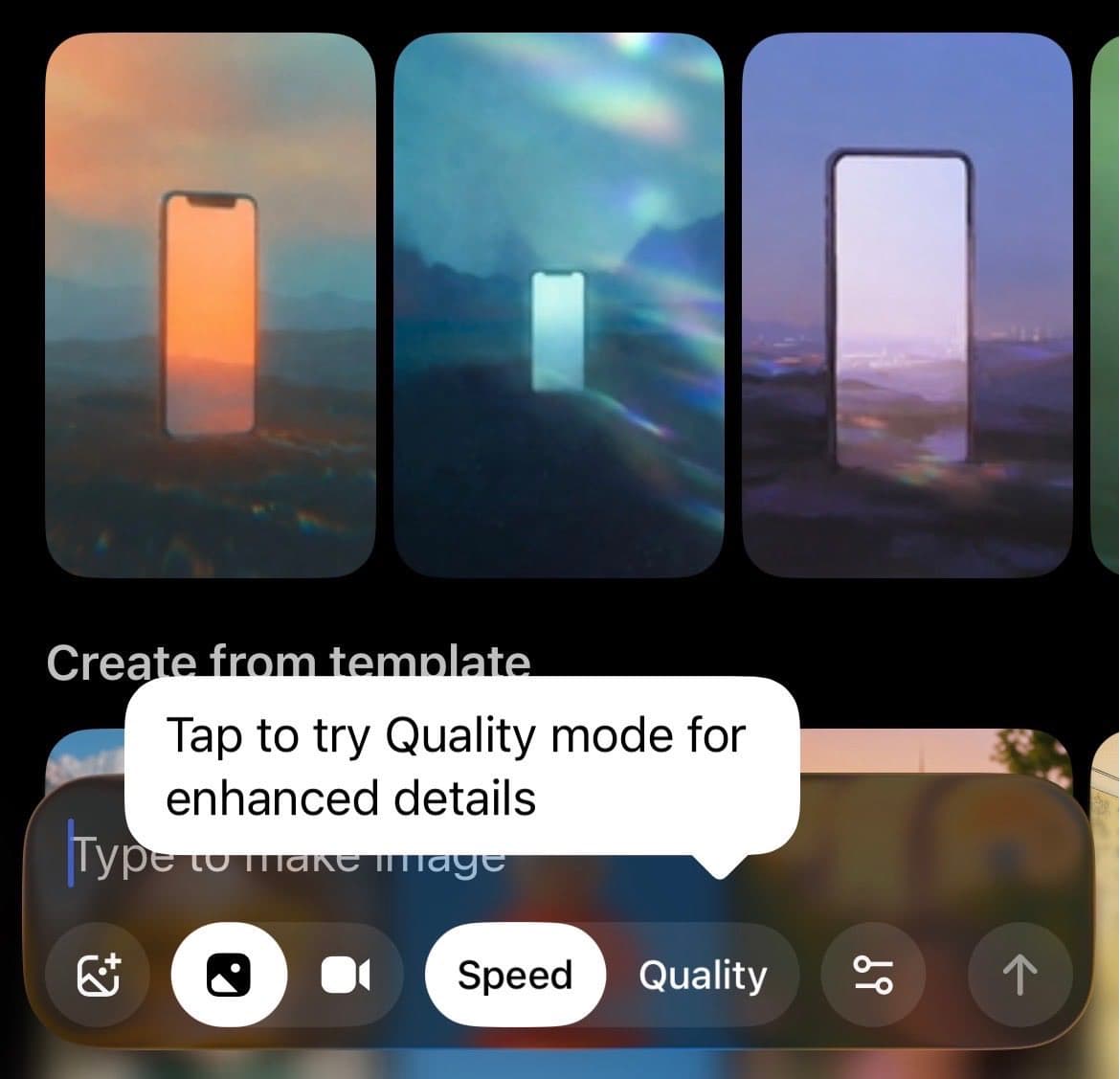
- xAI's launch post says Grok Imagine Quality mode is now live on web and mobile, with enhanced detail, stronger text rendering, and more creative control.
- In side by side creator tests, ai_artworkgen's comparison thread framed Speed as the looser, moodier option, while the same tester's wrap-up said Quality pushed images toward realism.
- venturetwins' text rendering demo and their infographic examples suggest the biggest practical jump is not just prettier images, but images that can carry longer text and structured layouts.
- venturetwins' world creation examples, their food photography tests, and their anime prompts point to a model that holds up across several creator-friendly use cases instead of one narrow style.
- venturetwins' prompt refinement workflow lines up with xAI's image generation docs, which describe iterative refinement through multi-turn conversations.
You can open Grok Imagine right now, check xAI's image generation guide for the multi-turn workflow, and compare that with xAI's image API reference, which already exposes quality and resolution controls. The weirdly useful reveal from early tests is that the model seems strongest when text has to survive inside the image, whether that means a cake inscription, a whiteboard joke, or a full infographic. The other pattern is simpler: Quality looks built for polished finals, Speed still has enough character that some creators kept preferring it for fashion and mood pieces.
Quality and Speed
The official pitch from xAI is straightforward: Quality mode uses its most advanced image model for higher detail, better text, and more control, and it is available on both web and mobile. In the product docs, xAI's image API reference lists quality settings from low to high and resolution settings up to 2k, which gives the launch a useful technical backstop beyond the social post.
Early creator testing made the tradeoff legible fast. ai_artworkgen reduced it to one line, Quality for more precise output, Speed for more vibey output. In a longer comparison, the same account said Quality generally looked more realistic, but still preferred Speed on at least one avant-garde fashion prompt, which is a good sign that xAI shipped a style choice, not just a faster-slower toggle.
Text rendering and infographics
The most concrete improvement in the evidence set is text. According to venturetwins' first test, Quality mode handled long-form text well enough to place supplied copy on a cake and generate its own whiteboard script for a Gen Z slang scene.
That same gain shows up in their infographic post, where the model is asked to combine numeric information, labels, and images in a single frame. Plenty of image models can fake the vibe of an infographic. Fewer can keep the diagram readable enough to be useful.
xAI made the same point in the launch copy. Its announcement puts stronger text rendering next to enhanced detail and creative control, which suggests xAI knows this is the headline feature, not a side benefit.
World creation, food, anime
The strongest creator thread here is basically a mini capabilities map. venturetwins' overview post says the model takes slightly longer in Quality mode, then breaks the results into five buckets.
- Text rendering, where longer copy survives.
- World creation, where simple prompts like an anime scene inside the a16z office or a video game version of San Francisco get fleshed out with environmental details.
- Food photography, where surfaces and lighting stop looking plasticky.
- Infographics, where layout and text have a fighting chance together.
- Anime, where character shots, action, and scenery remain highly steerable.
The official visuals back the realism push. xAI's follow-up post markets Quality mode as a leap in photorealism, and Chris First's gallery shows the model jumping between horror close-ups, children's illustration, motorsport action, and fantasy battle art without collapsing into one house style. Christmas came early for people who use one image model for many different briefs.
Prompt refinement
One late-day creator test added the most useful workflow detail. In venturetwins' video, the process starts with a simple prompt, hands the result to chat for expansion, and then feeds the denser prompt back into Imagine for a more controlled second pass.
That lines up cleanly with xAI's image generation guide, which says Grok can generate from text, edit existing images with natural language, and iteratively refine images through multi-turn conversations. The launch UI already hints at the split between fast exploration and slower polish: one mobile screenshot literally points users to a Quality button for enhanced detail, while another early demo shows xAI pushing short before-and-after style clips to make the upgrade legible in seconds.