
Kling Image 4.0 launches native 8K generation
Kling says Image 4.0 supports native 8K generation, batch image creation and font-style references. The model is also available on Higgsfield.
TL;DR
- Kling Image 4.0 is available with native 8K generation, as shown in Kling's resolution demo.
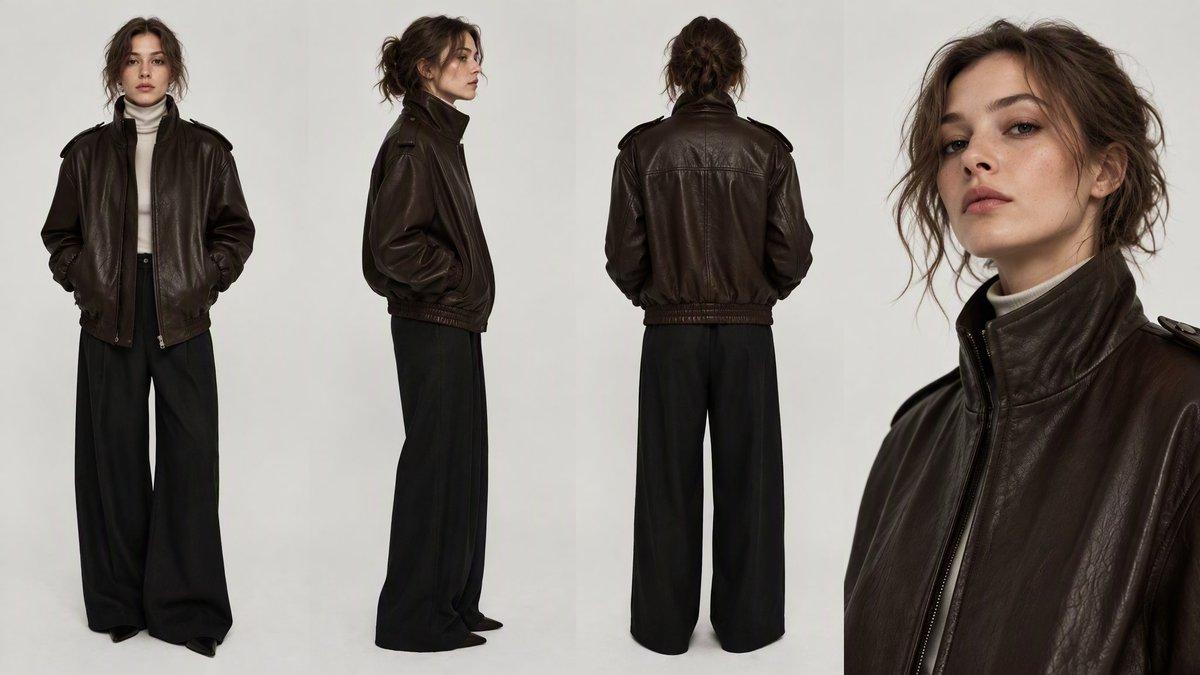
- One prompt can generate up to 10 related images, including multi-angle character views in CharaspowerAI's test.
- Font-style references and a built-in font library support typography-heavy advertising, which CharaspowerAI tested with a beauty campaign.
- Higgsfield also offers the model, with object-selection editing for changing props and colors.
The user guide accepts creative briefs up to 15,000 tokens. Early examples range from flour packed into a cook's knuckles to an anime moth touching a tear. The batch-generation tools are the creative prize here.
Native 8K
Kling released Image 4.0 after a prelaunch teaser promising realism and precision. Native 2K and 4K modes accompany the 8K option, according to its user guide.
Image Sets
Kling distinguishes ordinary batches from related image sequences in its generation guide:
- Default Mode: generates one or multiple images from a prompt.
- Series Mode: generates up to 10 related images with consistent subjects and visual styles.
- Reference inputs: supports up to 10 reference images per input.
The company says Series Mode can plan what each image should cover around the brief. CharaspowerAI demonstrated front, back and side character views from a single prompt.
Tone
The color controls include more than 110 preset grading styles, according to Kling's launch announcement. A reference-image upload can also extract a palette and grading characteristics.
Early-access user gizakdag singled out Tone for maintaining a consistent style and preserving a color palette across their visuals.
Typography and font references
Kling lists more than 70 commercially licensed fonts and support for up to 2,000 rendered characters per image in its guide. Creators can upload a font-reference image; the announcement also describes editing copy and font styles directly in generated images.
CharaspowerAI's beauty-ad tests targeted four things:
- Small, readable text.
- Multiple typography blocks.
- Complex layout and visual hierarchy.
- Glass, cream and liquid detail.
A separate Swiss-style poster prompt from DrSadek_ specified exact headline, date and footer copy, plus three levels of type hierarchy.
Full-page layouts
Kling also generates long page visuals for e-commerce listings and web designs, as described on its product page. Long images can be split into layers so individual elements can be edited and regenerated, according to the user guide.
These have a different resolution ceiling: the API release notes list 1K and 2K for long images, versus up to 8K for single images and image sets.
Seven candid-photo prompts
Creator minchoi shared seven everyday-photography examples with prompts. Their briefs deliberately specify camera flaws, mundane clutter and physical imperfections:
- Friends at a bar: harsh flash, overexposure, hard shadows and muted early-2000s color in the Polaroid example.
- Street snapshot: imperfect focus, motion blur and a peace sign close enough to distort in the lens in the street-photo prompt.
- Backyard birthday: red-eye, awkward framing, a half-deflated balloon and a grandmother partly cut off at the edge in the party scene.
- Beach selfie: just “candid selfie at the beach” in the shortest prompt.
- Dumpling making: exactly nine finished dumplings, flour in knuckle creases and a 50mm f/2.8 look in the hands close-up.
- Diner breakfast: two eggs, three bacon strips, three pancakes and a two-thirds-full coffee mug in the breakfast brief.
- Wet dog: clumped fur, sand, a flipped ear and a 26mm phone-camera look in the car snapshot.
Same-prompt comparisons
Creator ozansihay ran ten identical-prompt comparisons, preserving the prompts in image ALT text. The test set covered:
- Documentary scenes: a pepper vendor, a village wedding and a 1990s street photograph.
- Products and materials: a coffee splash, a wristwatch and a seven-object tabletop arrangement.
- Cinematic compositions: a whale skeleton in an Ottoman bathhouse and a foggy Istanbul ferry.
- Turkish typography: a magazine cover and a barbershop storefront.
Text still has visible rough edges. DrSadek_ also compared a fish-market scene across four models; Kling's market sample puts “2224 2:56” on a price card.
Higgsfield object edits
Higgsfield also offers Image 4.0 through its creation page. Its demonstrated editing workflow has three steps:
- Generate an image.
- Select an object within it.
- Describe the change, such as a new color or replacement prop, while preserving the surrounding scene.
Higgsfield's select-and-edit demonstration
API access and pricing
Beyond Kling's own interface, enterprises and developers get API access. The November 17 API update identifies the endpoint as /image-generation/kling-4.0.
Kling's published API price sheet charges the same output rate for single images and image sets:
| Resolution | Units per output image | Listed dollar price |
| --- | ---: | ---: |
| 2K | 16 | $0.063 |
| 4K | 24 | $0.094 |
| 8K | 40 | $0.157 |
Reference images and reference elements now cost an additional $0.003 each. The sheet explicitly says earlier models did not charge for those inputs, and gives an example of three reference inputs plus four 2K outputs costing $0.261.
The same sheet lists Image 3.0 at $0.028 per 2K output, compared with Image 4.0's $0.063.