
Leonardo supports Seedance 2.0 clip extension in creator video workflows
Creators showed Leonardo exposing Seedance 2.0 for clip-to-video runs and iterative clip extension, with separate action-prompt threads built around the same setup. The workflow matters because it gives Seedance users a simpler UI for uploading, extending, and rerunning shots without assembling a custom pipeline.
TL;DR
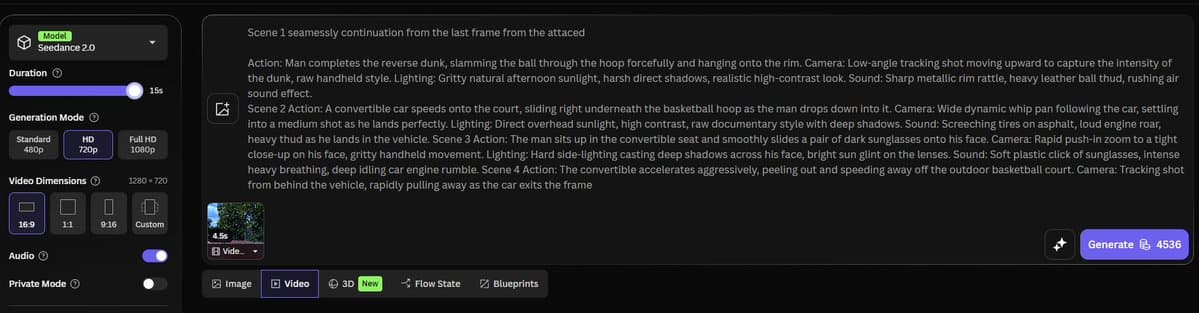
- techhalla's opener and techhalla's Leonardo walkthrough show Leonardo exposing Seedance 2.0 inside its video generation flow for clip-to-video runs.
- According to techhalla's follow-up, the same Leonardo setup also supports iterative clip extension, upload the new output, add another prompt, rerun.
- MayorKingAI's steampunk sequence and CuriousRefuge's previz test both use Seedance 2.0 as the animation layer after image planning, not as a one-shot text-to-video toy.
- Prompt threads like CharaspowerAI's seven-prompt post and AllaAisling's canopy runner prompt show the current sweet spot: tightly specified camera moves, environment detail, and shot-by-shot motion.
- Seedance 2.0 is also showing up in other creator surfaces, because LumaLabsAI's product post added it to Luma Agents while AllaAisling's Runway example used the same prompt grammar in Runway.
You can watch the Leonardo upload flow turn a trimmed live-action clip into a Seedance pass, then see the extension step keep the shot going with another upload. On the workflow side, MayorKingAI built character sheets and scene assets in GPT Image 2 before animating in Leonardo, while CuriousRefuge's test used storyboard panels with timing notes for cinematic previz. The prompt culture around the model is getting extremely literal, from seven action prompts on Leonardo to a six-shot jungle chase in Runway.
Leonardo clip extension
The useful reveal in techhalla's thread is not just that Leonardo supports Seedance 2.0. It is that the UI is set up for repeatable clip-to-video passes.
The thread shows a simple loop:
- trim or capture a source clip
- upload it in Leonardo's video generation flow with Seedance 2.0 selected
- add a motion prompt
- render, then re-upload the result for another extension pass
That makes Seedance usable as an iterative shot tool inside Leonardo, with no custom pipeline visible in the workflow techhalla's Leonardo walkthrough and techhalla's extension step.
Prompt blocks for action shots
The prompts getting traction are written more like shot lists than image prompts.
Across CharaspowerAI's gladiator example and AllaAisling's canopy runner prompt, the recurring structure is easy to spot:
- a named subject with wardrobe or physical detail
- a fully dressed environment
- camera instructions, often as a sequence
- motion verbs such as push-in, orbit, whip pan, speed ramp, tracking shot
- an ending beat for the last frame
That format is showing up in Leonardo-native threads and outside them, which suggests creators are converging on a reusable prompting grammar rather than one-off magic phrases.
Storyboards and style guides
The more interesting creator pattern is upstream planning. CuriousRefuge's previz test says storyboard panels made in GPT Image 2, complete with shot timing, translated well into Seedance 2.0 for scene pacing and transition tests.
[Src:6|MayorKingAI's steampunk sequence] used the same logic with character sheets and location sheets, and kaigani's style-guide experiment pushed it further with modular environment guides and a 20-scene montage prompt. Seedance is landing as the animation stage in a larger asset-prep workflow.
Other surfaces
Luma Labs said in its product post that Luma Agents can now generate with Seedance 2.0, which puts the model in another creator-facing interface beyond Leonardo. AllaAisling's Runway example also shows the same dense cinematic prompt style working in Runway.
The new fact here is distribution. By late May, Seedance 2.0 was not confined to one app or one workflow thread. It was already appearing in Leonardo for clip extension, in Luma Agents as a generation option, and in Runway-centered prompt experiments LumaLabsAI's product post and AllaAisling's Runway example.