
Seedance 2.0 creators package reference-first workflows for 15-second videos
Creators shared demos pairing Seedance 2.0 with node-based audition notes, Midjourney sketches in TopviewAI, GPT Image 2 character loops, and Magnific camera rides. The shared pattern uses references to control characters, motion, and settings.
TL;DR
- DavidmComfort's two-day Seedance 2.0 test combined Seed Audio, staged stills, lip-sync, blocking, and camera movement into three-character continuous shots.
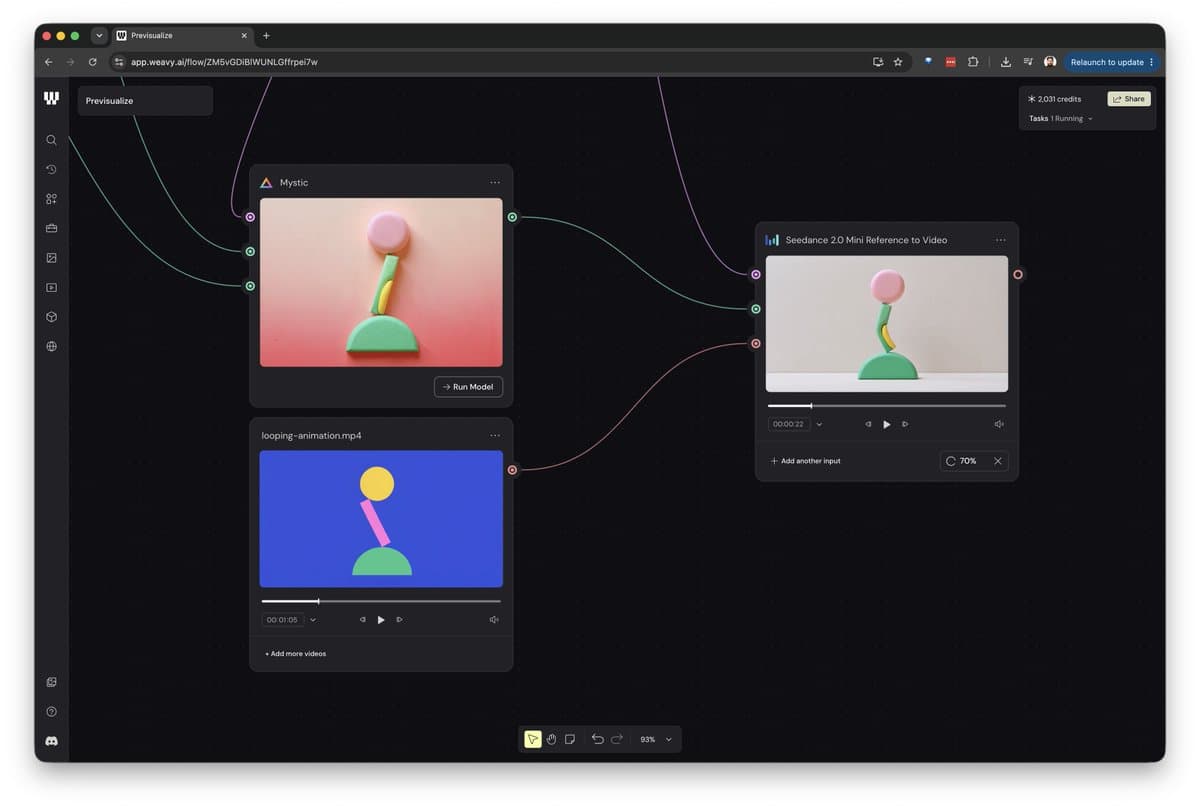
- LinusEkenstam's Figma Weave tutorial turned rough Figma previz into rendered motion by pairing a style image, a control image, and Seedance 2.0 Mini Reference.
- Higgsfield's Supercomputer demo used a 15-second clay pass to carry exact camera trajectory, timing, and framing into a Seedance 2.0 render.
- magnific's character sheet demo and magnific's ranger workflow treated reference sheets as production assets for consistent 4K characters.
- CharaspowerAI's comparison framed Seedance 2 Mini as faster and more accessible, while venturetwins's 4K test put one 15-second 4K clip at $47.
The useful shift: Seedance 2.0 is becoming a render layer for assets, blocking, audio, and camera paths. LinusEkenstam's Weave node setup used two references for video, DavidmComfort's audio workflow split cloned voices from ambience, and techhalla's Takeshi's Castle prompt rebuilt 1980s broadcast physics as a timed shot list. Platform pages surfaced the same pattern from another angle: Topview's AI video home page pitches storyboard-to-video control, Invideo's Agent One page pitches storyboards and multi-shot editing, and Pollo's creative suite page lists Seedance 2.0 among its video tools.
Previz to render
The cleanest design workflow came from LinusEkenstam, who built a Figma Weave flow for turning a rough animation into a finished render. The thread's mechanics were simple enough to copy into a production checklist:
- Add a style reference image to a blank Weave project.
- Use an Image Describer node with GPT-5-chat.
- Instruct the describer to output style only, not subjects, locations, or objects.
- Add a rough pre-render visual from Figma Design.
- Pass the description, style image, and control image into the Mystic node.
- Feed the output image and reference animation into Seedance 2.0 Mini Reference.
- Compare reference animation and rendered output, then switch to full Seedance 2.0 or an upscaler if needed.
Higgsfield showed the same idea with physical camera intent instead of Figma blocks. The Higgsfield Supercomputer demo said a creator built an app that blocks 3D scenes, records a real cinema camera move, and renders through Seedance 2.0; its 15-second clay pass carried trajectory, timing, and framing that prompt-only control kept losing.
Kaigani's Blender experiments added a softer constraint: kaigani's reply said lower-detail previs gave the final video more room to adjust, usually in useful ways. In kaigani's JSON prompt note, the same creator said JSON helped logical separation, but the syntax itself may not be doing the magic.
Character sheets
Magnific's reference workflow started with a character sheet, not a single beauty frame. magnific's demo showed front, side, and back views carrying helmet texture and character details into motion.
A second Magnific thread described character sheets as the starting point: generate the sheet, then go cinematic with Seedance 2.0 4K. The ranger sheet prompt defined Lyra Shadowmelt as a half-elf ranger, and the follow-up video prompt turned the reference into a misty forest action sequence with low glides, close-ups, whip pans, and scale shots against a giant.
Storyboard references also showed up as a bridge between design and final video. magnific's storyboard-to-video demo paired a reference storyboard with a Seedance 2.0 4K action prompt set inside a gothic crypt.
Dialogue and audio
DavidmComfort's audio finding was the nerdiest workflow gem in the pool. Seed Audio could produce a single conversation file for multiple characters, but voice reference clips changed what came out.
His reported split:
- Seed Audio with voice references produced dry cloned dialogue.
- Seed Audio without voice references returned dialogue, ambience, and timed foley in one generation, up to two minutes.
- Seedance generated scene ambience when audio generation was on.
- Whisper QC checked the audio before spending on video.
- The staged still locked geography before reference-to-video.
- The video prompt repeated exact dialogue, speaker order, and standing positions.
- The ceiling he reported was 15 seconds for Seedance, with up to three voice references.
The result was not a lip-sync sticker pass. DavidmComfort's wharf clip had two period characters speaking in one continuous shot with water, gulls, rigging, and synchronized mouths.
Camera blocking
The camera notes read like film-school rules translated for a video model. DavidmComfort's 180-degree note argued that the 180-degree rule governs cuts, while a continuous shot can cross the line if the camera travels there.
His strongest findings:
- Ask for travel, not a teleported camera position.
- In a three-person scene, the active axis is between the current speakers.
- A dialogue handoff can motivate the camera move.
- Seedance over-delivered motion in one test: under 30 degrees became an arc plus a push.
- One camera move and one blocking event held; a second character counter-move was dropped.
- Off-frame speakers remained usable, with voice continuing instead of a cutback or duplicate.
- Derived close-ups worked better when reframed from the master wide, not regenerated from fresh text-to-image.
The staging cheat sheet was blunt: triangle for three characters, profile for confrontation, three-quarter stagger for warmth, nearer to camera means dominant, and the mover owns the beat. That is the kind of rule list AI video has needed more than another adjective stack.
Shot-list prompts
The viral prompt format was not poetic. It was production paperwork.
Techhalla's fight prompts repeatedly used the same scaffold:
- Capture style: raw found footage, amateur handheld smartphone, low-fi consumer camera, grain, compression, motion blur.
- Reference policy: either no external references or a specific source image to preserve identity.
- Timeline: 0 to 3 seconds, 3 to 6 seconds, 6 to 9 seconds, 9 to 12 seconds, 12 to 15 seconds.
- Camera behavior: continuous shaky handheld, pans, jolts, operator movement, no stabilization.
- Physics and artifacts: dust, debris, impacts, lens flare, overexposure, coherent bodies, no text or watermarks.
The same timed structure rebuilt a 1980s game-show obstacle course in techhalla's Takeshi's Castle prompt, down to analog grain, color bleeding, limited dynamic range, spinning logs, and a final water impact. venturetwins's camcorder prompt used a related approach for early-2000s high-school nostalgia, including autofocus hunting, exposure pumping, no smartphones, and an abrupt cut to black.
AIwithSynthia used the other dominant structure: continuous transformation loops. AIwithSynthia's GRWM prompt packed a full wake-up, commute, workday, return-home loop into 15 seconds, while AIwithSynthia's travel transformation prompt used selfie framing, finger snaps, fashion changes, and location jumps from a hotel suite to Paris to Dubai.
Access and costs
Model choice showed up as a cost and quality split. CharaspowerAI's comparison said Mini was faster and more accessible, while full Seedance 2 kept an edge on details, stability, and final rendering.
Pricing claims varied by surface:
- underwoodxie96's Mini availability post priced Seedance 2.0 Mini at $0.07 per second on that platform.
- Artedeingenio's Topview plan note cited a €468 Ultra Annual Plan with unlimited Seedance 2.0 Mini generations for a year.
- DavidmComfort's cost note put a 15-second two- or three-person 720p conversation shot at about $4.50 for video, $0.07 for the staged still, and $0.10 for conversation audio.
- venturetwins's 4K test put one 15-second Seedance 2 4K clip at $47.
Availability was scattered across creator tools rather than one canonical front door. magnific's post said Seedance 2.0 4K was available on Magnific, AIwithSynthia's ImagineArt post showed Seedance 2.0 4K on ImagineArt, PJaccetturo's CapCut Video Studio post cited Seedance 2.0 4K inside CapCut Video Studio, Anima_Labs's Invideo Agent One post used Seedance 2 on Invideo, and awesome_visuals's Pollo AI post tagged Seedance 2.0 on Pollo AI.