
Intangible adds an MCP agent to persistent 3D scenes
Intangible connects to Claude Code, Claude Desktop, or ChatGPT through MCP so an agent can build scenes, compose cameras, and preview renders. The beta leaves creators to finish directing inside the scene.
TL;DR
- Intangible has put a remote MCP server in front of its 3D Studio, so Claude Code, Claude Desktop, and ChatGPT can create projects, arrange models, frame cameras, and render images, as hasantoxr's quick-start demonstrates.
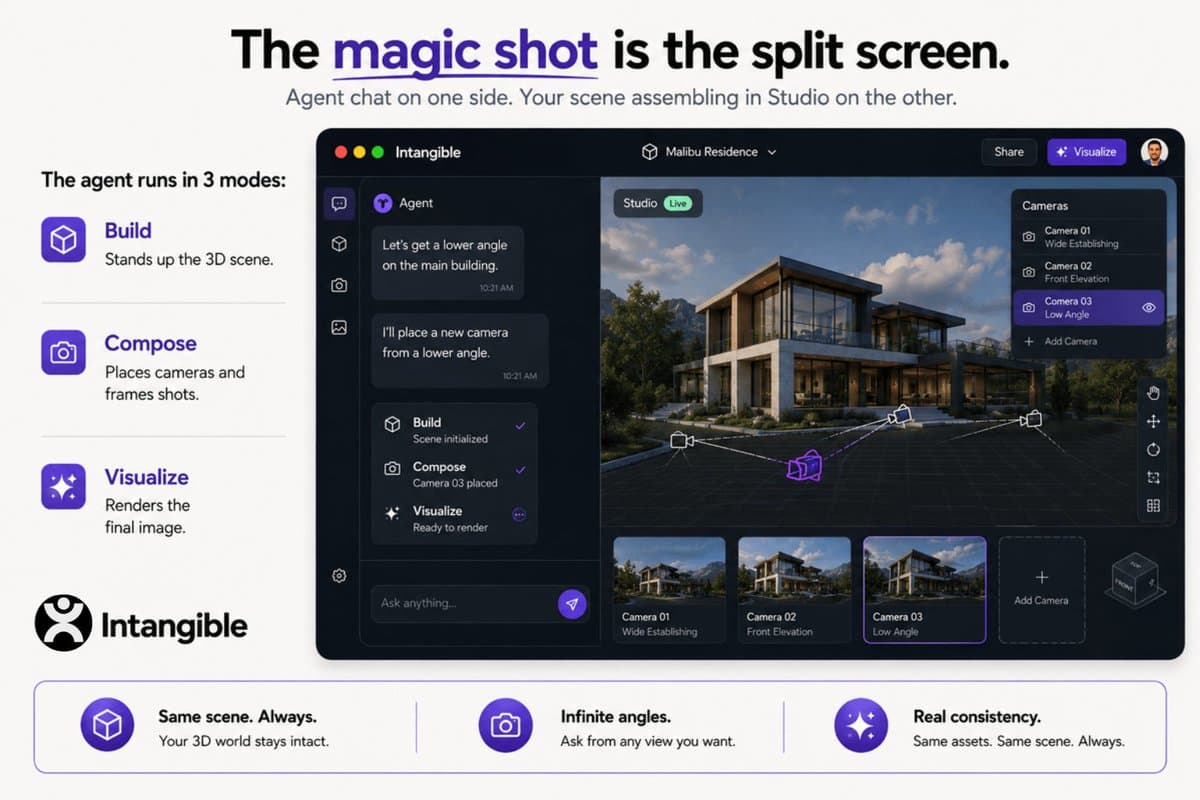
- The agent works through Build, Compose, and Visualize, a division that hasantoxr's mode breakdown maps to set construction, camera framing, and final image rendering.
- Work stays in a live 3D scene, letting creators revisit the same environment for fresh angles and renders, according to hasantoxr's description of the persistent scene.
- The beta deliberately hands back an approximate scene for human placement and direction, a split shown in hasantoxr's Studio handoff, while hasantoxr's beta note reports retries and second passes on some builds.
The MCP guide says a large scene can leave Studio's viewport empty for its first couple of minutes while the agent searches for assets. Intangible's three-mode documentation maps the interface to art department, camera department, and post.
The MCP server
Intangible exposes Studio at https://mcp.intangible.ai/mcp, a streamable-HTTP MCP endpoint with OAuth sign-in. The official MCP guide lists the operations an agent can perform:
- Create a project and construct a 3D set.
- Place and swap 3D models.
- Set cameras and frame named shots.
- Render images from the scene.
Build, Compose, Visualize
Intangible turns a brief into three discrete stages, as hasantoxr's mode breakdown lays out.
- Build: the agent places 3D assets to make a virtual set. Intangible's Build-mode documentation also covers props, time of day, CAD imports, and generating a 3D mesh from a reference image.
- Compose: a request for beauty shots or a shot set becomes a named list in Studio, with the agent placing cameras and framing each view.
- Visualize: framed shots become rendered images with added art-direction detail. The MCP guide lists video generation through the agent as coming soon.
One live scene
The persistence claim is the creative hinge. In hasantoxr's description of the persistent scene, the agent operates inside a scene that remains available for reframing and repeat views.
Intangible's MCP guide says images render from that constructed scene while scene fidelity, camera framing, and model choice remain controllable in Studio. The Build-mode docs let users attach a reference image to a specific 3D object through Object Details or the AI Composer.
The Studio handoff
Intangible's MCP guide says the agent deliberately stops at roughly 80 percent, returning placements for manual nudging in Studio. Its interface-side adjustment is presented as faster and less token-heavy than describing each positional correction in chat.
Large scenes take minutes to build and minutes more to shoot, according to the same guide. hasantoxr's beta note adds that early builds can require retries or a second pass.
Connection and access
The beta currently exposes the Build-Compose-Visualize flow to agents, and the MCP guide says additional Studio functions will follow.
- Claude Code: the setup instructions use
claude mcp add --transport http --scope user intangible https://mcp.intangible.ai/mcp, followed by a restart and/mcpfor browser authentication. - Claude Desktop: an organization owner adds the connector on Team and Enterprise plans, then users authenticate their own Intangible accounts.
- ChatGPT: the ChatGPT setup section requires a Business, Enterprise, or Edu workspace with developer mode for scene-writing access. Personal plans can attach the connector but remain read-only, and ChatGPT asks for approval before its first write action.