
LetzAI Canvas supports DOME 7 film boards with AI review tags and Seedance handoff
A creator walkthrough showed DOME 7 preproduction on one LetzAI Canvas board with character sheets, environment zones, retake history, status tags, and per-page system prompts. Keeping visual decisions, consistency checks, and Seedance outputs in one workspace can reduce folder sprawl and speed handoff.
TL;DR
- The DOME 7 walkthrough opener framed LetzAI Canvas as a single board for character sheets, environments, retakes, animated clips, and storyboards, with an assistant that can read the whole workspace.
- According to the consistency workflow post, the character pass happens with pinned references always in view, and the side by side grid post uses 12 shots in 12 contexts to catch identity drift early.
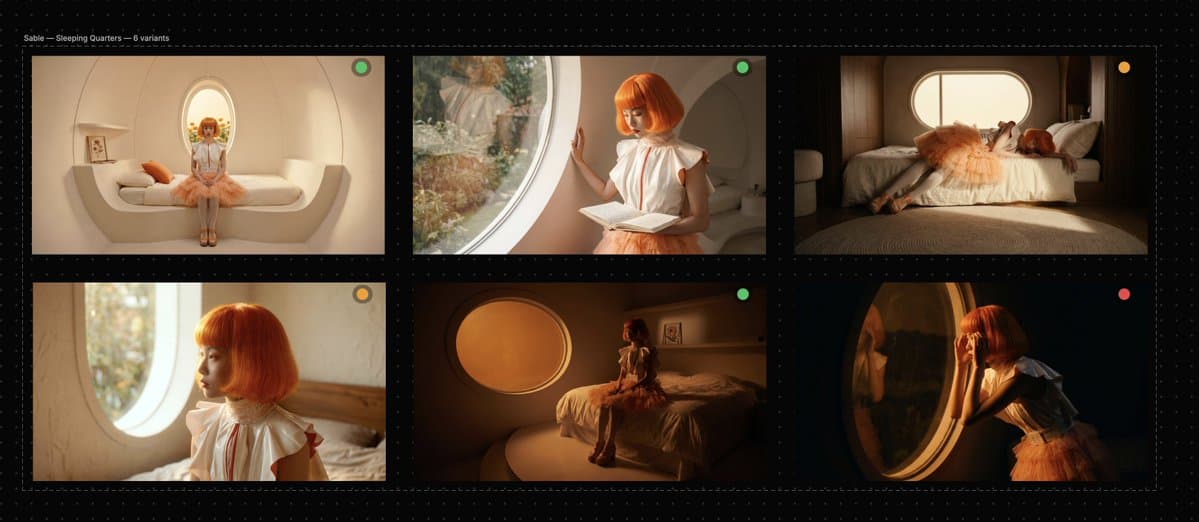
- The review tags post showed the most interesting mechanic: green, orange, and red status dots become machine-readable instructions, so the assistant can rerun only the shots marked for iteration in one zone.
- The motion handoff post pushed approved stills into Seedance 2.0 without leaving the board, while Seedance 2.0 on LetzAI supports image-to-video and multimodal reference inputs up to 1080p.
- The page prompts post split cheap exploration from high quality finals with per-page system prompts, and the access post said Canvas is live on any LetzAI plan with 2,500 free credits on free accounts.
You can read LetzAI's Canvas docs, skim the homepage launch framing, and check the Canvas shortcuts reference. The creator also said in a follow-up reply that the agent had the full script, which makes this less like a moodboard and more like a board-level production context window.
One board
LetzAI's own docs describe Canvas as an infinite workspace where creators can generate images and videos, lay out storyboards, build decks, review work, and share preview links, all in one tab, with an assistant that reads the board. Using Canvas and the homepage launch section both pitch it directly at AI filmmakers.
That framing lands because the DOME 7 setup post is not a toy example. It is one short film board with one character, six environments, storyboard beats, retakes, and later motion assets sitting on the same surface.
Consistency grid
The workflow starts with references pinned in the same top-left zone, which the reference layout post says keeps character sheets, environments, interactions, and storyboard frames constantly visible to the agent.
Then the board turns into a visual QA pass. The pressure test post runs Sable through 12 shots and 12 contexts on one screen, so drift shows up next to sibling shots instead of weeks later in exports.
The environment pass uses the same trick. According to the zone breakdown post, the dome is split into:
- Biosphere Interior
- Sleeping Quarters
- Archive Room
- Dining Space
- Terra-Dome Observation
Because each zone sits beside its variants, warm and cold color decisions stay comparable at a glance, as the zone breakdown post put it.
Review tags
Two mechanics make the board feel more like production memory than a gallery.
First, retakes stack instead of overwrite. The retake history post describes v2, v3, and v4 passes preserved in sequence, so the reason one frame won is still visible later.
Second, review metadata becomes prompt input. In the status-tag review post, green means approved, orange means iterate, red means rejected, and the assistant can target only the orange shots in the Archive Room while leaving the rest alone.
That is the sharpest reveal in the thread. The review pass stops being a separate note layer and becomes board state the agent can act on.
Motion and storyboard
Approved stills move into animation without a tool hop. The Seedance handoff post shows a selected frame being sent to Seedance 2.0, with the resulting clips placed next to the stills they came from.
LetzAI's models page says Seedance 2.0 supports text, image, audio, and video reference inputs, while the Enterprise variant adds private asset library support and up to 1080p output. That makes the DOME 7 handoff more than a demo flourish, because the board can hold both the source frame and the generated motion clip in the same sequence.
The last step is screening. According to the same handoff post, those clips feed a storyboard section that can play fullscreen from the board itself.
Page prompts and access
The most useful production trick arrives late in the thread. The per-page prompts post sets one page for 1K images, 720p video, and cheap models, then a finals page for full-quality runs.
That turns budget control into layout, not self-control. One page is for exploration, one is for expensive outputs, and both still live inside the same board.
The supporting docs fill in the practical edges. Canvas shortcuts confirms that R triggers media actions on selected assets, matching the retake history post, while fit and zoom tools support the kind of full-board comparison shown in the pressure test post. And the access post says Canvas is live on any LetzAI plan with 2,500 free credits on free accounts, while the shortcuts-sheet post adds that the creator published a condensed cheat sheet for tools, media actions, and present mode.