
Hailuo releases MiniMax H3 as open-weight model
Hailuo said MiniMax H3 is now officially open-weight, with posts promoting local generation, text rendering, lip sync, and motion transfer. Creators tested it in ComfyUI, Krea, Magnific, and Mac workflows.
TL;DR
- Hailuo made MiniMax H3 officially open-weight for creators and developers, and MiniMax's model card puts the output window at 4 to 15 seconds, 24 FPS, 32 kHz stereo audio, and up to 2K; Hailuo_AI's launch post is the primary signal.
- The local path arrived on day zero: ComfyUI support covers text-to-video, image-to-video, first-and-last-frame, reference-to-video, and shot editing, according to the ComfyUI Reddit post.
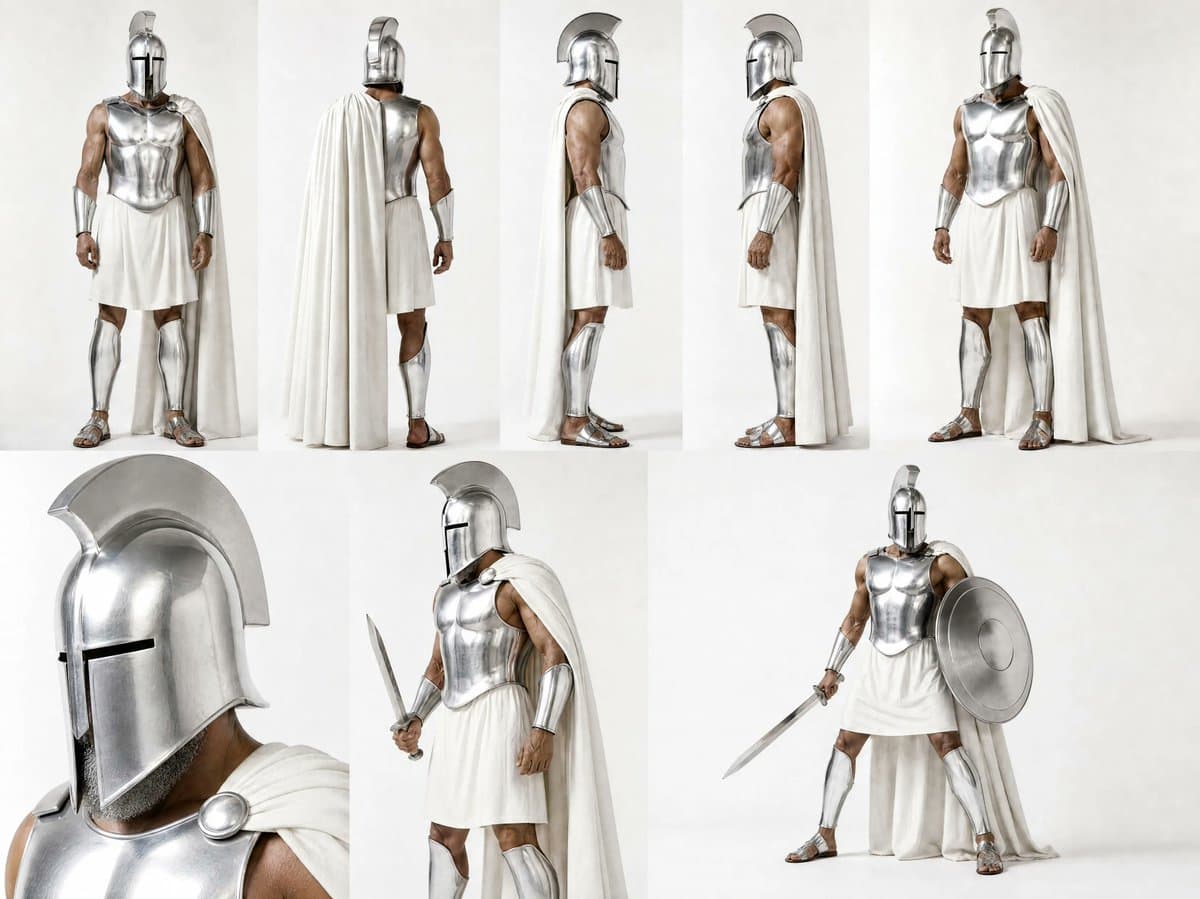
- Character consistency is the creator demo to save: magnific's method post used a reference sheet, up to nine references, scene generation, then animation to keep Odysseus' face consistent across nine scenes.
- Audio refs are landing as a practical music-video workflow: pzf_ai uploaded a full track and selected 15-second sync segments, while ai_artworkgen said H3 recognized the uploaded audio well enough that lyrics may not be needed.
- The first caveat is action: Artedeingenio's comparison put Seedance 2.5 ahead on fight choreography, even while later posts praised H3's close-ups and illustration animation.
MiniMax's open-source post says H3-Context-IR is hosted and excluded from the initial open release, and H3-Regenerate-2K is not yet open. The Hugging Face license excludes the US, EU, UK, and South Korea. Comfy's day-zero writeup says its local optimization cuts the footprint from 123.6 GB to 42.5 GB, and magnific's Odyssey guide turns the model into a reusable character-lock recipe.
What shipped
MiniMax published H3 as an open-weight, general-purpose video model on Aug. 3, after the July 31 official launch post introduced it as an omni-modal system for text, image, video, and audio prompts.
The public spec from MiniMax and the Hugging Face model card is short enough to keep handy:
- Output duration: 4 to 15 seconds.
- Frame rate: 24 FPS.
- Audio: 32 kHz stereo.
- Aspect ratios: 21:9, 16:9, 4:3, 1:1, 3:4, 9:16, and other ratios.
- Local base output: 768p, with 2K through H3-Regenerate-2K.
- Dialogue languages: stable support for Arabic, Chinese, English, French, German, Italian, Japanese, Korean, Portuguese, Russian, and Spanish.
The launch framing is creator-first: MiniMax called out advertising, branding, e-commerce, product design, UI/UX, gaming, film titles, product websites, and animated posters in the July 31 post.
The downloadable release is H3-Base
The downloadable piece is H3-Base, not the entire hosted Hailuo pipeline.
MiniMax splits the full system into three parts in its open-source post:
- H3-Context-IR: hosted preprocessing that parses multimodal inputs into a context representation.
- H3-Base: the local model that generates 768p audio-video output.
- H3-Regenerate-2K: a hosted in-context regeneration step for 2K output.
The open release contains two task-specific checkpoints:
- H3-Base-FL2VA: text-to-audio-video plus first-frame, last-frame, or first-and-last-frame generation.
- H3-Base-Ref2VA: reference-to-audio-video using text plus reference images, videos, and audio.
Two missing pieces matter for builders. H3-Context-IR is not included because it depends on hosted services, and H3-Regenerate-2K is not yet open-sourced, according to MiniMax's release notes. The same page says sparse-attention inference is also coming later.
The license has a bigger distribution caveat: the MiniMax H3 Community License applies worldwide except the EU, UK, South Korea, and US, and commercial products above $20 million in annual license revenue need written authorization.
ComfyUI local workflow
Day 0 MiniMax Support for ComfyUI
0 comments
ComfyUI had native H3 support on day zero, with workflow templates for T2V, I2V, R2V, and first-and-last-frame generation. The Reddit post also links the official MiniMax Hugging Face repo, Comfy's repackaged weights, and template JSONs for each workflow.
Comfy's engineering writeup says the team pruned modulation weights, about 40% of total parameters, replaced them with a lookup table, added int8 convrot quantization, and used custom kernels to reduce peak VRAM. The reported footprint drops from 123.6 GB full precision to 42.5 GB for the smallest model variants.
Early local reports were mixed in the useful way. AIandDesign said H3 ran on a Mac, while one ComfyUI Reddit test reported a 608 by 352 generation on a 4070 with 64 GB RAM taking 167 seconds.
Local generation changes the cost shape. BLVCKLIGHTai's reply described the cost of local runs as power instead of credits.
Character lock
magnific's Odysseus thread turns character consistency into a production recipe, not a lucky seed.
The method in magnific's workflow post is three steps:
- Build a reference sheet: front, back, profiles, and close-ups.
- Feed up to nine references to MiniMax H3 to lock the character.
- Generate each scene, then animate it.
The linked magnific guide adds one design trick: Odysseus keeps a strong helmet silhouette, so the model has fewer identity variables to lose across scenes.
The same pattern shows up in a darker form in DrSadek_'s full prompt. One image is treated as the exact opening frame and strict visual reference, then the 15-second video is broken into five shots: submerged hand, rooted soldiers, central warrior, colossal apparition, final battlefield reveal.
Audio refs and lip sync
The most practical H3 workflow in the creator posts is audio as timing, voice, and performance reference.
- pzf_ai uploaded an entire music track, then selected 15-second segments to sync.
- ai_artworkgen used an MP4 audio clip, a character sheet, an environment reference, and a timestamped camera prompt for a music-video scene.
- Uncanny_Harry recorded dialogue as an audio track, fed it with an image reference, and said H3 used the exact audio rather than requiring black video or written dialogue.
- hellorob used two reference images and an input audio that generated identically, then shared a prompt that tells H3 to use
<Audio 1>exactly. - hellorob's follow-up called near 1-to-1 audio retention the model's best feature.
The ComfyUI docs describe the same architecture-level claim: H3 models voice, sound effects, and music with the video in one forward pass, not as a separate audio layer.
Text and motion graphics
Hailuo kept pushing text as a headline capability. Hailuo_AI called text rendering a new use case in its text demo, then repeated the claim in a follow-up.
Creators immediately aimed it at design work:
- AllaAisling prompted words to morph into their meanings, from BECOME to CREATE to INSPIRE, as one continuous typography animation.
- CharaspowerAI tested interface animation: transitions, micro-interactions, camera movement, and text integration.
- 0xInk_ used H3 for a client ad shot after Seedance struggled with clean scrolling phone text.
- Hailuo_AI's motion-design post framed the model as commercial-grade motion design.
For designers, this is the cleanest H3 lane so far: product UI, kinetic type, ad motion, and brand-readable text.
One-shot text-to-video on Krea
venturetwins' viral Office test used the prompt: "Jim and Dwight from The Office discuss autonomous coding agents." The clip ran as a one-shot text-to-video generation, not an image-to-video setup.
When commenters assumed there had to be extra guidance, venturetwins posted the Krea screenshot and called it a very simple text-to-video prompt. a follow-up reply repeated that it was pure text-to-video.
Hailuo_AI later joked that the clip looked like a 500-word prompt generated an entire Office episode in its reaction post, but the shared prompt was much shorter.
Where creators tried it
H3 appeared across creator surfaces fast:
- Hailuo: MiniMax's model card lists the global web app at hailuoai.video and the API at platform.minimax.io.
- Hugging Face: the official MiniMaxAI/MiniMax-H3 repo hosts the model card and checkpoints.
- ComfyUI: the day-zero Reddit post links local workflow templates and Comfy's repackaged weights.
- Comfy Cloud: PurzBeats posted a 2K, 8-second reference-to-video run costing about 300 credits.
- Krea: venturetwins said the Office test was run on Krea.
- Magnific: magnific's character-sheet post said H3 was available there.
- Topview: MayorKingAI said Topview brought H3 to creators with native 2K, 15-second generations, multimodal control, and pricing at 30% of Seedance 2.0's cost.
Action scenes
Artedeingenio tested Seedance 2.5 and Hailuo MiniMax H3 with the same Leeloo prompt and the same Midjourney reference images. His read: both models are strong, but Seedance still has the edge on action scenes.
The follow-up got more specific. Artedeingenio preferred H3's opening edit and close-ups, then said it fell short on jumps and fight choreography.
H3's counterweight is illustration. Artedeingenio called illustration animation one of MiniMax H3's biggest strengths and said it had nothing to envy Seedance there.