
Amir Mushich releases an open-source Blender template for coding agents
Amir Mushich's open-source Blender template guides coding agents through text, color and font changes. It includes dependency checks and synchronized sound; he reports a roughly 75-minute render on a laptop RTX 4070.
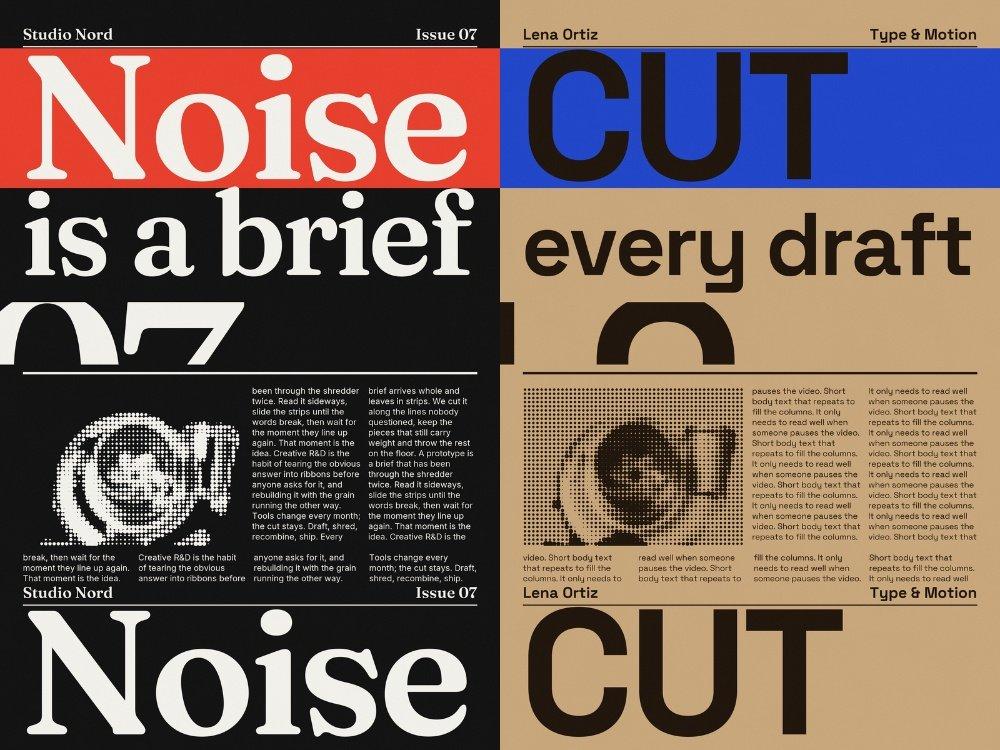
TL;DR
- Shred-kit turns a custom poster into a Blender paper-shred reel; AmirMushich released it as a free template.
- Claude Code, Codex or Cursor can guide setup and customisation through chat, following the launch instructions.
- A final render took roughly 75 minutes on a laptop RTX 4070 in the creator's test, with much faster previews.
The agent playbook gives the headline a 3-7-character target and warns about descenders in oversized type. The smartest constraint sits in the README: motion, camera, timing and editing stay fixed while the poster changes.
An eight-second Blender loop
Amir Mushich's shred-kit makes an eight-second, 9:16 animation: a printed poster gets torn into strips, fed through a shredder and rebuilt into a seamless loop. The finished format is 1080×1920 at 60 fps.
Production runs through four scripts listed in the project documentation:
poster.pydraws the poster.shred.pybuilds and animates the Blender scene, including paper geometry, fibre and translucency shaders, and shredder cutter discs.edit.pycuts the shots and adds grading, glow, grain and punches.sound.pybuilds audio from the render's timings, keeping it synchronised when the text changes.
Machine checks before the brief
Mushich names Claude Code, Codex and Cursor as starting points, with a prompt to clone the repository, read it and help make a new version.
Before collecting the brief, the agent checks dependencies specified in the environment playbook:
- Python 3.10 or newer.
- Blender 5.x, tested with 5.2.
- ffmpeg.
- An available GPU backend, with CPU rendering as a slower fallback.
The playbook requires permission before system-wide installations. A missing Python installation pauses the workflow until the user installs it.
Five choices in the creative brief
The agent asks one question at a time and records the user's choices in brief.json, according to the briefing playbook.
- Words: seven fields covering two corner labels, the headline, subline, cropped giant lettering, footer and body copy.
- Fonts: separate display and body families, downloaded from Google Fonts or supplied as
.ttfor.otffiles. - Colours: paper, ink and one accent colour, with an option to remove the accent band.
- Picture: a supplied image converted into halftone dots.
- Sound: a designed track of ripping, falling paper, shredder noise and clicks, mixed to −14 LUFS, or silence.
After each text or colour answer, the agent validates the brief. The specified contrast thresholds are 4.5:1 for ink against paper and 2:1 for the headline against its accent band.
Fast previews, 75-minute renders
Mushich reports a poster preview in seconds and four 3D stills in about a minute. His final render took roughly 75 minutes on a laptop RTX 4070.
The agent's render playbook specifies the remaining steps and revision costs:
- Estimate first: time real frames for 2-5 minutes, report the projected duration and get approval before the long render.
- Draft option: half resolution and roughly a quarter of the final render time.
- Visual revisions: text or colour changes require a full re-render because the poster appears in every shot.
- Audio toggle: switching sound on or off only requires re-muxing.
Social exports and commercial rights
Deliverables land in out/. The social-export option adds 16 Mbit/s encodes and two cover stills alongside the 60 and 30 fps video versions; audio also comes as a WAV with a frame-exact cue sheet.
Mushich separates the rights in the licence section:
- Code: GPL-3.0.
- Included sound recordings: public domain.
- Demo picture: the author's own render, free to use in videos made with the kit.
- Finished videos: the user's to use, including commercially.