
OpenAI Codex adds Mac computer use and 90+ plugins
OpenAI updated Codex with Mac app control, background computer use, image tools, ongoing tasks, and 90+ plugins, while Remotion added a one-click skill. Agents can now work inside desktop creative apps and stacks without blocking the visible cursor.
TL;DR
- OpenAI’s launch post says Codex can now control Mac apps with its own cursor, run multiple agents in parallel, browse in-app, generate images, remember preferences, and schedule ongoing work, which lines up with OpenAI’s launch tweet and the demo clipped by minchoi.
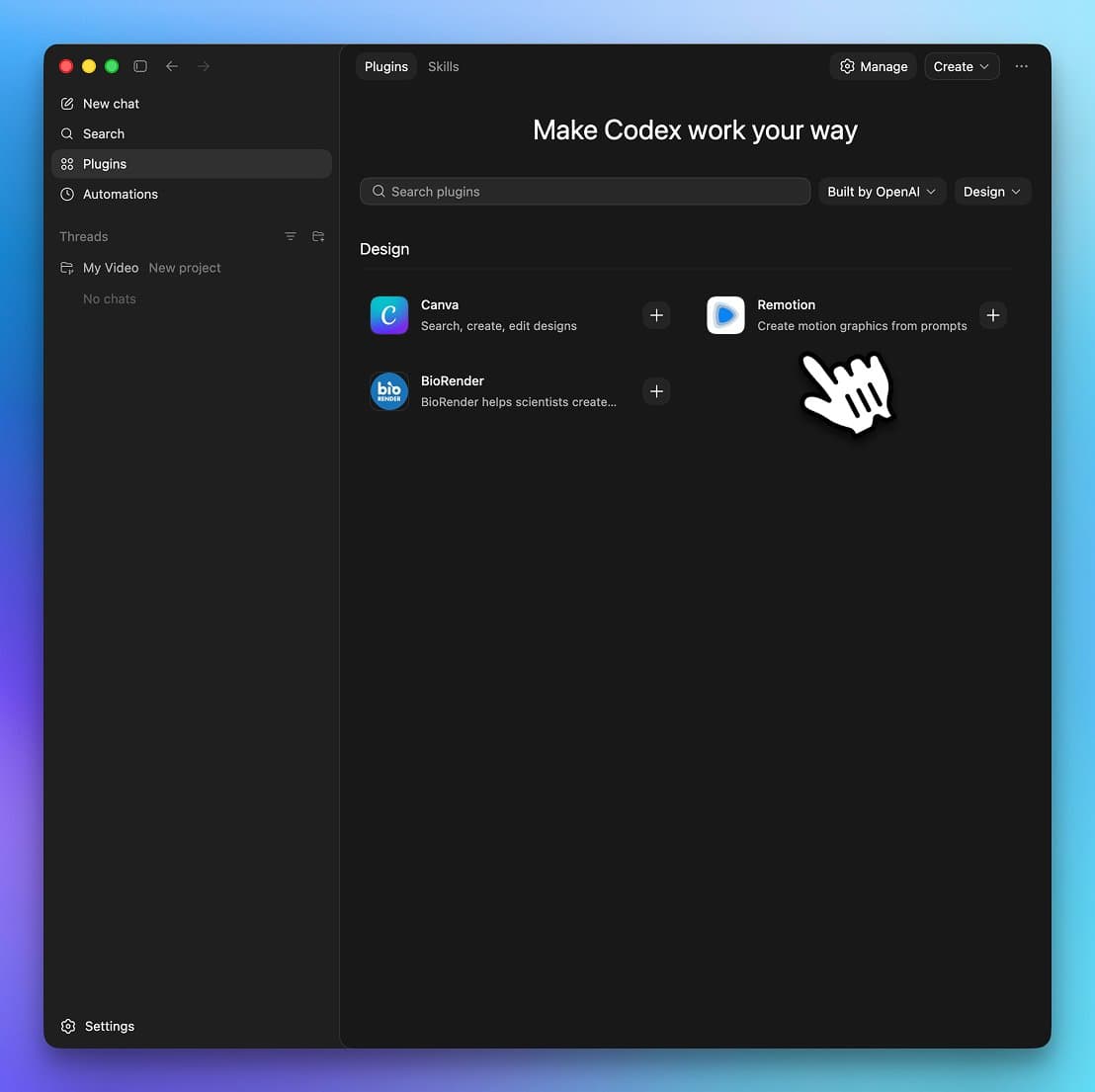
- The plugin layer got much wider: OpenAI’s post says more than 90 new plugins are live, while the OpenAI developer repost summarizes the drop as computer use, browser, image editing, and 90-plus plugins, and Remotion’s screenshot shows one-click install inside the app.
- The creative angle is obvious fast. OpenAI’s post explicitly pitches product concepts, frontend designs, mockups, and games, and SIGKITTEN’s leaked screen shows Codex reading Chrome’s accessibility tree while pulling live flight data inside the app.
- Background execution is the part people immediately latched onto: aakashgupta’s thread argues the real unlock is separate agent cursors on the same Mac, while AriX’s reposted demo focuses on raw GUI speed.
- Under the hood, the day-before 0.121.0 release notes added marketplace installs, a
/memoriesmenu, MCP parallel-call support, and sandbox changes, and LLMJunky’s release-notes thread surfaced the same pieces before the desktop launch landed.
You can read the official launch post, skim the 0.121.0 release notes, and watch Codex jump from code editor to full desktop operator in minchoi’s demo. Remotion’s plugin card shows Canva, BioRender, and Remotion sitting in the same install surface, and SIGKITTEN’s screenshot reveals the app peeking into Chrome through an accessibility tree instead of staying trapped in a chat box.
Mac computer use
OpenAI’s announcement says Codex can now see, click, and type across Mac apps with its own cursor, and can run multiple agents in parallel without hijacking the user’s foreground session. That is the whole product shift in one line: Codex stops being an IDE sidekick and starts acting like a background operator for the rest of the desktop.
OpenAI frames this as useful for frontend iteration, app testing, and software with no API. aakashgupta’s other thread pushes the same point harder, arguing that the target is the long tail of enterprise tools and internal apps that were never going to ship clean agent interfaces.
Plugins
OpenAI says the new plugin batch mixes skills, app integrations, and MCP servers, with named examples including Atlassian Rovo, CircleCI, CodeRabbit, GitLab Issues, Microsoft Suite, Neon by Databricks, Remotion, Render, and Superpowers in the launch post. The interesting part is not just the number. It is that creative and design tools now sit in the same surface as dev tooling.
The Remotion example is especially tidy. Remotion’s launch post says its skill can be installed with one click inside Codex, skipping CLI setup, while a follow-up reply from Remotion makes clear that the old CLI path still exists too. The screenshot shows Canva, BioRender, and Remotion under a Design category, which is a small but concrete sign that OpenAI wants Codex living inside visual workflows, not just terminal ones.
Ongoing tasks and memory
The other big expansion is time. According to OpenAI’s post, automations can now reuse existing threads, preserve context, schedule future work, and wake up later to continue a task across days or weeks. OpenAI also says memory is rolling out in preview so Codex can keep personal preferences, corrections, and hard-won context from earlier sessions.
OpenAI’s own example is more interesting than the feature list: Codex can pull open comments from Google Docs, combine that with Slack, Notion, and codebase context, then return a prioritized action list in the morning. For creative teams, that reads less like “chat with an assistant” and more like a standing production coordinator that remembers how you work.
Availability is uneven. The launch post says the desktop rollout starts for ChatGPT-signed-in Codex users today, while memory and context-aware suggestions are still coming soon for Enterprise, Edu, and EU and UK users. Computer use is macOS-only at launch.
CLI groundwork
The desktop reveal landed a day after OpenAI shipped a pretty telling CLI release. The 0.121.0 notes added codex marketplace add, memory reset and deletion controls, MCP namespacing, optional parallel tool calls, realtime output APIs, and stricter sandbox support.
That release matters because it shows this launch was not just a flashy app demo. The supporting pieces were already moving underneath:
codex marketplace addcan register plugin marketplaces from GitHub, git URLs, local directories, or directmarketplace.jsonURLs, according to the release notes.- The new
/memoriescontrols cover memory mode, reset, deletion, and cleanup in both TUI and app-server flows, according to LLMJunky’s thread and the release notes. - MCP support now includes namespaced registration and optional parallel calls, which matches the broader push from single-purpose coding agent to general operator across tools.
- OpenAI tightened sandboxing at the same time, including macOS Unix socket allowlists and a secure devcontainer profile in the release notes.
One more boundary check came from the community quickly. a Linux community build says the Codex app can be packaged for Linux, but computer use is not available there, which makes the Mac-first nature of this launch pretty hard to miss.