
Seedance 2.0 supports storyboard-frame and motion-sheet video workflows
Creators posted Seedance 2.0 pipelines that turn storyboard frames, motion sheets, and landing pages into finished clips. Use it as a final renderer for ads, demos, and cinematic scenes, not just one-off image-to-video tests.
TL;DR
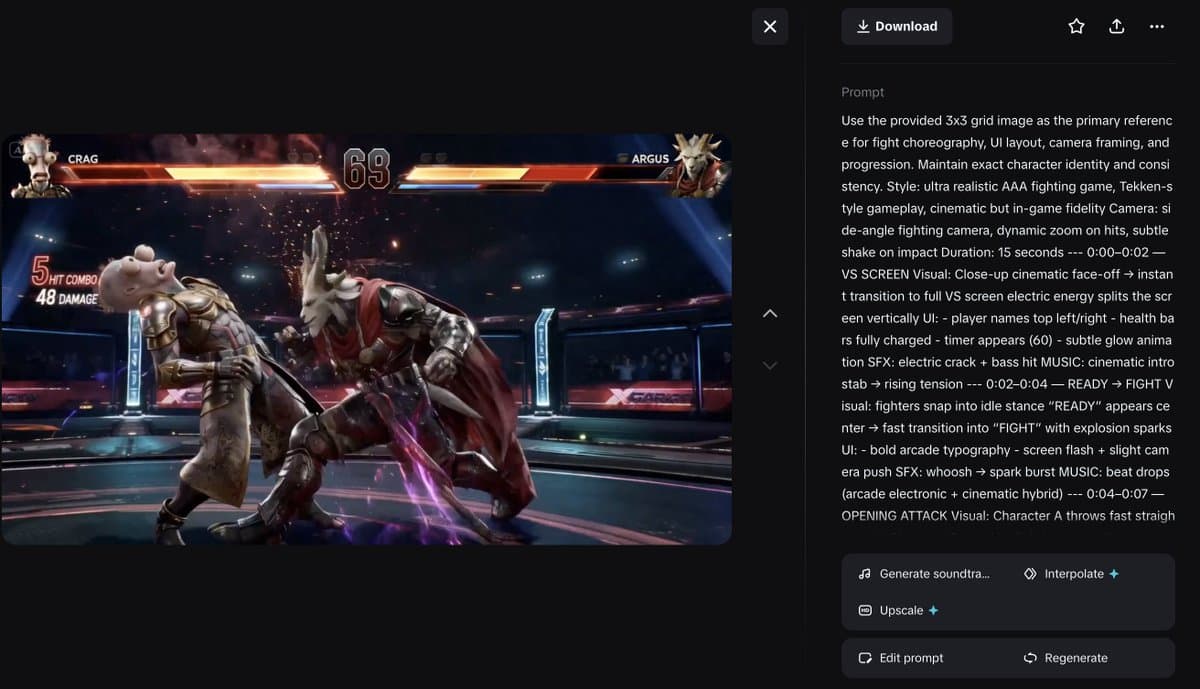
- Seedance 2.0 is showing up as a final renderer for structured inputs, not just single stills, with egeberkina's fight-scene prompt turning a 3x3 storyboard into a 15-second game clip and egeberkina's workout demo turning a motion sheet into an exercise video.
- Several creators are pairing GPT Image 2 or Midjourney with Seedance 2.0, using image models for character design, interface layouts, or shot planning, then handing the sequence to Seedance for motion, as in 0xInk_'s interface workflow, AllarHaltsonen's car storyboard, and koldo2k's Vespa hotel tour.
- The strongest pattern is blueprint-driven prompting: egeberkina's storyboard spec breaks a scene into exact beats, UI states, and timing, while the workout motion sheet uses panel-by-panel poses and movement rules.
- Creators are already pushing the format beyond cinematic tests, with underwoodxie96's landing-page animation treating a web mockup like a motion canvas and AmirMushich's Telegram agent demo showing voice-message prompting from a phone.
You can inspect the shared image prompt and video prompt behind one landing-page demo, grab starks_arq's Telegram guide link, and watch creators use Seedance 2.0 for everything from a Vespa-shaped hotel flythrough to a 3D-to-stylized render pass.
Storyboard frames
The cleanest Seedance 2.0 workflow in the evidence pool is a storyboard-first pipeline. egeberkina's full fight prompt turns a nine-panel grid into a shot list with timing, UI behavior, effects, and sound cues already locked.
That prompt is unusually specific about what the input image should control:
- choreography
- camera framing
- UI layout
- scene progression
- character identity
- beat-by-beat timing
The same creator's earlier post, egeberkina's finished fighting-game clip, shows the upstream stack: Midjourney for base characters, GPT Image 2 for the warrior variations, then Seedance 2.0 for the final match sequence.
A simpler version of the same idea shows up in AllarHaltsonen's car demo, where one storyboard image with shot notes became a finished automotive montage. The interesting part is not the ad aesthetic. It is how little intermediate material the workflow seems to need once the storyboard is doing real planning work.
Motion sheets
egeberkina's workout demo pushes the format into something closer to animation direction than prompt poetry. The input is a grayscale 2x4 exercise sheet with numbered poses, arrows, form notes, and consistency rules for anatomy.
The Seedance prompt then treats that sheet as a hard blueprint:
- exact motion reference
- fixed character identity
- fixed camera style
- fixed clip duration
- explicit movement order
- negative constraints against stylization or extra characters
One practical detail came from the same thread: egeberkina's workout demo says four exercises fit into 15 seconds, but 2 to 3 would likely produce the best output. That is the kind of constraint that makes these posts useful. The workflow works, but the sequence length still matters.
Interface and product shots
0xInk_'s interface workflow is a nice example of why GPT Image 2 keeps appearing in these Seedance posts. The thread argues that GPT Image 2 is strong on interface detail and can be iterated repeatedly without obvious quality loss, then uses that strength to set up a HUD-style animation.
A second example, underwoodxie96's landing-page animation, starts from a static design and adds glowing effects to produce a moving landing page. The creator attached both the image prompt and video prompt, which makes the workflow more legible than the usual before-and-after flex.
Taken together, these posts suggest a narrow but valuable lane for Seedance 2.0: animate the polished design artifact you already made. That covers splash pages, game UIs, product reveals, and demo loops without asking the model to invent the structure from scratch.
Multi-step creative stacks
koldo2k's Vespa hotel tour lays out the stack in three steps:
- Use GPT Image 2 to design a Vespa-inspired hotel concept.
- Ask GPT Image 2 for interior rooms based on that concept.
- Give both references to Seedance 2.0 for a guided hotel tour and logo reveal.
That same staged pattern shows up across the evidence pool:
- egeberkina's fighting-game build goes character sheet, then transformation, then storyboard, then video.
- 0xInk_'s interface workflow goes character design, then interface design, then animation.
- starks_arq's actor guide post packages a portrait guide, a human library setup, and a ref-to-video Seedance workflow.
The common move is separating design from motion. Image models handle identity, layout, and surface detail first. Seedance 2.0 gets the already-planned material.
Reference video and stylized render passes
venturetwins' 3D-to-stylized example points at another use case: treating Seedance 2 as the last stylization layer on top of animation that already exists. The post says creator fatboypink made the motion in 3D first, then used a reference video plus frames to generate the final render.
That makes Seedance look less like a pure ideation toy and more like a finishing tool for teams that already animate in Blender, Cinema 4D, or game engines. Motion is solved upstream. Seedance handles the surface translation.
Telegram agents
AmirMushich's Telegram agent demo is the oddest workflow in the set, and the one with the clearest product implication. The setup plugs an agent into Telegram, takes voice-message prompts on a phone, and returns Seedance-generated key visual animation inside the chat.
That sits far from the storyboard and motion-sheet examples, but it introduces a new fact pattern for the story: Seedance 2.0 is already being wrapped in lightweight agent interfaces, not just used in desktop creative tools. The output in the clip is still a designed motion asset. The difference is the surface where the request gets made.