
Claude Code adds macOS computer use with app control and permission prompts
Claude can now drive macOS apps, browser tabs, the keyboard, and the mouse from Claude Cowork and Claude Code, with permission prompts when it needs direct screen access. That makes legacy desktop workflows automatable, and Anthropic is pairing the push with more background-task support for longer agent loops.
TL;DR
- Anthropic has put macOS computer control into Claude Cowork and Claude Code, letting Claude open apps, navigate the browser, and fill forms as part of a task flow in what Anthropic's launch post calls a "research preview" for macOS only.
- The access model is hybrid: Claude tries connected apps like Slack and Calendar first, then asks for permission to operate software on your screen directly, with the permission dialog showing per-app controls, clipboard access, and a warning that Finder can get "Full control."
- For developers, the feature is landing in Claude Code Desktop rather than the terminal-only experience; Anthropic staff and docs references in the desktop post and the Claude Code docs position it as part of a thicker desktop workflow.
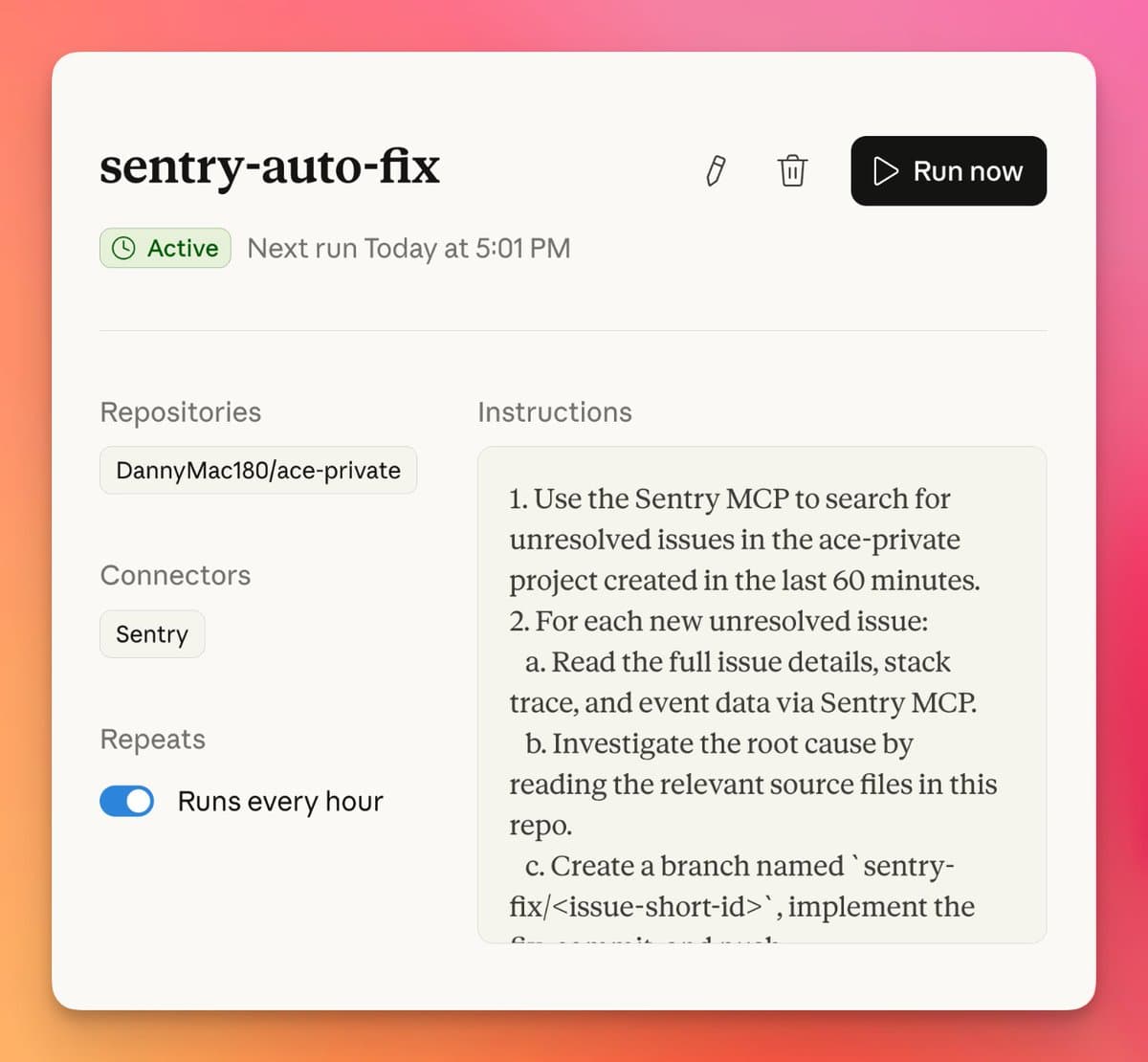
- Anthropic is pairing the desktop push with longer-running automation: scheduled cloud tasks now let Claude Code run recurring background jobs without keeping a local machine awake, and users are already wiring that into issue polling, root-cause analysis, PR creation, and review loops in a Sentry workflow example.
What shipped in Claude Code and Cowork
Claude can now operate a Mac "anything you'd do sitting at your desk," according to Anthropic's launch post. The demo attached to that post shows Claude opening email, following a link, and completing a travel-request form, which makes this more than browser automation or filesystem access alone Form-filling demo.
The rollout matters for engineers because it lands in Claude Cowork and in Claude Code Desktop, not just the chat surface. A follow-up from Anthropic engineer Thomas Reger says it is "only available in Claude Code Desktop" and points to the desktop docs, which also place computer control alongside visual diff review, live preview, PR monitoring, and parallel sessions in the desktop product surface docs thread.
That expands Claude Code from a coding agent that edits files and runs commands into one that can cross the boundary into native tools and internal apps. As one practitioner reaction put it, the practical unlock is "arbitrary apps, not just your browser," especially for companies still running older custom desktop software.
How the permission model works
Anthropic says Claude uses connected services first, including Slack, Calendar, and other integrations, and only falls back to direct screen control when there is no connector for the tool it needs connected-app flow. That is the key architectural detail: API-style integrations remain the first choice, while GUI control becomes the escape hatch.
The permission UI in the screenshot is explicit about the risks and scope. It says Claude may take screenshots and control the mouse and keyboard, warns about "malicious instructions" and privacy concerns, and asks for app-by-app approval. The same dialog shows Finder with "Full control," Chrome as "View only," plus read/write clipboard access, and notes that other windows are hidden during the session
.
Anthropic is also tightening the interaction layer around these actions. A separate update says Claude Code channels now support "Permission Prompts," with users told in the channels update to update Claude and their channel plugins.
Why this changes agent workflows
Computer use is more useful when the agent can stay alive long enough to finish multi-step work. Anthropic's scheduled cloud tasks for Claude Code let recurring workflows run "entirely in the background," so developers no longer need to keep a terminal, browser tab, or local machine running, according to the scheduled-tasks post.
That background model already looks like production operations automation. In one shared setup, a user schedules Claude Code to poll Sentry hourly via MCP, retrieve new issues, investigate root cause, create a PR fix, review its own PR, address findings, and send an email notification when the PR is ready. The screenshot shows an active hourly job tied to a repo and Sentry connector, with instructions that begin by searching for unresolved issues from the last 60 minutes
.
Taken together, the new release closes a gap between tool-connected coding agents and desktop operators. Anthropic engineer Ben Cherny says the Labs team shipped MCP, Claude Desktop, and Claude Code, and that early computer-use prototypes in the Sonnet 3.6 era felt "clunky and slow" before this "full computer use" release in Cowork and Dispatch Cherny's note.