
Codex supports hidden-app control on macOS as users report 38-hour computer-use sessions
Fresh hands-on reports show Codex controlling minimized apps via macOS APIs, using a DOM-aware browser comment mode, and running for day-long sessions in the desktop app. That gives OpenAI stronger evidence that computer use is usable for daily development, though the rollout remains macOS-first and brittle around working-state changes.
TL;DR
- OpenAI’s OpenAI launch post turned Codex into a broader desktop agent, adding background computer use on macOS, an in-app browser, image generation, 90+ plugins, thread automations, and preview memory, as detailed in the official announcement.
- The biggest hands-on signal is speed plus non-interference: according to embirico's background-computer-use post, Codex can click and type with its own cursor while you keep using your machine, and mckbrando's repost of AriX's demo showed a GUI run that several users described as roughly human-speed.
- The browser work is more structured than a plain screenshot loop, because WesRoth's browser demo showed Codex sending both the rendered page and the selected DOM element back into chat, matching OpenAI’s developer post.
- Early users are already pushing it into day-long sessions: itsclivetime's screenshot showed a 38-hour run with seven background terminals, while doodlestein's overnight swarm report described 18 hours of multi-agent orchestration across 14 agents and 500 commits.
- The rollout still has sharp edges. the fresh HN discussion surfaced sandboxing anxiety, brittle working-state assumptions, and lost context across tools, while kevinkern's EU rollout note and the launch post both point to region and platform limits.
You can read the official launch post, skim the broader Codex docs, and check Federico Viticci’s MacStories teardown, which is the clearest outside explanation of why the macOS implementation feels different. The main Hacker News thread is also useful because the comments split cleanly between "this finally works" and "I still do not trust this on my desktop."
Background computer use
The core change is that Codex now drives macOS apps with a separate cursor instead of stealing your active one. In OpenAI's launch thread, the company framed that as background computer use for tasks like frontend iteration and app testing, while kevinkern's cursor clip focused on the extra cursor itself.
MacStories' technical writeup adds the missing implementation detail: Codex is reading the macOS accessibility hierarchy, or AX Tree, rather than relying only on screenshots and coordinate clicks. That matches thsottiaux's description that the agent can use "a lot more than pure pixels," and it explains why andersonbcdefg's repost of qinzytech said hidden or minimized apps can still be inspected through system APIs.
The UX detail people kept noticing was the split cursor model. dkundel's post about working in parallel and npew's hands-on note both treated "doesn't interrupt your flow" as the headline feature, not just a nice animation.
Comment mode
The browser addition is not just "Codex can open a tab." In WesRoth's demo, clicking an element inside the in-app browser sends two things into the thread: a screenshot of the page and the exact DOM node. OpenAI described the same flow in the OpenAIDevs browser post as a way to comment directly on local or public pages while Codex iterates on UI, apps, and games.
That makes the browser a tighter frontend loop than the usual "describe what looks wrong" routine. daniel_mac8's runtime framing bundled browser use with plugins, memory, automations, and multi-terminal workflows, which is a fair read of where this release is heading.
Automations and long-running threads
OpenAI's launch post bundled three persistence features together: automations that resume in the same thread, preview memory for preferences and corrections, and proactive suggestions for what to pick up next. reach_vb's feature list is the cleanest tweet summary of that cluster.
The hands-on reports are already leaning on duration. itsclivetime's screenshot showed a single thread still running after 38 hours with seven background terminals, and dkundel's teammate post described a workflow where plugins, CLIs, automations, and memories let Codex handle relatively vague requests.
The heavier end of that pattern showed up in doodlestein's overnight swarm report, which combined Codex with Claude Code and custom orchestration tools across seven projects. That report is about a mixed-agent stack rather than stock Codex alone, but it still shows where long-lived coding sessions are heading once thread reuse and unattended runs stop feeling fragile.
Rollout caveats
Fresh discussion on Codex for almost everything
The freshest discussion centers on the new computer-use behavior itself: one commenter described seeing a literal cursor move through Slack and Chrome to gather information, calling it impressive but unsettling. Others pushed on the operational implications—whether this kind of agent needs sandboxing and clearer safety boundaries, and whether the macOS-only rollout limits the product’s ambitions outside developer-heavy environments. A second new thread is about practical trust and continuity rather than raw capability. One commenter said the product is useful but still brittle when working directories move, while another noted that switching between Codex and other tools loses accumulated project context unless that context is kept in repo files. There are also fresh complaints about pricing/message limits, suggesting the launch is not landing uniformly well even among interested users.
The best counterweight to the launch hype is the Hacker News thread. According to the fresh HN discussion, commenters focused on four practical problems: the creepiness of a glowing cursor moving through Slack and Chrome, unclear sandbox boundaries, brittle behavior when folders move, and context loss when switching between Codex and other tools.
User reports on X were not uniformly glowing either. BEBischof's post mentioned crashes, a broken stop button, and model-selection issues, while jxnlco's question about the model selector pointed at a more interesting class of concern: how much UI surface an agent should be allowed to manipulate inside its own host app.
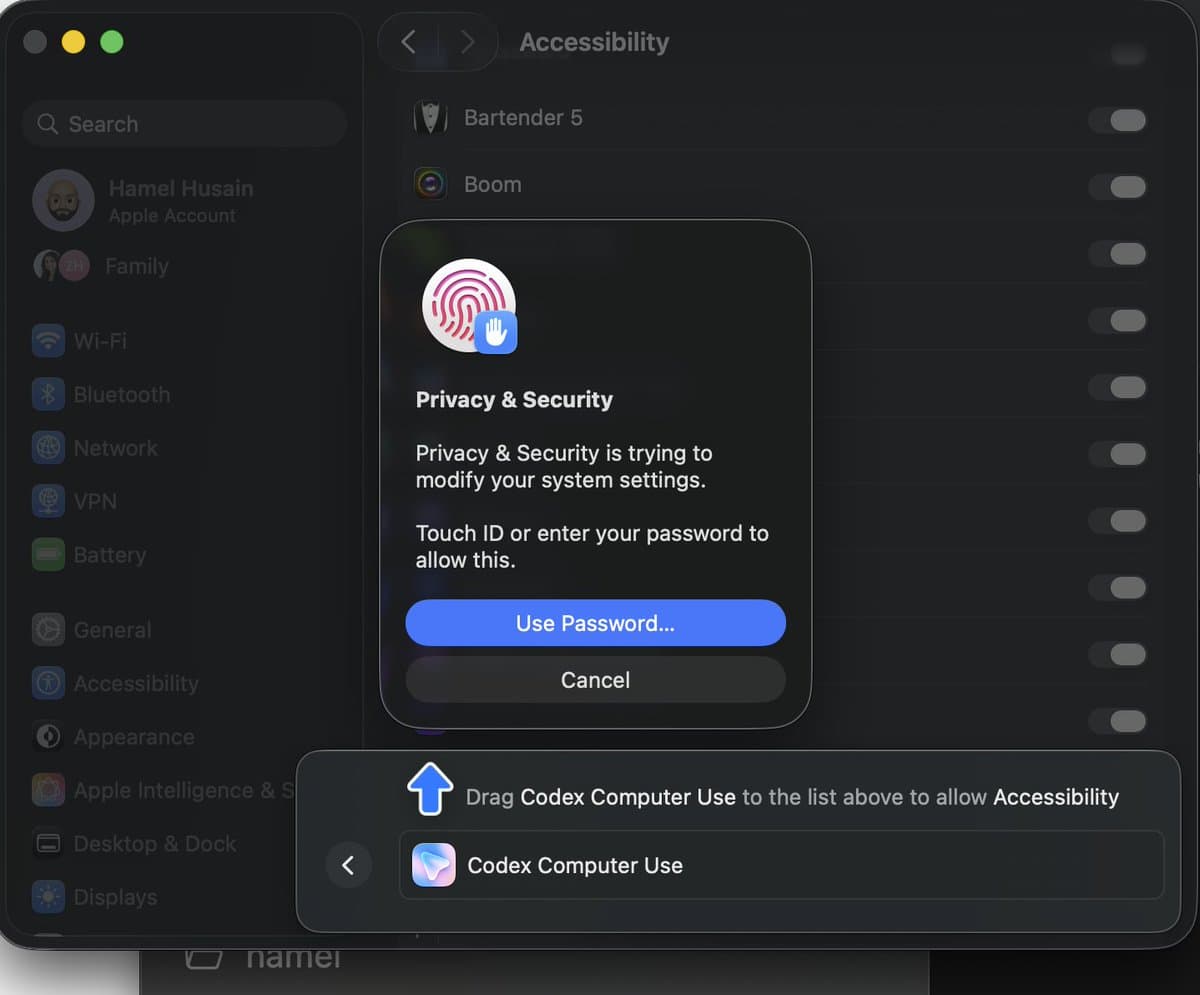
There is also a straightforward trust problem in the permissions model. HamelHusain's screenshots show Codex asking for Accessibility and Screenshot access, and kylejeong's Apple Music prompt is a reminder that once people start treating computer use as a general desktop operator, odd permission requests become part of the product experience.
Windows app, Mac-only agent
One slightly buried detail is that the Codex app itself is no longer Mac-only. The developer docs say the app is available on macOS and Windows, and embirico's Intel Mac note marked Apple Intel support on launch day.
Computer use is narrower than the app footprint. OpenAI's official post says personalization and computer use are initially macOS-only, embirico's reply said you still need the app to grant permissions before using computer use from the CLI, and kevinkern's post said the feature was not available in the EU at launch. That leaves Codex in an awkward in-between state: wider desktop distribution, but the headline agent behavior still tied to macOS permissions and staged regional rollout.