
Expect launches CLI to QA apps in a real browser and record bug videos
Expect wraps browser QA for Claude Code, Codex, or Cursor into a CLI that records bug videos and feeds failures back into a fix loop. It gives coding agents a tighter UI validation cycle without requiring a custom browser harness.
TL;DR
- Expect launched as an open-source CLI and agent skill that lets Claude Code, Codex, or Cursor test app changes in a real browser, then iterate until checks pass, according to the launch thread and the demo post.
- The core loop is browser QA plus replay: Expect's demo post says it "generates a highlight reel for every test" and feeds failure context to another agent for a fix pass.
- Setup is deliberately lightweight: the launch thread points to a single
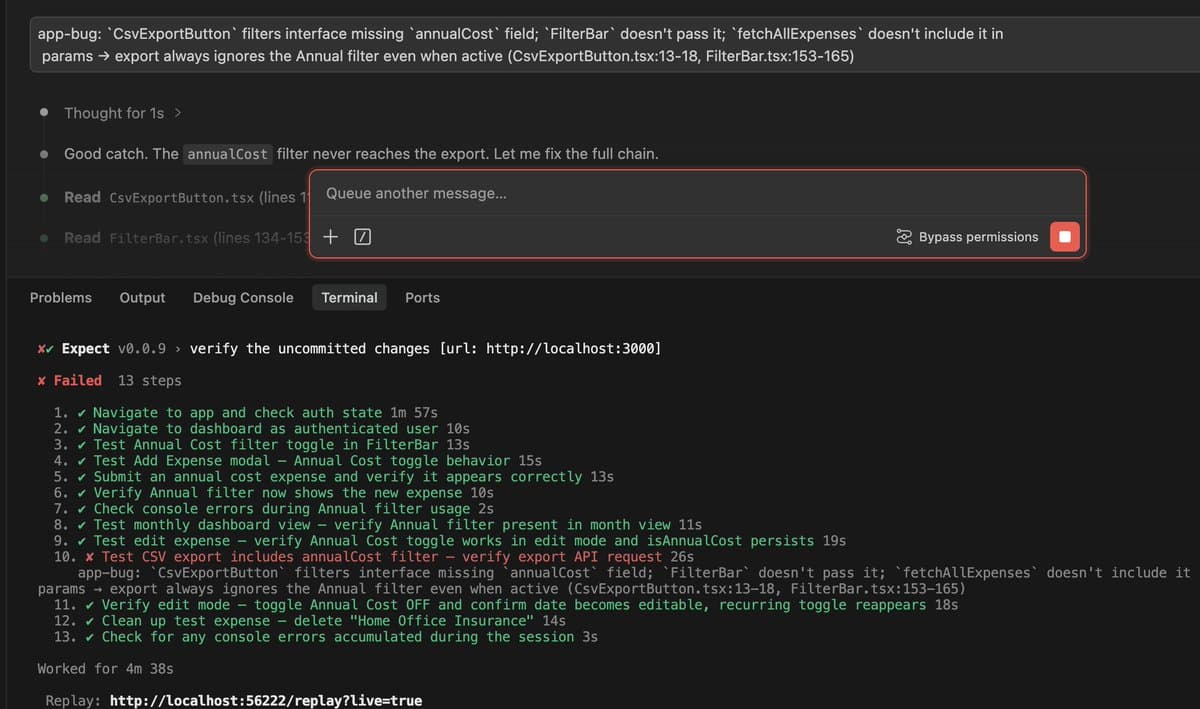
initcommand, while an amplified recommendation shows early developer reaction centering on just installing it first. - Early usage examples show it catching UI-to-backend wiring bugs, with a shared failure screenshot surfacing a missing
annualCostfilter in a CSV export path and attaching a replay link.
What shipped
Expect packages browser-based app QA into a command-line workflow instead of requiring teams to wire up their own browser harnesses. In the announcement, Aiden Bai describes the flow as: run Claude Code or Codex to QA your app, "watch a video of every bug found," then "fix and repeat until passing." The same post says it runs as either a CLI or an agent skill, and links to the GitHub repo.
The project is positioned as a wrapper around tools engineers already use rather than a new coding agent. In the follow-up demo, Bai says Expect uses "your existing Claude Code, Codex, or Cursor under the hood," which makes the integration story more about inserting browser validation into an existing agent loop than switching stacks. The project page adds that it scans unstaged changes or branch diffs, generates a test plan with AI, and asks for approval in the terminal before executing tests in a live browser.
How the loop works in practice
The distinctive feature is the debugging artifact. Bai's demo post says Expect "generates a highlight reel for every test" and, when something fails, provides "context for another agent to fix." That turns UI regression checking into something closer to an agent-readable bug report with a browser replay attached, not just a pass/fail test log.
A shared practitioner example shows the kind of issue this can catch. The failure screenshot reports that a CsvExportButton filter interface was missing an annualCost field, FilterBar was not passing it through, and the export request therefore ignored the Annual filter; the run failed on "verify export API request" after 13 steps and produced a replay link. That lines up with the launch pitch that Expect can find bugs without manual hunting, and with an early repost urging developers to "probably go ahead and just install this" rather than treat it as another browser-testing demo.