
Google Stitch launches an AI-native canvas with DESIGN.md and voice mode
Google rolled out a redesigned Stitch workspace that accepts text, code, PRDs, and images on a spatial canvas, then generates prototypes and portable DESIGN.md files. Teams testing AI-native UI workflows can use it to try a tighter design-to-code loop in the live product.
TL;DR
- Google is rolling out a rebuilt Stitch workspace with an "AI-Native Canvas," a smarter design agent, instant prototyping, DESIGN.md support, and voice mode, according to the feature teaser and early rollout footage.
- The new canvas appears to accept more than plain prompts: TestingCatalog's beta screenshot shows a new Stitch BETA workspace, while a detailed breakdown from Wes Roth's thread says it can work from text, code, PRDs, and reference images in one spatial canvas.
- Voice is the clearest workflow shift. In a hands-on demo, a user starts from one prompt, turns on voice mode, and has Stitch generate a mobile app layout while the agent edits the canvas live.
- Google is positioning Stitch closer to a design-to-prototype-to-code handoff: The Rundown AI's summary says the agent reasons over project history, and the supporting thread says DESIGN.md is meant to make design systems portable into codebases.
What actually shipped in Stitch
The update turns Stitch from a prompt-to-UI generator into a canvas-based design environment. TestingCatalog's announcement clip lists five new pieces: "AI-Native Canvas," "Smarter Design Agent," "Instant Prototypes," "Design Systems and DESIGN.md," and "Voice mode."
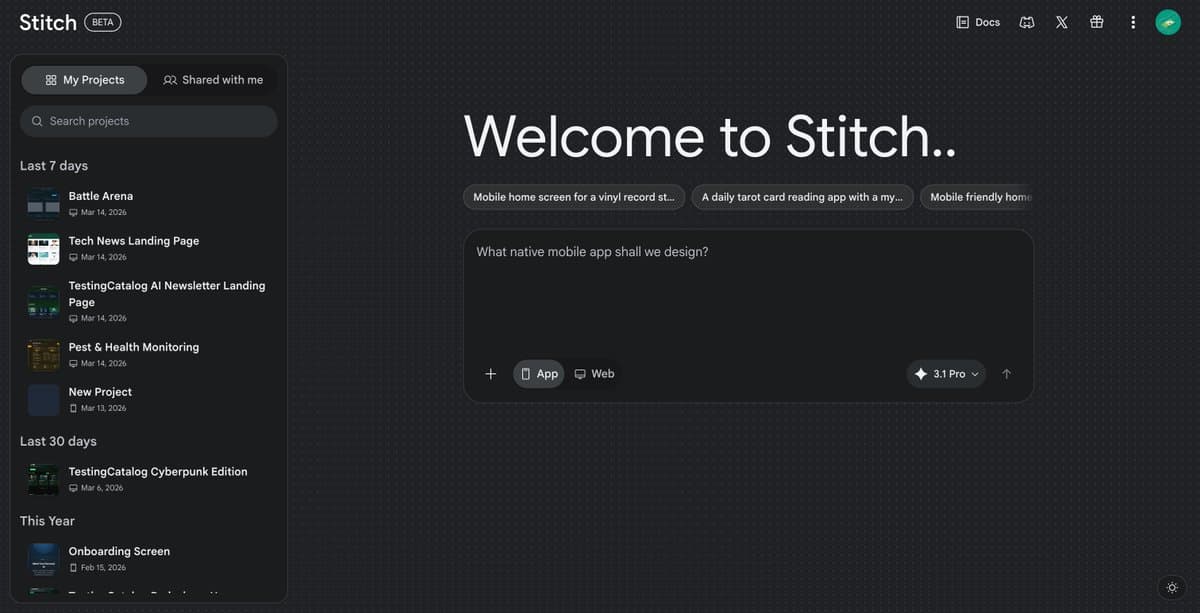
The live product already reflects that shift. TestingCatalog's beta screenshot shows a new "Stitch BETA" home screen with app and web project starters, project history, and a "3.1 Pro" indicator, while its earlier rollout post says the new experience is "already rolling out to users" and available for testing.
How the new workflow changes design-to-code loops
Voice mode is not just dictation. In the demo post, the flow is "start with a single prompt," then "enable the voice mode," explain the app, and let "the agent take care of it" while updating the canvas. That suggests Stitch is now operating more like an interactive design agent than a one-shot generator.
The deeper technical claim is that the agent has full project context. According to the thread breakdown, Stitch can mix mobile and desktop screens in one workspace, swap assets across multiple screens, infer a brief from the UI under construction, and create interactive prototypes with a Play action. The same post says DESIGN.md is intended to anchor a unified design system and help teams export tokens or import existing brand guidance, including from a live URL.
What engineers can test now
For engineering teams, the practical value is the tighter handoff between requirements, interface generation, and prototype output. The Rundown AI's recap says Stitch can turn static screens into interactive prototypes in seconds and auto-generate a "logical next screen," which matters for quickly validating flows before code is written.
The rollout still looks early. TestingCatalog's initial post said voice mode was "not available yet" in the first wave, but the later full announcement and hands-on demo show voice as part of the updated product. That points to a staged release rather than a single global flip, with the public entry point available through the Stitch site.