
Zed releases v1.3.5 Terminal Threads for Claude, Amp, and Pi sessions
Zed v1.3.5 adds Terminal Threads, turning CLI agents and long-running shell jobs into managed sidebar threads. Zed says this becomes the main path for Claude Code inside the editor as older subscription sign-in flows change.
TL;DR
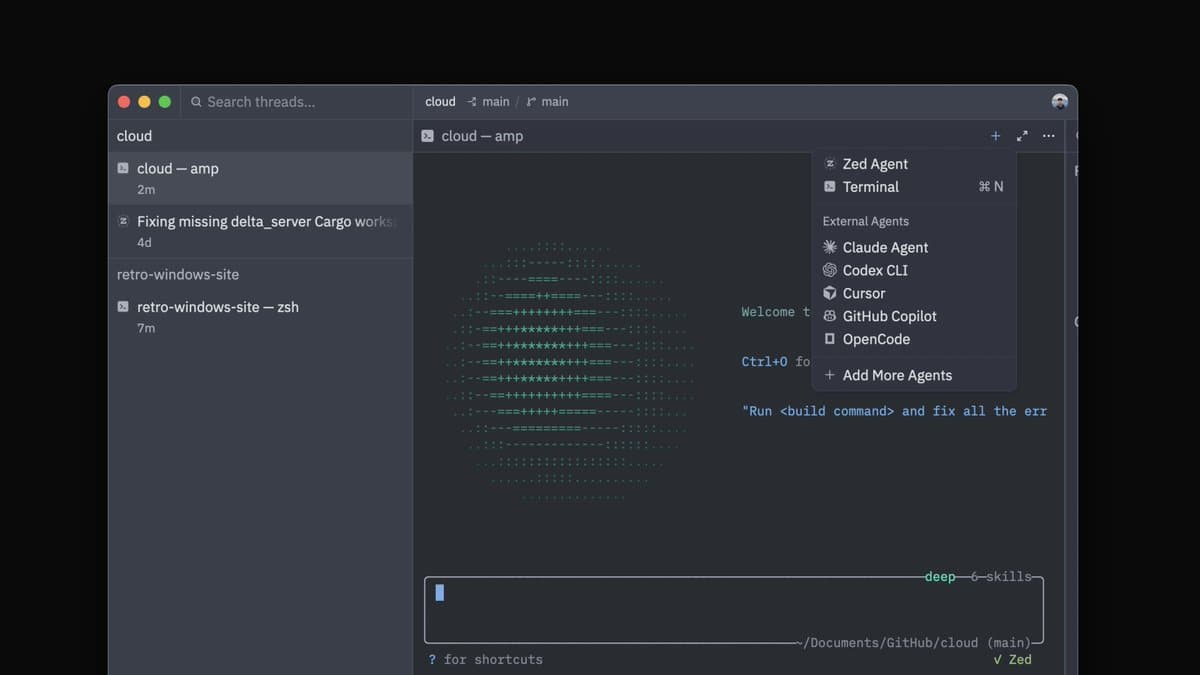
- Zed v1.3.5 adds Terminal Threads, which let users run Claude, Amp, Pi, or other terminal-based workflows as managed threads inside the Threads sidebar, according to zeddotdev's launch post.
- A Terminal Thread starts from the Agent Panel and keeps the shell session visible in the sidebar, where Zed says it can hold CLI agents, long compiles, eval runs, and other long-lived jobs, per zeddotdev's usage post.
- Zed tied the feature directly to Anthropic's tooling changes: zeddotdev's Claude Code note says Terminal Threads will become the only way to use Claude Code in Zed with an existing Claude subscription.
- Zed published both a blog post and a stable release page for the feature, while zeddotdev's walkthrough post points to a longer demo video.
Zed is turning the editor sidebar into a home for terminal-native agents, not just chat panels. You can jump from the launch thread to the feature post, then over to the stable releases page. The interesting wrinkle is that Zed is already framing this as the path forward for Claude Code subscriptions, not just a nice new shell UI.
Terminal Threads
The core change is simple: terminal sessions now live as first-class threads beside the rest of Zed's agent surfaces. Zed's launch post says the sidebar can host Claude, Amp, Pi, or any other terminal-based workflow inside the same thread model it already uses for agents.
Zed's own examples split neatly into four use cases:
- CLI agents
- Long compiles
- Eval runs
- Anything you want to keep visible and organized in the workspace
That last point matters more than the launch copy lets on. A plain terminal tab disappears into editor clutter; a managed thread makes long-running work easier to park, revisit, and keep adjacent to other agent conversations.
Claude Code
Zed is not pitching Terminal Threads as a generic shell feature only. In the same launch thread, the company said the feature is "especially useful for Claude Code users," then added that upcoming pricing changes mean Terminal Threads will be the only way to use Claude Code in Zed with an existing subscription.
That gives the release a second job: it is also a migration surface. Instead of signing into Claude through an older Zed-specific agent path, users can keep using their existing Claude subscription through a terminal session that Zed now manages inside the editor.
Walkthrough video and release links
Later the same day, Zed linked a walkthrough video by rtfeldman showing the feature in action. For a small release, that extra demo is a tell that the company expects users to change workflow, not just click a new menu item once.
The launch thread also points to two canonical references: Zed's Terminal Threads blog post and the stable releases page. Commentary around the launch was light but positive, with badlogicgames' reaction summing up the obvious takeaway: for developers already living in CLI agents, this is the kind of feature that makes switching editors feel less expensive.