
BeatBandit adds a full NLE editor for one-app story-to-edit workflows
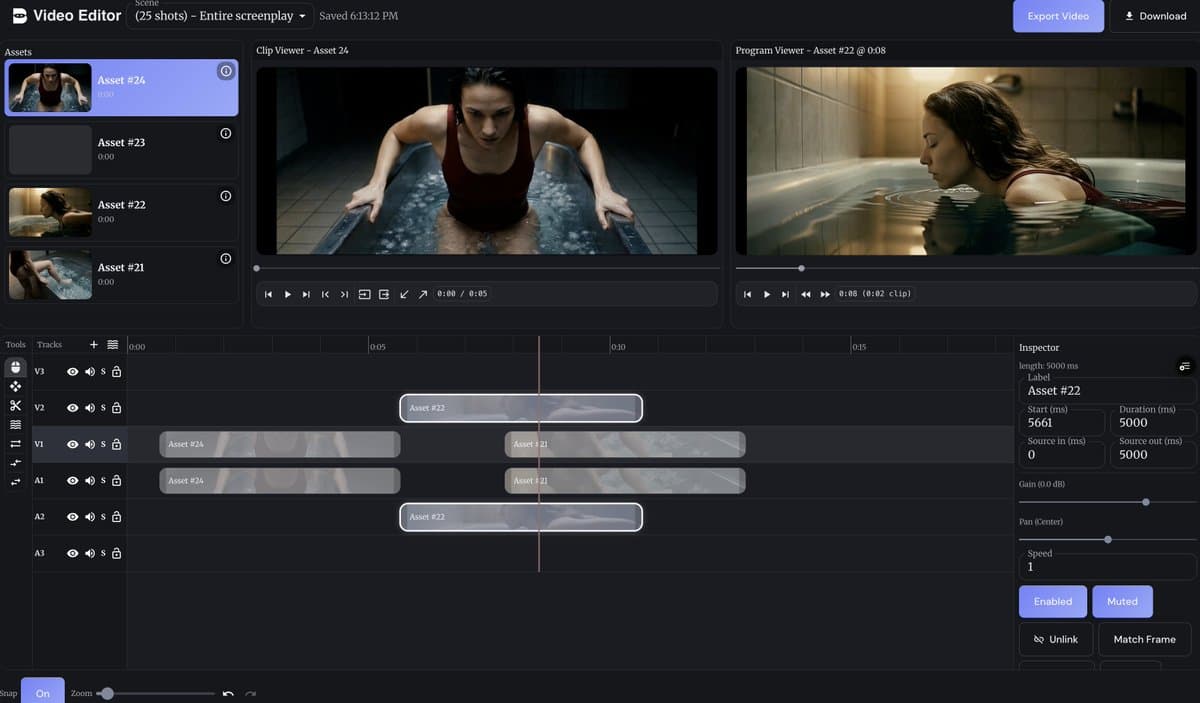
BeatBandit added a full NLE editor so scripts, shot lists, character setup, video generation, and editing can stay in one app. MultiShotMaster also arrived in-browser with 1-to-5-shot generation and node-graph chaining, so test both if you want faster narrative iteration.
TL;DR
- BeatBandit added a full non-linear editor, so writing, screenplay drafting, shot definition, character setup, video generation, and final assembly can now stay inside one service, according to the creator's launch post.
- The same BeatBandit thread shows a new “Generate Video” action inside Shot List view, tying generation directly to the planning layer rather than a separate export step Shot List update.
- In parallel, AI FILMS Studio’s MultiShotMaster tutorial brought Kuaishou’s open-source MultiShotMaster into the browser, with 1-to-5-shot generation in a single pass and a cap of 308 total frames.
- The linked tutorial page says MultiShotMaster keeps characters and scenes consistent through a hierarchical prompt structure and can be chained in a node graph with enhancement, TTS, and lipsync tools.
What BeatBandit shipped
BeatBandit’s new release is an editing-layer expansion, not just another generator. The creator says users can now write the story, turn it into a screenplay, define shots, lock in consistent characters, generate clips, and cut them together without leaving the app. That closes a workflow gap many AI video tools still leave to Premiere, Resolve, or CapCut.
The follow-up post adds one concrete UI detail: Shot List now includes a “Generate Video” option. That matters because it places generation beside shot planning, which is closer to how directors and previz artists already work.
What MultiShotMaster adds to the workflow
MultiShotMaster solves a different problem: generating short narrative sequences with continuity already baked in. AI FILMS Studio’s tutorial thread says the model can output 1 to 5 shots per pass, supports 16:9 and 9:16, and offers 480p on a 1.3B model or 720p on a 14B model, with costs scaling by duration and resolution.
The full tutorial describes the prompt recipe: one global scene description for shared character and environment traits, then per-shot captions for framing and action. It also says the model is available in a node graph, where multi-shot generation can feed directly into enhancement, text-to-speech, and lipsync steps.