
Stages AI introduces CUE with 500-shot generation and saved transition prompts
Dustin Hollywood says Stages AI is rolling out a CUE-centered update with shot tracking, saved transition prompts, and one-click generation of up to 500 shots. Teams can use it to keep characters, motion, and timelines consistent across full sequences.
TL;DR
- dustinhollywood's CUE rollout post says Stages AI's new CUE agent can turn a script or brief into tracked shots, keep style and motion aligned, and generate up to 500 shots in one click.
- In dustinhollywood's transition prompt post, Stages also adds saved transition prompts inside VIDX, with controls aimed at preserving screen direction, subject scale, and motion continuity.
- dustinhollywood's one-shot demo frames the current workflow as video to frames and prompts to storyboard and timeline in about 30 seconds, while his multi-shot post says multi-shot generation lands in under 30 seconds.
- dustinhollywood's CUE poster pitches the bigger ambition: one control plane for image, video, audio, 3D, memory, continuity, planning, and execution.
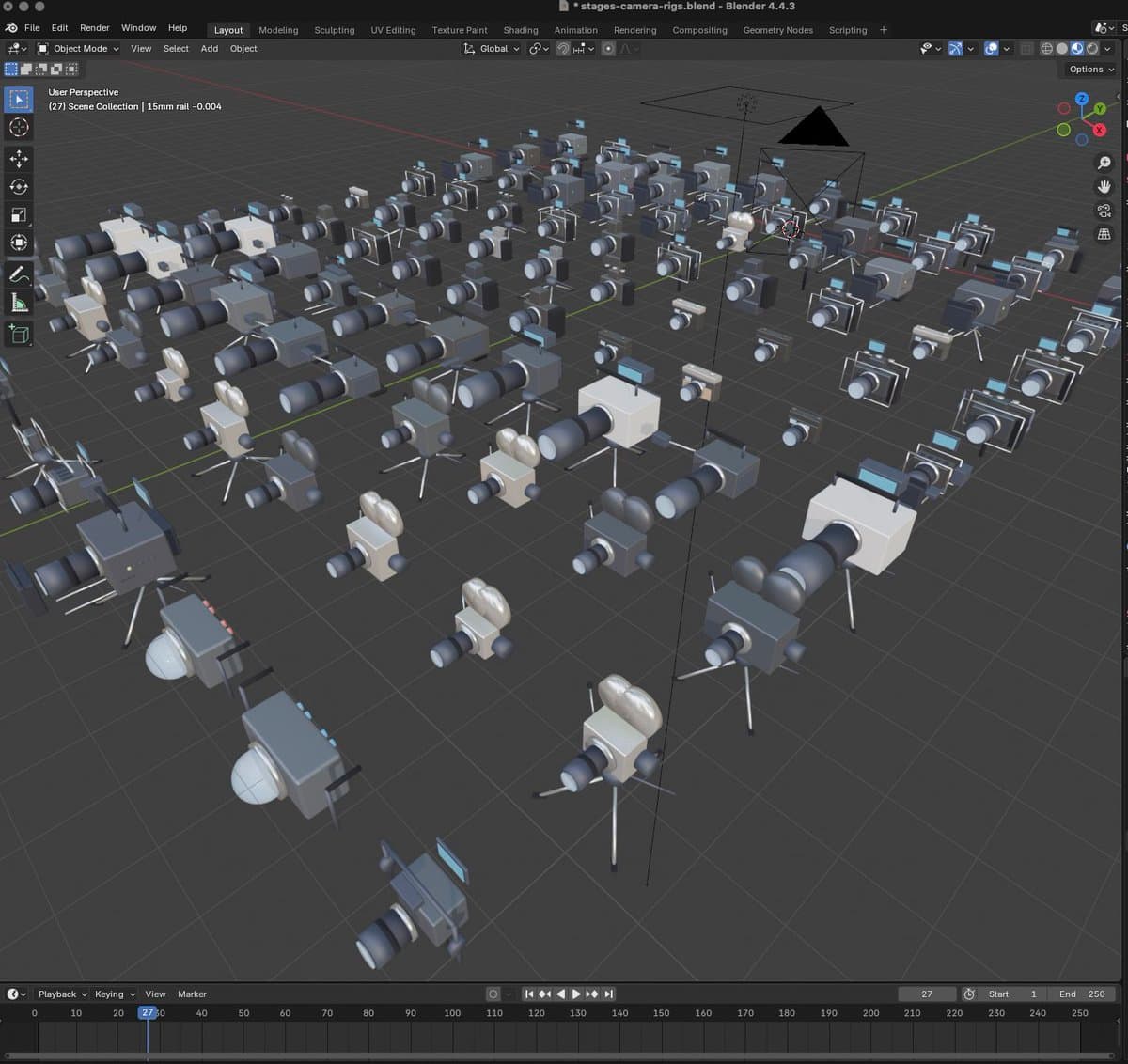
You can open the Stages app via the product link, watch the main CUE demo stack consistent shots into a timeline, and inspect the Bridge Composer screenshot where transition prompts can now be saved. The more surprising bit is how much of the update is really editing infrastructure: one teaser shows compact CUE chat, transition tools, speed ramps, and sound curves, while an earlier prototype post points to Blender camera rigs as part of the same workflow.
CUE
Stages is turning CUE into the front door for the product. In dustinhollywood's launch post, Dustin Hollywood says the agent can ingest images or video, convert them into a dialogue driven plan, track each project piece down to the shot, and prep sequences for new generation inside the timeline.
The core creative promise is consistency at sequence scale, not just single clip generation. dustinhollywood's storyboard screenshot shows a shot level view with character fields and visual descriptions, which lines up with the claim that CUE can keep characters and story beats coherent across many shots.
Bridge Composer
The new VIDX tooling is full of continuity controls. dustinhollywood's transition prompt post shows saved prompts inside Bridge Composer, and his update teaser adds dedicated speed ramp and sound curve editors.
The transition panel tracks three specific constraints:
- preserve screen direction
- preserve subject scale
- carry motion energy from the outgoing shot into the destination framing
That is editor brain software, which is the interesting part here. The prompts are not only asking for a pretty bridge, they are trying to keep shot logic intact.
One-shot to timeline
Stages keeps pitching speed as a feature, not a benchmark. dustinhollywood's one-shot demo says a clip can move from video to frames and prompts to storyboard and timeline in about 30 seconds, while his multi-shot post makes the same claim for multi-shot generation.
The UI mockups in dustinhollywood's update teaser suggest that fast generation is being wrapped in more post controls, including a bottom canvas palette, compact chat history, and timeline side tools. His generate-button redesign post even shows model cards sitting next to a shutter style generate button, which makes the interface read more like a camera and edit suite than a model picker.
Blender rigs
The most concrete new subsystem sits outside the timeline. dustinhollywood's Blender prototype post says Stages is building around 100 camera rigs spanning cinema, photography, underwater, film, and digital setups, and his camera rig screenshot shows an ARRI Alexa 35 rig inside Blender.
dustinhollywood's lighting rig post adds matching lighting assets, including softboxes, Fresnels, LED tube rigs, and ring lights. That turns the Stages roadmap into something broader than shot generation: it is creeping toward virtual production tooling with camera and lighting grammar baked in.