
Claude Code adds /slides skill: 12 HTML layouts and PNG self-checks
Peter Yang published a /slides skill for Claude Code that turns rough outlines into animated HTML decks with 12 layouts, three templates, live charts, and screenshot-based self-fixes. It matters because presentation polish becomes a repeatable prompt-to-HTML pipeline that also runs in Codex.
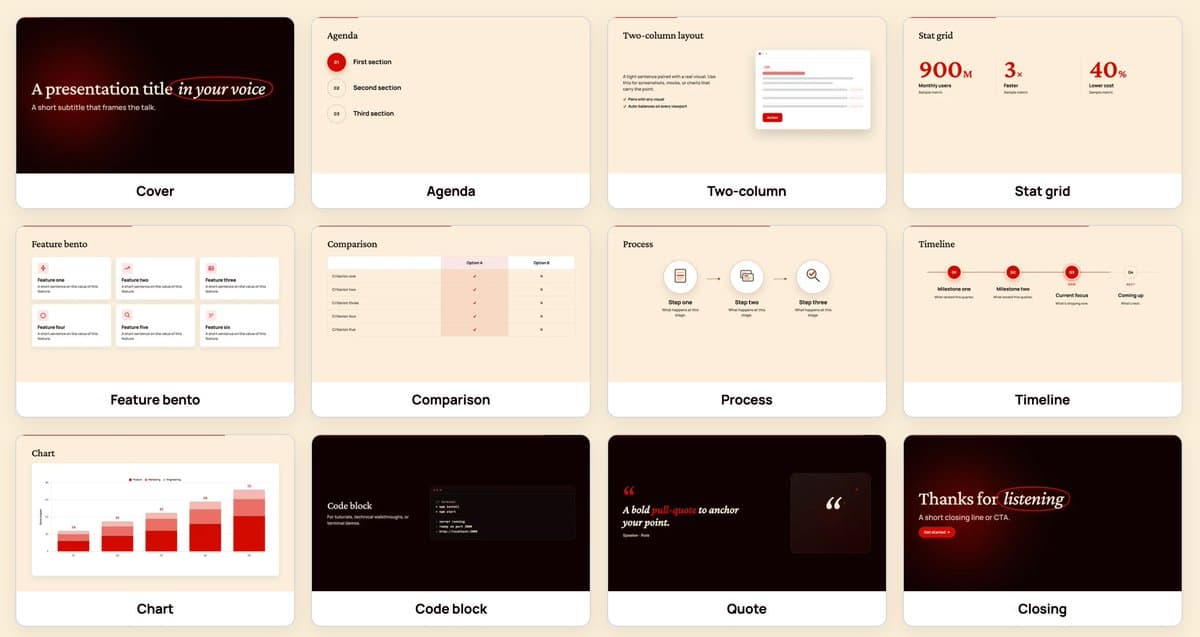
TL;DR
- petergyang's tutorial post frames /slides as a Claude Code skill that turns a rough outline into an HTML presentation, with 12 slide formats, 3 templates, live charts, subtle animation, and a render-check-fix loop.
- In petergyang's format overview, Yang says the skill can generate 12 distinct layouts instead of defaulting to bullet slides, and links a written guide.
- petergyang's starter prompt shows the workflow in one block: generate self-contained HTML, prefer varied layouts like cover, stat grid, chart, quote, code, and comparison, then render every slide to PNG and fix layout bugs.
- The demo in petergyang's video post pitches the output as an animated presentation built in minutes, while the same thread says the prompt also works in Codex, not just Claude Code.
You can skim the written guide, open the sample deck, and watch the full tutorial video. The useful bit is the workflow split: layout variety comes from a fixed slide library, polish comes from PNG screenshots, and the final output stays in HTML instead of getting trapped in PowerPoint.
HTML decks, not slideware
Yang's pitch is blunt: he was tired of making PowerPoint slides, so he built a /slides skill instead. The skill outputs self-contained HTML decks, which matters because the medium can carry live charts, web-native motion, and reusable templates in one file-based pipeline.
The example posts keep returning to the same claim: HTML is doing the heavy lifting. Yang describes the result as a beautiful animated presentation built in minutes, then points readers to both the video walkthrough and the browser-hosted sample deck.
Twelve layouts and three templates
According to Yang's format thread, the skill ships with 12 slide formats. His starter prompt names several of them directly:
- cover
- stat grid
- chart
- quote
- code
- comparison
The same posts say the system uses 3 templates and explicitly prefers varied layouts over bullet lists. That turns the deck into a constrained design system, not a one-shot prompt asking the model to improvise slide structure from scratch.
PNG self-checks are the real trick
The sharpest workflow detail in Yang's main post is the feedback loop: the model renders slides to images, inspects them, and fixes its own layout mistakes. His pasted prompt makes that step concrete by telling Claude Code or Codex to render each slide to PNG, inspect the result, and repair layout bugs.
That gives the skill a second pass most AI deck generators skip. Instead of trusting HTML and CSS on the first render, the system uses screenshots as QA.
The starter prompt is portable
Yang did not keep the method locked inside the tutorial. In the follow-up post, he published a starter prompt readers can paste into Claude Code or Codex, and linked both the sample output and the fuller paid guide.
The prompt also reveals the design brief in compact form:
- generate self-contained HTML decks in markdown
- use 12 varied layouts instead of bullet-heavy slides
- add one subtle ambient animation per slide
- render slides to PNG for inspection
- ask clarifying questions before starting
That portability is the last useful reveal here. Yang is presenting /slides as a skill pattern, not a single app, which is why the same recipe is framed as usable inside both Claude Code and Codex.