
Freepik Spaces cuts Kling 3.0 Omni cost with 2x2 grid prompts
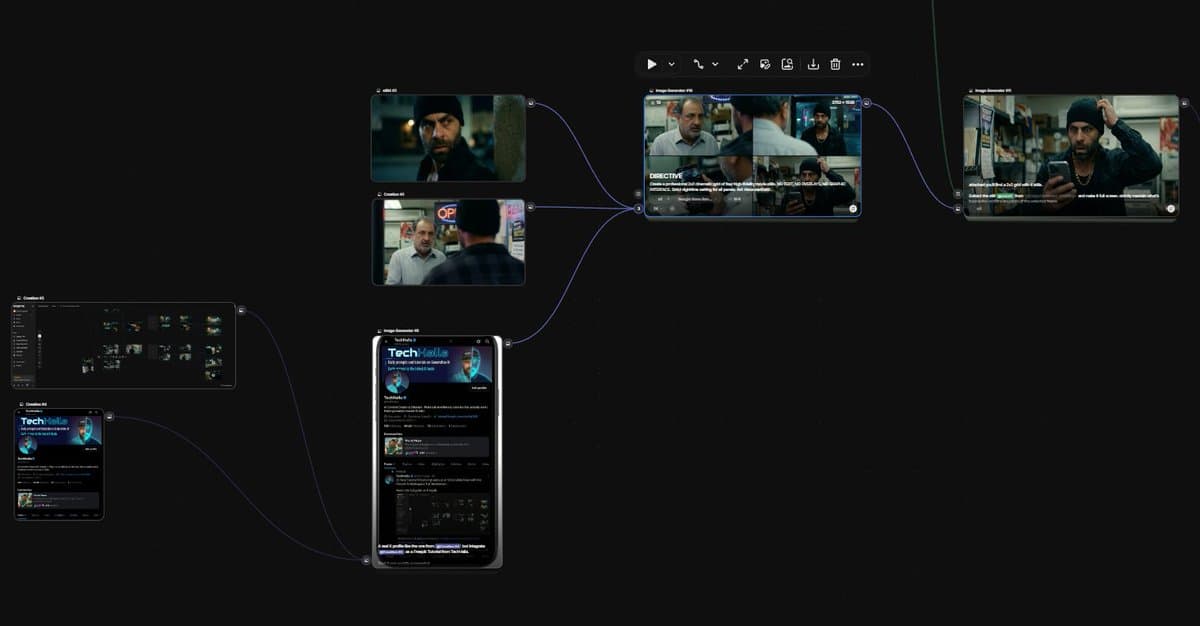
A creator shared a Freepik Spaces workflow that makes 2x2 cinematic grids, extracts four stills into Nano Banana 2, then animates them in Kling 3.0 Omni. The claimed savings come from matching Omni's 10-second cap to four preplanned shots instead of larger grids.
TL;DR
- A creator shared a Freepik Spaces workflow built around 2x2 cinematic grids, not the usual 3x3 layout, and said the setup cuts Kling 3.0 Omni spend by as much as 50 percent by matching the model's short clip format to four planned shots main thread 2x2 grid step.
- The workflow uses four stills as the planning unit: generate a 2x2 grid, split the grid into individual frames, then feed those stills forward for animation grid extraction frame-by-frame extraction.
- Freepik's own docs line up with the method: Video nodes support prompts plus visual references, and the List node is built for batch processing items through a workflow Kling handoff.
- The still-generation step uses Nano Banana 2, which Freepik markets as a fast image model with reference support for keeping characters, products, or locations consistent across outputs workflow setup Nano Banana 2.
You can browse Spaces itself, skim Freepik's video node docs and utility node docs, and the creator also published the exact shared template, 2x2 Grid Prompting for Video. Freepik describes Spaces as an infinite canvas for AI image, video, and text workflows, plus partner-made templates that users can copy and adapt.
2x2 cinematic grids
The central trick is brutally simple. Instead of spending credits on a 3x3 board of nine candidate shots, the workflow generates a 2x2 board of four cinematic stills and treats those four frames as the whole shot plan.
The creator's argument is that Kling 3.0 Omni does not need more than that for a 10 second clip. Four distinct anchors are enough to map the beginning, middle beats, and end of a short sequence.
List node extraction
Once the 2x2 board is approved, the workflow slices it into four separate images. The thread says this is done by iterating through the grid with a list, then dropping the result into an NB2 node.
That matches Freepik's own description of the List node: it aggregates prompts, images, video, or audio for batch processing, so one structure can push multiple assets through the same next step. Freepik's image node docs describe the image side of Spaces as chainable pipelines, which is exactly the kind of plumbing this workflow leans on.
Kling 3.0 Omni references
The final step is to plug those four stills into a Kling 3.0 Omni video node as references, then write a prompt that calls out each shot scene by scene. Freepik's video node docs say the Video Generator accepts text prompts and optional visual references across more than 40 video models, including Kling.
The interesting part is the division of labor. Nano Banana 2 does the fast image planning, and Kling handles motion and continuity across the selected frames. Freepik's Nano Banana 2 page pitches the model on speed plus reference-based consistency, which makes it a neat preproduction partner for reference-heavy video generation.
Shared Space template
The thread ends with a direct link to the reusable Space. Exa's read of that page identifies it as "Spaces | 2x2 Grid Prompting for Video," not a vague demo or teaser.
That matters because the workflow is packaged as something people can inspect and clone inside Freepik's own system, not just reverse-engineer from a thread. For creative tooling, that is the good stuff: process, nodes, and prompts in one place.