
Freepik releases Cuco B. Hops trailer workflow with Nano Banana 2 and Seedance 2.0
Freepik published a Cuco B. Hops breakdown that moves from Nano Banana 2 character sheets to Seedance 2.0 scenes inside one workspace. Teams can use it as a repeatable template for cross-shot character consistency.
TL;DR
- Freepik's Cuco B. Hops thread turns a familiar WhatsApp bunny into a short crime trailer, then breaks the whole process into character sheets, scene planning, motion prompting, and final assembly in one workspace.
- According to Freepik's character-design post, the team used Nano Banana 2 to build locked character sheets first, which lines up with Freepik's own Nano Banana 2 guide describing improved multi-character consistency.
- In the motion step, Freepik says every scene was animated with Seedance 2.0 inside Spaces, while Freepik's Seedance 2.0 guide frames the model around motion realism and scene consistency.
- Freepik's prompting note splits image prompts from video prompts: images define character, angle, lighting, and mood, while video prompts define camera movement and action.
- The final post says the entire trailer was made by one person in one workspace, which matches Freepik's Spaces product page and Spaces docs describing a shared infinite canvas built from connected workflow nodes.
Freepik also published the raw sketch-style transformation prompt in its style post, not just the polished trailer beats. The official Spaces launch blog says the canvas is meant to connect image, video, audio, editing, and automation in one visual system, which makes the Cuco thread read less like a one-off flex and more like a template. You can browse the Seedance 2.0 guide, the Nano Banana 2 guide, and the create-your-first-Space docs alongside the thread.
Nano Banana 2 character sheets
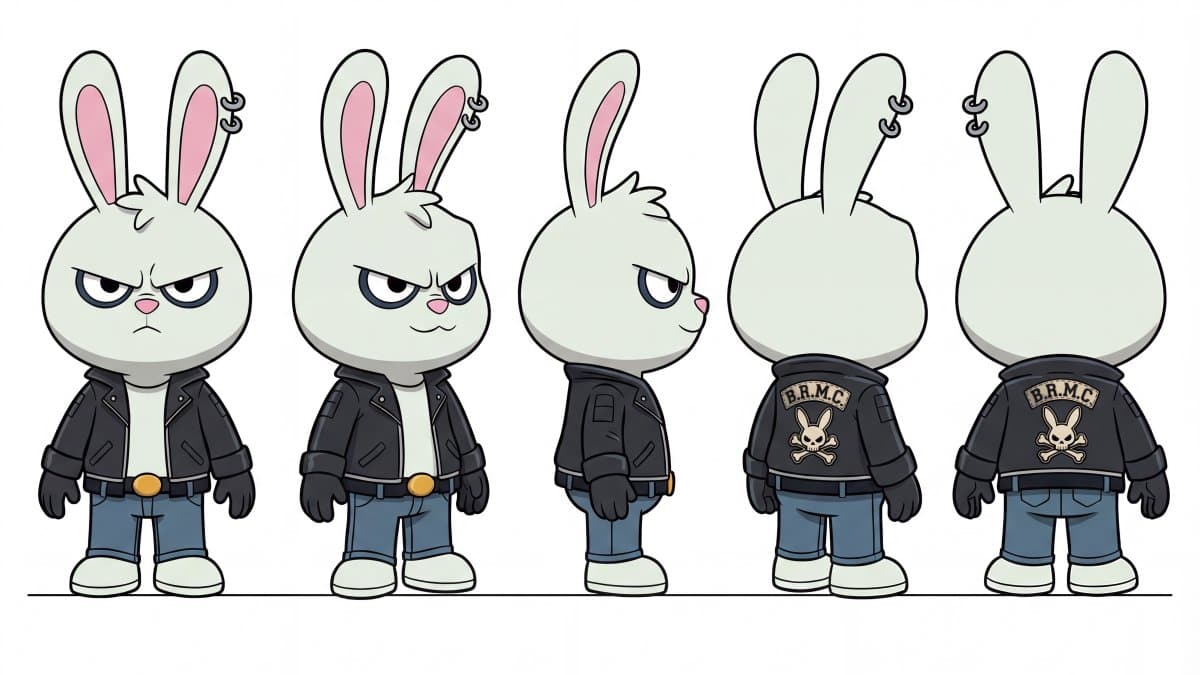
Freepik starts with model sheets, not video. In the first workflow step, it says Cuco, the grandma, and the cops were all built in Nano Banana 2, then kept consistent by reusing the same locked description in every prompt.
That maps neatly to Freepik's Nano Banana 2 guide, which says the model can maintain consistency for up to five characters and preserve object fidelity across a single workflow. For this trailer, the practical unit is not a hero image. It is a reusable sheet that can survive multiple shots.
Scene planning as a shot list
The second step is plain pre-production. Freepik's planning post says the world was mapped scene by scene before generation, including streets, wanted posters, hideouts, and meme cutaways.
That matters because the thread is structured like a mini production board:
- character sheets first
- a scene-by-scene map next
- image prompts before motion prompts
- final scenes assembled inside one workspace
Freepik's Spaces docs describe the same logic in product terms: a canvas-based workflow made of connected nodes for generation, editing, prompting, and automation.
Seedance 2.0 motion prompts
Freepik's strongest reveal is how literal the video prompting gets. The animation step says to start with a strong image prompt, then guide motion with a separate video prompt. The intro scene scripts camera position, glass break timing, suspended mid-air comedy, and the final hold on the broken bank window. The sidewalk scene scripts recognition, reaction, and even the gag line about grandma loving the meme bunny.
The prompt explainer turns that into a simple split:
- image prompt: character, angle, lighting, mood
- video prompt: movement, camera behavior, action timing
- audio direction: foley and ambient sound, often with no music
Freepik's Seedance 2.0 guide says the model is built for motion realism, scene consistency, and stronger user control. The Cuco prompts show what that control looks like when someone writes like a storyboard artist instead of a prompt minimalist.
Style changes without rebuilding the shot
One of the most useful posts in the thread is not a scene at all. Freepik's style prompt keeps the same composition and swaps the finish to rough pencil, ink lines, crosshatching, off-white paper texture, burnt orange and teal washes, and an "Arcane title sequence" plus "Spider-Verse sketch breakdown" feel.
That is a separate workflow move from character consistency. The thread treats style as a layer you can push after the shot is already designed, which is closer to look development than first-pass generation.
One-person trailer, one workspace
The closing post reduces the stack to three parts: character sheets in Nano Banana 2, animation in Seedance 2.0, workflow in Spaces. Freepik's summary also says the trailer was made by one person in one workspace.
The official product language is broader. Freepik's pricing page lists Spaces as a shared canvas built for workflows, while the Spaces launch post says it connects image, video, audio, retouch, upscale, and editing through visual nodes. The collaboration docs add comments, sharing, and access controls, which means the same setup is positioned for teams even though Cuco was presented as a solo build.