
Seedance 2.0 supports character-sheet animation across CapCut, InVideo, Mitte, Magnific, and Runway
Creators showed Seedance 2.0 turning Midjourney sketches, GPT Image 2 boards, and character sheets into shorts across multiple host tools. Shared camera-language and shot-angle failures are turning into clearer continuity rules, which should reduce trial and error.
TL;DR
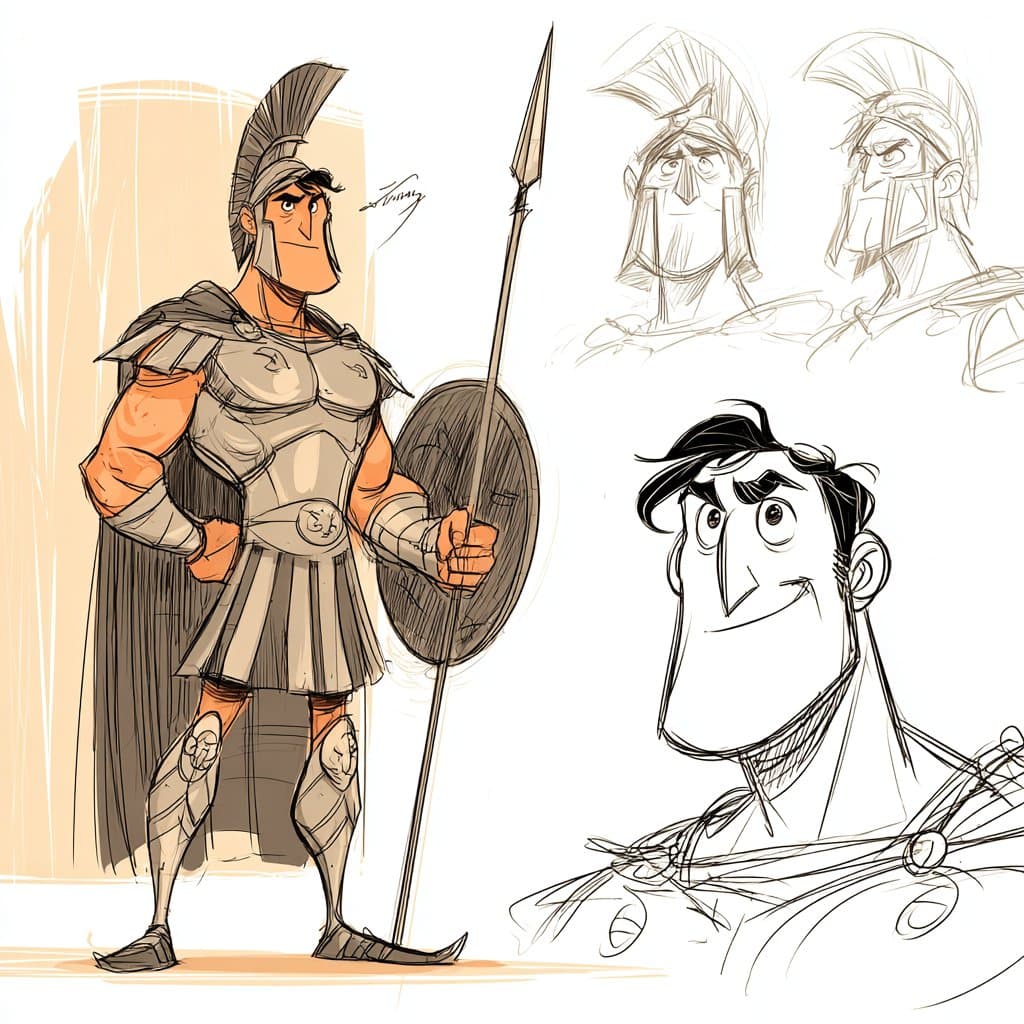
- Across four days of creator posts, Artedeingenio's three-tool workflow, MayorKingAI's Leonardo demo, and dustinhollywood's CapCut short all showed the same pattern: character sheet or storyboard first, Seedance 2.0 second.
- The most reusable prompt format in the evidence is the same one Artedeingenio spelled out for a Greek-warrior clip and reused for a Vampirella scene: 15-second continuous single-shot, no cuts, with explicit beat-by-beat timing.
- Failure reports are getting more specific, because underwoodxie96's troubleshooting post tied a weak result to vague camera language, while their linked angle-adjustment tool points to shot control as a separate step.
- Seedance 2.0 is already showing up inside Mitte AI, CapCut Video Studio, InVideo, Magnific, Runway, and Leonardo, according to Anima_Labs, dustinhollywood, 0xInk_, CharaspowerAI, juliewdesign_, and MayorKingAI.
You can watch Artedeingenio turn a Midjourney sketch into motion, see CharaspowerAI package a 30-second anime sequence around character sheets, and compare that with underwoodxie96's miss where the image started static and the camera intent stayed fuzzy. The host-tool spread is just as notable: awesome_visuals used InVideo, dustinhollywood used CapCut Director Mode, juliewdesign_ used Runway, and CharaspowerAI highlighted Magnific Spaces as the asset-management layer around the generations.
Character sheets
The clearest workflow shift in the evidence is upstream. Creators are spending more effort on the reference pack than on the final animation prompt.
The repeated input stack looks like this:
- Character sheet in Midjourney or another image model, as in Artedeingenio's setup and their note on sketch styles for Seedance.
- Storyboard in GPT Image 2, as in Artedeingenio's later example and MayorKingAI's Leonardo post.
- Animation pass in Seedance 2.0, usually inside a host product rather than a standalone Seedance interface, per Mitte use, Leonardo use, and CapCut use.
That is why the outputs suddenly look less like disconnected clips and more like preproduction pipelines. Artedeingenio's sketch-style sequence and their Vampirella example both keep a strong drawn look because the style decisions were locked in before motion started.
Single-shot prompts
Several of the best examples are not just image-to-video prompts. They are shot lists disguised as prose.
The shared structure is unusually consistent:
- Duration locked up front: 15 seconds.
- Edit constraint locked up front: no cuts, no scene transitions.
- Style block: aesthetic, lighting, texture, and genre language.
- Identity block: exact character design, wardrobe, props.
- Beat map: 2 to 3 second chunks with camera and action instructions.
- Final frame: a specific closing image.
- Sound bed: ambience and effects, usually with no vocals.
Artedeingenio's Spartan prompt is even more explicit about failure prevention. It specifies one shield, one spear, no duplicated weapons, no extra limbs, and no overlapping soldiers on the hero. That reads like a continuity checklist pulled straight from model failure cases.
Camera language
The most useful negative example in the evidence comes from underwoodxie96, who said a landmark montage failed because the video began from a static-image perspective instead of a clearly defined camera move.
Creators across the other posts are converging on the opposite approach:
- Define the opening move, usually a push-in, orbit, whip-pan, or side-track, as in Artedeingenio's swordsman prompt.
- Tie movement to exact time windows, as in the Greek-warrior beat map.
- Ask for camera behavior, not just scene description, which CharaspowerAI's workflow post frames as part of getting dynamic anime shots.
The community commentary lines up with that diagnosis. In a StableDiffusion thread about making AI shorts look less fake, the original poster called out face consistency and movement, while commenters argued that strong style choices and better control over the model's default look matter more than piling on realism.
Where Seedance shows up
The model is already being treated like an engine inside other creative products, not as a destination app.
From the evidence pool:
- CapCut Video Studio: dustinhollywood used Director Mode with Seedance 2.0 for an episodic sci-fi short.
- InVideo: awesome_visuals and 0xInk_ both posted Seedance-made clips on InVideo.
- Mitte AI: Artedeingenio, Artedeingenio, and Anima_Labs all named Mitte as the host layer.
- Magnific: CharaspowerAI and their follow-up on Spaces treated Magnific as the place where image assets, generations, and sharing stay organized.
- Runway: AllaAisling and juliewdesign_ both referenced Seedance 2.0 running in Runway.
- Leonardo: MayorKingAI said the full storyboard-to-animation workflow happened inside Leonardo.
That distribution matters because the surrounding workflow is starting to specialize. CharaspowerAI's Magnific Spaces post is about asset organization and collaboration, while the CapCut example is about edit-ready series production.
Style consistency
The strongest clips are leaning harder into stylization, not away from it.
The evidence splits into a few reliable style lanes:
- Sketch and storyboard animation, per Artedeingenio and their second sketch-style post.
- Anime action, per CharaspowerAI and Artedeingenio's industrial-city swordsman clip.
- Gothic fantasy, per Artedeingenio's Vampirella setup and the later 45-second variation.
- VFX-heavy surreal or cinematic work, per juliewdesign_ and Anima_Labs.
That matches the outside discussion in the Reddit thread, where the highest-signal comment argued that strong graphical style helps hide uncanny detail mismatches better than chasing photoreal humans.
Shot-angle tools
A separate layer of tooling is starting to appear around Seedance outputs: not just prompt writing, but camera correction.
The linked AI Change Angle tool suggests creators are already breaking the job into two parts:
- Generate the subject and style package.
- Adjust viewpoint and shooting angle as an explicit control step.
That is new information relative to the earlier examples. The first wave of posts mostly treats Seedance as the animator. underwoodxie96's link suggests the next wave may treat camera direction as its own utility layer, which fits the same lesson from their failed landmark test: when the shot language is underspecified, the model falls back to the logic of a still image.