
Seedream 5.0 Pro edits 2K annotated photos in BytePlus Lumina
Linus Ekenstam showed Seedream 5.0 Pro edits in BytePlus Lumina using reference photos and art-direction marks. The demos covered posters, character sheets, items, animals, blueprints, and Seedance references.
TL;DR
- Seedream 5.0 Pro's practical workflow is reference guided: LinusEkenstam's setup used 2K generation, one uploaded reference photo, and a pasted prompt inside BytePlus Lumina.
- Visual markup is the control surface: LinusEkenstam's follow-up used one image full of edits plus “follow instructions in the image,” while hasantoxr's SaaS test says red-pen notes were executed without regenerating the whole image.
- Text-heavy design is part of the demo set: pzf_ai's infographic test cites diagrams, a phase timeline, and a data table, and pzf_ai's multilingual test shows five scripts in one generation.
- Seedream is already being used as a video pre-production step: higgsfield_ai's comparison generated keyframes for Seedance 2.0, and LinusEkenstam's character-sheet note frames sheets as Seedance references for character consistency.
- Access is split across BytePlus, Lumina, and partner tools: hasantoxr's access note points to BytePlus and Lumina, pzf_ai's Leonardo post says it landed in Leonardo AI, and magnific's offer says Magnific has one-month unlimited 1.5K generations.
The BytePlus product page prices Seedream 5.0 Pro at $0.045 per image, with the first reference image free and additional reference images from $0.003 each. BytePlus lists prompt following, infographics, more languages, layer separation, precise positioning, and freeform markup as product features. The Seedream 5.0 Pro page is mostly examples: blueprint cars, RPG interfaces, annotated living-room edits, multilingual posters, and translation prompts. The ModelArk image-generation docs now sit beside the creator-facing Lumina docs, which describe reference images as a way to steer generation toward the intended result.
Reference photo plus prompt
The creator-facing flow in LinusEkenstam's setup had three steps:
- Use Seedream 5.0 Pro at 2K.
- Upload a reference photo.
- Paste the prompt.
The poster prompt in LinusEkenstam's full prompt reads like a compact art-direction brief:
- Format: vertical streetwear editorial poster.
- Typography: oversized cobalt-blue bubble type reading “CITY JUMP.”
- Camera: extreme low-angle fisheye from ground level.
- Product detail: black messenger bag strap and silver buckle kept sharp.
- Annotation: rough red oval around the buckle.
- Copy: small cobalt-blue editorial text and a barcode graphic.
- Style: Gen-Z fashion editorial with forced perspective and motion blur.
The useful move is the mix: product retouching, layout, typography, campaign copy, lens direction, and annotation all in one instruction stack.
Red-pen edits
Linus then reduced the edit instruction to one sentence. In LinusEkenstam's markup test, he put all edits into one photo and prompted Seedream to “follow instructions in the image.”
hasantoxr tested the same pattern with commercial feedback. hasantoxr's SaaS hero test used a poster marked up with red-pen client notes, asked Seedream to preserve the sketch layout, and reported that it executed the edits directly without regenerating the whole image.
The demo artifact was a normal marked-up comp. That is Christmas come early for anyone who has ever translated vague client arrows into a clean layout.
Character sheets for Seedance
The character workflow starts with a selfie and a detailed studio portrait prompt. LinusEkenstam's character prompt specifies stance, hair, shirt fabric, pants silhouette, sneakers, soft studio lighting, off-white background, and a slightly low camera angle.
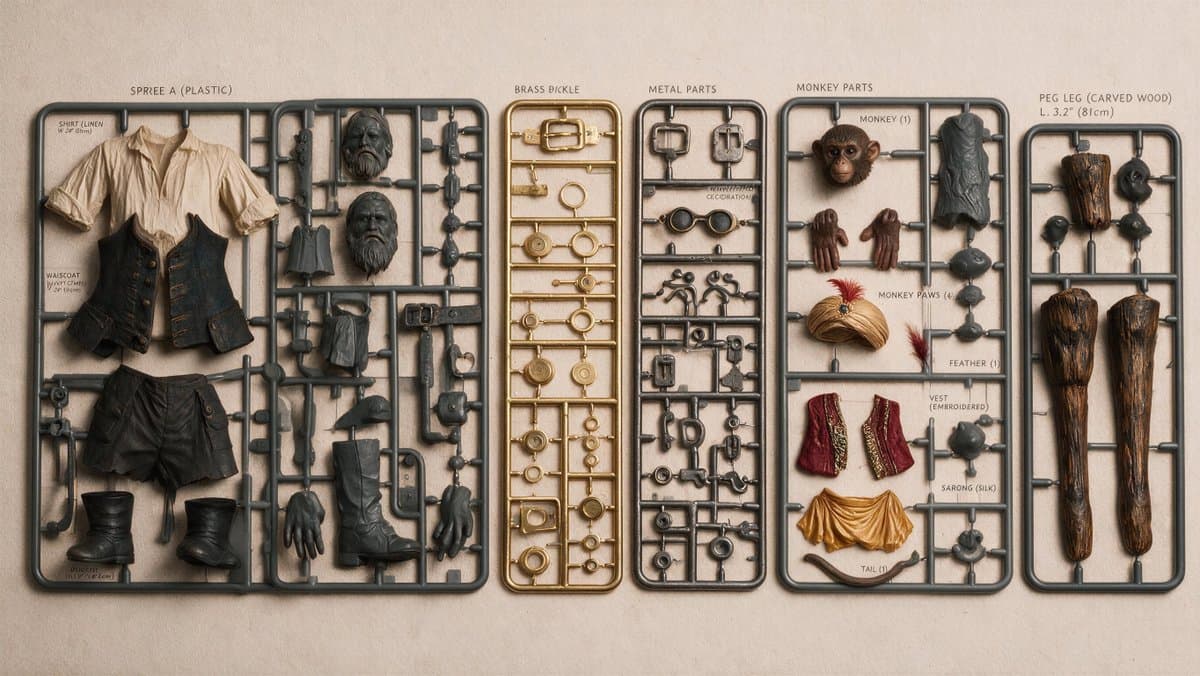
The same character then gets pushed through art-directed variants. LinusEkenstam's pirate edit notes slight pose drift during a pirate-style transformation because the prompt was not explicit enough.
For video work, LinusEkenstam's character-sheet post says full character sheets from one reference image and prompt are useful as Seedance inputs when character consistency matters.
Text, receipts, and infographics
Seedream's sharper edge is dense visual information, not just prettier portraits.
The creator tests clustered around five hard image-model tasks:
- Model kits: LinusEkenstam's pirate model kit turns a character into a detailed kit with descriptions.
- Combined-image text: LinusEkenstam's text-rendering note says Seedream can render text while combining images.
- Annotated infographics: hasantoxr's infographic test asks the model to read six purple boxes and handwritten English annotations.
- Receipts: hasantoxr's receipt test uses dense line items, a special request, QR codes, barcodes, and low-ink thermal printing.
- Multilingual type: pzf_ai's multilingual test reports Japanese, Arabic, Spanish, Russian, and Korean in one generation.
Surveillance UI overlays
magnific's surveillance-fashion thread says Seedream 5.0 Pro handled UI overlays, infrared night vision, and CCTV grain.
The prompt set is a ready-made recipe for fake interface density:
- CCTV labels, timestamps, scene numbers, and VHS scan lines in magnific's parking-garage prompt.
- Face and shoe boxes, connected detection crops, ID codes, a cursor, a warning triangle, and a REC dot in magnific's night-cam prompt.
- A wireframe face mesh, “MATCH: 98.7%,” side-panel biometric data, and RGB glitching in magnific's biometric prompt.
- Red tracking boxes, black-and-white crops, a motion trail, and pixel folder icons in magnific's subway-platform prompt.
Seedance keyframes
higgsfield_ai turned Seedream 5.0 Pro into a still-frame generator for Seedance 2.0 comparisons against GPT Image 2.0.
The prompts show the handoff pattern:
- Keyframe first: higgsfield_ai's gothic comparison starts with a third-person boss-arena frame and then animates it in Seedance 2.0.
- One-shot choreography: higgsfield_ai's colosseum prompt specifies a continuous 15-second action sequence, FPV camera movement, 30 fps, and diegetic sound.
- Exact first frame: higgsfield_ai's candy battle prompt tells the video model that the reference image is the literal first frame, matched 1:1 in composition and camera position.
- Multi-reference locking: higgsfield_ai's cyberpunk prompt locks a woman, combat robot, and environment across separate image references before the video action begins.
- Reusable archival style: techhalla's Havana workflow uses Seedream 5 Pro stills and a single reusable Seedance 2.0 prompt for 1960s documentary-style footage.
Access surfaces
Official access runs through BytePlus. LinusEkenstam's launch post and hasantoxr's access note both point enterprises and developers to the BytePlus API and BytePlus Lumina, with hasantoxr's linked entry point attached.
Creator tools are already packaging the model differently:
- Lumina: LinusEkenstam's access post shared a direct access link.
- Leonardo AI: pzf_ai's Leonardo post says Seedream 5 Pro landed in Leonardo AI's toolkit.
- Magnific: magnific's offer says Seedream 5.0 Pro is available with unlimited 1.5K generations for one month.
- Regional availability: magnific's surveillance thread says Magnific access is available to users in Asia, the Middle East, Africa, Europe, and other select regions.
- Dreamina: HalimAlrasihi's first tests used Seedream 5 Pro with Seedance 2 via Dreamina.